
Your Mac Deserves a Smarter, Simpler Calendar
The best free lightweight calendar mac apps are small, fast, and live quietly in your menu bar — here are the top picks:
| App | Size | Best For | macOS Requirement |
|---|---|---|---|
| Itsycal | Tiny | Events + menu bar | macOS 11+ |
| Mini Calendar | 2.4 MB | Quick date glance | macOS 10.13+ |
| Calendr | Minimal | Open-source agenda | macOS 11+ |
| CalendarX | Minimal | Custom menubar styles | macOS 11+ |
| Calair | Minimal | Privacy-first popup | macOS (recent) |
| ormal | Minimal | Ultra-minimalist dates | macOS (recent) |
Apple’s built-in Calendar app works fine for basic needs. But for many Mac users, it feels like overkill — a full app just to check what day a meeting falls on.
That’s a real problem when your Mac is already juggling dozens of tasks.
A bloated calendar app drains battery, hogs RAM, and adds visual noise to an already busy screen. What most people actually need is something that does one thing well: show you the date and your upcoming events at a glance, without slowing anything down.
The good news? There are several excellent free options that weigh just a few megabytes, sit quietly in your menu bar, and stay completely out of your way. Some even collect zero data and require no account to use.
Top Free Lightweight Calendar Mac Apps for the Menu Bar
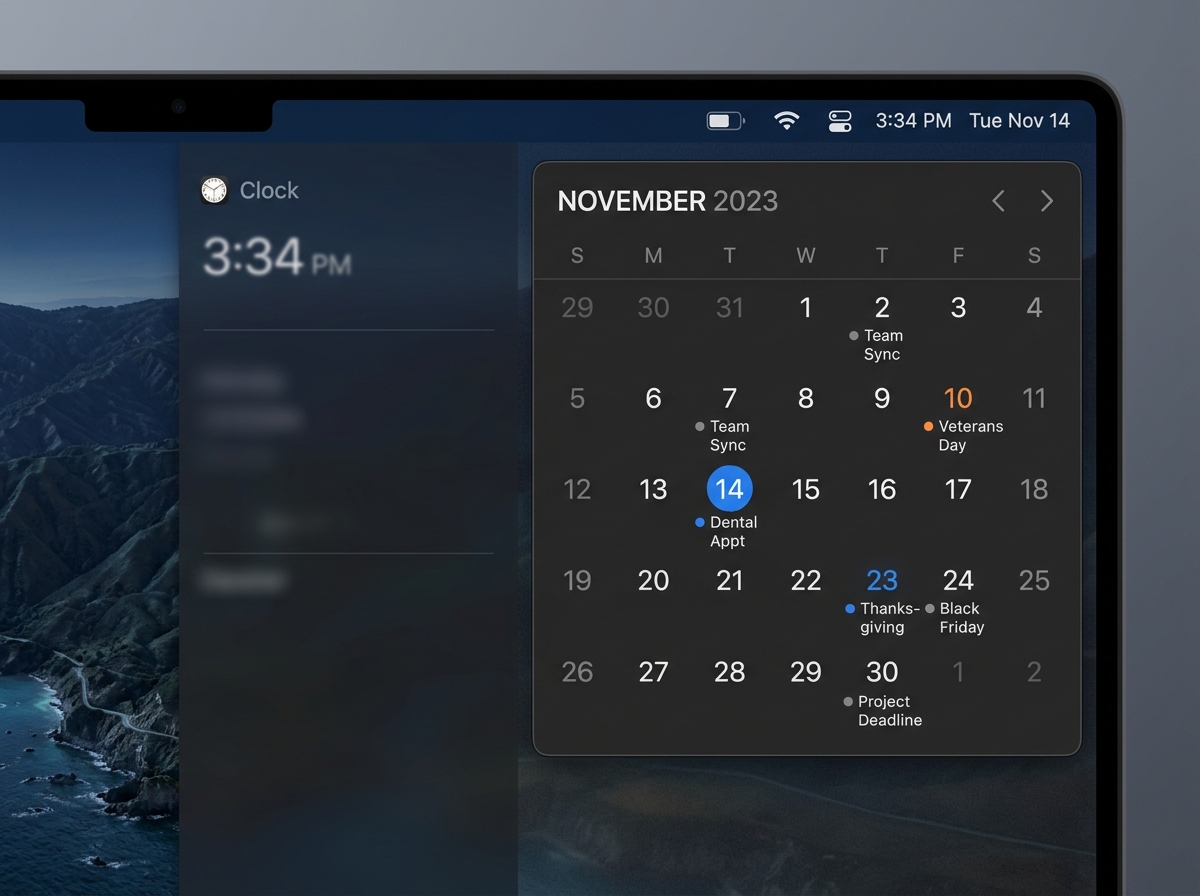
When we talk about a free lightweight calendar mac solution, we are usually looking for something that lives in the menu bar. This allows for instant access without the need to keep a heavy application window open in your Dock. These apps are designed for speed, often launching in milliseconds and consuming almost no system resources.
Itsycal for Mac
Itsycal for Mac is perhaps the most famous name in this category. It is a “tiny” menu bar calendar that packs a surprising punch. Despite its small footprint, it integrates directly with the native Mac Calendar app. This means you can see your existing iCloud or Google Calendar events right in the popup.
One of our favorite features is its ability to join virtual meetings directly from the calendar interface. If you have a Zoom or Teams link in your event, Itsycal lets you jump in with one click. It also offers a discrete “hourly beep” and supports ISO week numbers, making it a favorite for project managers who live by week counts.
Mini Calendar
If you want something even more compact, Mini Calendar is a powerhouse of efficiency. Boasting an exceptionally small size of just 2.4 MB, it is one of the most compact options available. It serves as a perfect digital replacement for a wall calendar.
While it doesn’t sync events from the macOS Calendar app, it excels as a quick reference tool. You can open it via the menu bar, a Dock icon, or a configurable keyboard shortcut. It even includes sunrise and sunset times, which is a lovely touch for those of us trying to catch the last bit of daylight during a long workday. For more tips on keeping your workspace tidy, check out our guide on Minimalist Calendar Apps for Productivity.
Calendr
For the open-source fans among us, Calendr is a top-tier choice. It is an elegant, native Mac app built with Swift and RxSwift. It provides a simple month view and an agenda overview. What makes it stand out is its “negligible performance impact.” It feels like a part of the operating system rather than a third-party add-on. It even shows “time remaining” for your current appointment, helping you stay on track during back-to-back meetings.
Essential Features of a Free Lightweight Calendar Mac
A great free lightweight calendar mac app isn’t just about being small; it’s about being smart with the features it does include. When you are looking to Reduce Digital Clutter, you want tools that simplify your life, not add more buttons to click.
- Keyboard Shortcuts: Most of these apps allow you to summon the calendar with a quick key combo (like
Option + C). This is much faster than reaching for the mouse. - Vim Motions: For the power users and developers, apps like Itsycal actually support Vim-style navigation (H, J, K, L) to move through months and days.
- Notification Center Widgets: Many of these apps, like Calair and Mini Calendar, include widgets. This allows you to see your month-at-a-glance in the macOS widgets panel without even touching your menu bar.
- Dark Mode Support: Since these are native Mac apps, they almost all support system-wide Dark Mode, ensuring they look great whether you’re working in the morning or late at night.
Syncing and Integration Capabilities
Even though these apps are “lightweight,” they don’t have to be isolated. Most of the top picks act as a “bridge” to your larger ecosystem. By Streamlining Tech Tools for Productive Work, you can ensure that your small menu bar app stays updated with your big-picture schedule.
- iCloud and Google Calendar: Apps like Itsycal and Calendr tap into the accounts you’ve already signed into on your Mac. If it’s in your Apple Calendar app, it shows up in your menu bar app automatically.
- Microsoft Exchange: For the corporate crowd, as long as your Mac’s system settings are connected to your Exchange account, these lightweight tools can usually pull that data through.
- Event Creation: While some apps (like ormal) are “read-only,” others allow you to quickly type in a new event. Itsycal even allows for basic event creation without opening the full Calendar app.
Privacy-First and Open-Source Calendar Solutions
In an era where data is the new gold, many of us are rightfully protective of our schedules. Your calendar contains where you live, who you meet, and what you do. That’s why many minimalists prefer open-source or privacy-focused free lightweight calendar mac options.
CalendarX
ZzzM/CalendarX is a fantastic open-source project that has gained significant community support, with nearly 500 stars on GitHub. It is highly customizable, allowing you to change the menu bar style, font sizes, and even track Chinese statutory holidays. Because it is open-source, the code is transparent, and the community helps keep it updated with the latest macOS versions.
ormal
If you want the absolute extreme of minimalism, ormal is your app. Its philosophy is refreshingly blunt: it does not show appointments, it does not have alerts, and it is not social. It is purely for date information. It doesn’t even have a “sync” feature because the developer believes a calendar should just be a calendar. It is a great choice if you just need to know “what day is next Tuesday” without being sucked into your to-do list.
Calair
Calair popup calendar is another gem that emphasizes “Privacy by design.” The developer explicitly states that absolutely nothing is stored or shared with third parties. It provides a simple, clean popup with four theme choices and week numbers. It’s perfect for those who want a “rudimentary” tool that just works. For more on this philosophy, see our thoughts on Productivity Apps for Minimal Tech.
Choosing a Free Lightweight Calendar Mac for Privacy
When selecting an app, look for these privacy hallmarks to ensure you are Maintaining a Clutter-Free Desktop that is also secure:
- No Account Required: You shouldn’t have to sign up for a new service just to see a calendar.
- Local Storage: The app should ideally read from your local macOS calendar database rather than sending data to its own servers.
- Zero Data Collection: Developers like those of Mini Calendar and Calair explicitly state they do not collect any user data.
Performance Impact and System Requirements
One of the biggest reasons to switch to a free lightweight calendar mac is performance. A heavy app can take several seconds to bounce in the Dock before opening. A lightweight app is already there.
- CPU and RAM: Most of these apps use less than 50MB of RAM. Compare that to some “modern” electron-based calendar apps that can hog 500MB or more.
- Battery Life: Because these apps use native frameworks (like Swift and SwiftUI), they are highly optimized for Apple Silicon (M1, M2, M3 chips). They stay idle until you click them, meaning they have almost zero impact on your battery life.
- Compatibility: Most of the apps we’ve discussed require macOS 11.0 (Big Sur) or later. However, Mini Calendar is a great choice for those on older hardware, supporting versions as far back as macOS 10.13 (High Sierra).
- Updates: Many of these apps use the “Sparkle” framework, which is a standard, lightweight way to handle app updates without needing a background “update manager” service running constantly.
If you are looking for other ways to keep your machine running smoothly, our guide on File Organization Apps for Mac and Windows can help you clear out the digital cobwebs.
Frequently Asked Questions about Mac Calendars
How do these apps impact battery life and CPU?
The performance impact is generally negligible. Because these apps are built using native Apple technologies like Swift, they are designed to sleep when not in use. They don’t run heavy background processes or constant sync cycles that drain your battery.
Can I replace the system clock with these apps?
Yes! Apps like Itsycal and CalendarX are designed specifically to replace the standard macOS clock. You can hide the default clock in System Settings and use the app’s icon instead. This allows you to have a clock that, when clicked, reveals a full monthly calendar rather than just the notification center.
Are there any limitations or missing features in free lightweight calendars compared to paid alternatives?
While these apps are excellent, they do have some trade-offs. You won’t find “Natural Language Parsing” (the ability to type “Lunch at 1pm tomorrow” to create an event) in most free, tiny apps—though Fantastical offers this in its paid version. You also might miss out on advanced team scheduling or multi-platform syncing (like having the same custom app on your iPhone and Mac). However, for the minimalist on a budget, these “missing” features are often just distractions anyway.
Conclusion
At Tamba Tech, we believe that your tools should work for you, not the other way around. Choosing a free lightweight calendar mac is a small but significant step toward a more focused, less cluttered digital life. Whether you choose the feature-rich Itsycal, the open-source Calendr, or the ultra-minimal ormal, you’re making a choice for better system performance and peace of mind.
If you’re looking to further refine your workflow, we recommend checking out our list of Task Management Apps for Minimalist Workflow. For more expert tech reviews and productivity guides, Explore more at Tamba Tech.
This guide was compiled by the expert team at Tamba Tech to help you find the best tools for your digital journey.
