
Your Photos Are Piling Up — Here’s the Fix
Free cloud photo storage is the easiest way to back up, organize, and access your photos from any device — without spending a cent.
Here are the top free options available right now:
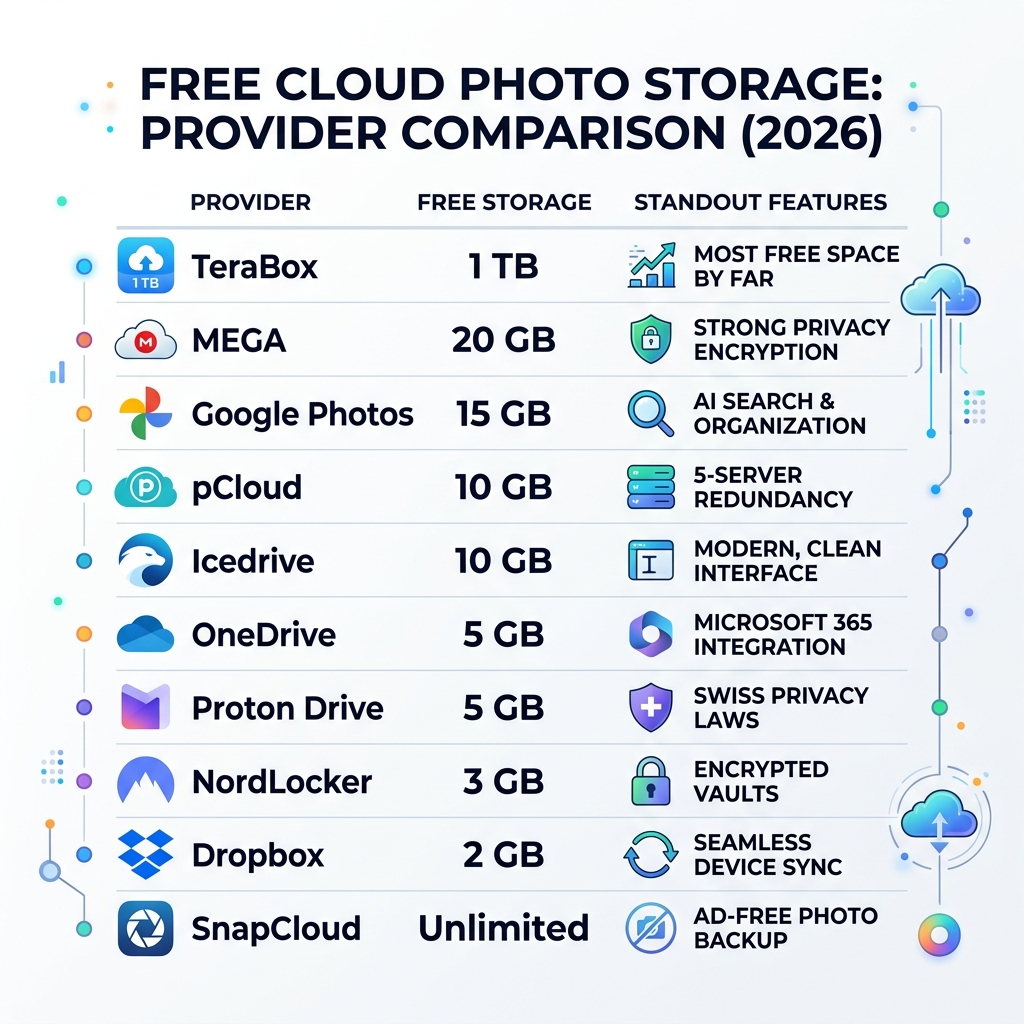
| Service | Free Storage | Standout Feature |
|---|---|---|
| TeraBox | 1 TB | Most free space by far |
| MEGA | 20 GB | Strong privacy encryption |
| Google Photos | 15 GB | AI search and organization |
| pCloud | 10 GB | 5-server redundancy |
| Icedrive | 10 GB | Modern, clean interface |
| OneDrive | 5 GB | Microsoft 365 integration |
| Proton Drive | 5 GB | Swiss privacy laws |
| NordLocker | 3 GB | Encrypted vaults |
| Dropbox | 2 GB | Seamless device sync |
| SnapCloud | Unlimited | Ad-free photo backup |
Your phone’s camera roll grows fast. Every birthday, vacation, and random dog photo adds up. Before long, you get that dreaded “Storage Full” notification — usually at the worst possible moment.
For most people, photos are the biggest storage drain on their device. And losing them to a full phone, a cracked screen, or a failed hard drive is genuinely painful.
The good news? You don’t have to pay to protect them.
Free cloud photo storage services let you automatically back up your entire library, free up space on your phone, and access your memories from anywhere. Some even throw in smart search, built-in editing tools, and easy sharing on top.
This guide covers the 10 best free options in 2026 — so you can pick the one that fits your life and stop worrying about losing a single shot.
Why You Need Free Cloud Photo Storage
If you look at your smartphone’s internal memory consumption, you will likely find that photos and videos occupy the lion’s share of space. We live in an era where high-resolution cameras are in every pocket, leading us to capture hundreds, if not thousands, of professional-grade photos. But what happens when that internal memory hits its limit?

Beyond just clearing space, the primary reason to use free cloud photo storage is redundancy. Physical hardware is surprisingly fragile. Research indicates that physical drives have an average annual failure rate of approximately 1.46%. Whether it’s a dropped phone or a corrupted SD card, relying on a single physical device is a risky gamble with your memories.
Cloud storage acts as a digital safety net. By Organizing Photos on Smartphone and Cloud, you ensure that even if your hardware fails, your data remains accessible from any device with an internet connection. It transforms your library from a static pile of files into a dynamic, searchable archive that follows you from your laptop to your tablet and back to your phone.
Top 10 Free Cloud Photo Storage Providers in 2026
Choosing the right provider involves more than just looking at the gigabytes. You need to consider ease of use, upload speeds, and how well the service integrates with your existing gadgets. Some people prefer maximum space, while others prioritize “zero-knowledge” encryption where not even the provider can see your files.
To help you manage your digital life, we’ve curated Cloud Storage Management Tips to ensure you get the most out of these free tiers. Below is our deep dive into the top ten contenders for 2026.
TeraBox: 1TB of Free Cloud Photo Storage
If your primary goal is sheer capacity, TeraBox is the undisputed heavyweight champion. Offering a staggering 1 TB (1,024 GB) of free storage, it provides enough room for roughly 250,000 photos taken with a standard 12 MP camera.
However, “free” often comes with trade-offs. TeraBox is ad-supported, and there is a 4 GB limit on individual file sizes for free users. While this is plenty for photos, it might be a hurdle for long 4K videos. Despite this, for the average user looking to dump a massive backlog of images without paying a subscription, TeraBox offers an unprecedented amount of breathing room.
Google Photos: Smart Free Cloud Photo Storage
Google Photos remains the gold standard for many because of its “magical” AI features. Every Google account comes with 15 GB of storage shared across Photos, Gmail, and Drive. While this is less than TeraBox, Google makes up for it with industry-leading organization.
The service uses machine learning to recognize people, pets, and places. You can simply search for “Pizza” or “Grandma” to find exactly what you need. In 2026, features like Magic Eraser (to remove photobombers) and Photo Unblur (to sharpen shaky shots) are available to help you Edit, Organize, Search, and Backup Your Photos. It even creates “Photo Stacks” to group similar shots together, keeping your gallery decluttered.
MEGA: Privacy-First Storage
MEGA is the go-to choice for the privacy-conscious. It grants 20 GB of free storage to new users, but its real selling point is zero-knowledge end-to-end encryption. This means your photos are encrypted on your device before they ever reach MEGA’s servers; only you hold the keys.
The interface is clean and works exceptionally well via a web browser or their mobile app. If you are worried about “Big Tech” snooping through your family vacation photos, MEGA provides a secure fortress that is hard to beat.
pCloud: Media-Centric Backup
pCloud offers 10 GB of free storage and is widely considered one of the most reliable options for media. One of its standout features is redundancy: pCloud stores your photos on five different servers at a time. If one server goes down, your data is still safe.
For free users, pCloud also provides 15 days of file versioning, which is a lifesaver if you accidentally edit a photo and want to revert to the original. It also includes a built-in media player, making it easy to stream your backed-up videos directly from the cloud without downloading them first.
Icedrive: Modern Interface
Icedrive provides 10 GB of storage and focuses heavily on the user experience. Its interface is often described as the most modern and “fluid” in the industry. For those who value security, Icedrive utilizes the Twofish encryption algorithm, which many experts consider even more secure than the standard AES.
If you are looking for Encrypted Storage Solutions for Minimalists, Icedrive’s simple, no-fuss approach is perfect. It feels less like a complex database and more like a natural extension of your computer’s hard drive.
OneDrive: Microsoft Ecosystem Integration
For those who live in Windows and use Word or Excel, OneDrive is the logical choice. The free plan offers 5 GB of storage, which is enough for about 2,500 photos.
OneDrive shines with its “Personal Vault” — a folder that requires an extra layer of identity verification (like a fingerprint or PIN) for your most sensitive documents or photos. It also features a great “On This Day” tool to help you rediscover old memories and a mobile document scanner that is perfect for digitizing old physical prints.
Proton Drive: Swiss Security
Based in Switzerland, Proton Drive benefits from some of the world’s strictest privacy laws. Like MEGA, it offers 5 GB of free space and uses high-level encryption. What makes Proton unique is that it encrypts not just the file content, but also the metadata — meaning even the file names are hidden from prying eyes.
Proton’s code is open-source and independently audited, providing a level of transparency that “Big Tech” providers rarely match. It’s a fantastic choice for those who want their free cloud photo storage to be as private as a Swiss bank vault.
NordLocker: Encrypted Vaults
NordLocker, from the makers of NordVPN, offers 3 GB of free storage. While the capacity is smaller than others, it focuses on “drag-and-drop” encryption. You can create encrypted “lockers” on your computer that sync to the cloud.
This is a great tool for Securing Cloud Storage Accounts because it allows you to encrypt files locally before they even touch the internet. It’s a specialized tool for those who have a small number of extremely sensitive photos they want to keep under lock and key.
Dropbox: Seamless Syncing
Dropbox is the pioneer of the cloud storage world. While its free tier is the smallest at only 2 GB, it remains a favorite because of its legendary syncing speed and reliability.
Dropbox’s “Camera Uploads” feature is incredibly robust, and its “online-only” file system allows you to see all your photos in your computer’s folders without them actually taking up space on your hard drive. It’s the “it just works” option for people who need their photos available across Windows, Mac, iOS, and Android without any hiccups.
SnapCloud: Unlimited Freedom
SnapCloud is a unique entry in 2026, positioning itself as a “forever free” alternative for photo enthusiasts. It offers Unlimited Cloud Storage for photos specifically, using smart image recognition to organize your library.
SnapCloud is ad-free and allows for instant access across multiple devices. For travelers and content creators who don’t want to worry about hitting a storage ceiling or managing multiple accounts, SnapCloud’s “unlimited” promise is a game-changer in the free market.
Essential Features for Secure Backups
When you are hunting for the best free cloud photo storage, don’t just look at the price tag. A good service should feel like an assistant, not a chore. Here are the features we consider non-negotiable in 2026:
- Automatic Backup: You shouldn’t have to remember to upload your photos. The best apps run in the background, sending your shots to the cloud the moment you’re on Wi-Fi.
- Smart Organization: As libraries grow into the thousands, manual sorting becomes impossible. Look for AI-powered search and “stacks” that group similar images.
- Security and Encryption: At a minimum, your data should be encrypted in transit (using SSL/TLS). For maximum privacy, look for “zero-knowledge” providers.
- Sharing Controls: You should be able to share a single photo or an entire album with a link, ideally with the ability to set passwords or expiration dates.
For a deeper dive into how these apps function in professional settings, check out our guide on Cloud Backup Apps for Home and Work.
Frequently Asked Questions about Photo Storage
How much free storage do I really need for high-res photos?
It depends on your camera. A standard 12 MP JPEG is about 3-5 MB. A 15 GB plan (like Google Photos) can hold about 3,000 to 5,000 of these. However, if you shoot in RAW format (common for DSLR users), a single photo can be 30 MB or more. In that case, you’ll want to lean toward TeraBox or SnapCloud.
Is free cloud storage safe for private family photos?
Generally, yes, but not all “free” is created equal. Services like Proton Drive and MEGA offer end-to-end encryption, which is the gold standard for privacy. We always recommend Securing Cloud Storage Accounts by enabling Two-Factor Authentication (2FA) to prevent unauthorized access.
Can I combine multiple free accounts for more space?
Absolutely! In fact, many digital minimalists do this. By combining the free tiers of pCloud, MEGA, Google Photos, OneDrive, and Icedrive, you can easily cobble together over 60 GB of total space. Some apps even allow you to manage multiple accounts from one interface to simplify the process.
Conclusion
At Tambas Tech, we believe that your digital legacy shouldn’t be locked behind a paywall. Our expert writers, including Lucas Oliveira, spend hundreds of hours testing these platforms to ensure our recommendations are both practical and secure.
Whether you choose the massive 1 TB offering from TeraBox or the AI-powered brilliance of Google Photos, the most important step is simply to start. Don’t wait for a “Storage Full” warning to protect your memories. Pick a provider, turn on automatic backup, and enjoy the peace of mind that comes with knowing your photos are safe.
For more expert advice on keeping your digital life tidy, explore More info about file management on our site.
