
Unlock the World with an App for Finding Items by Picture
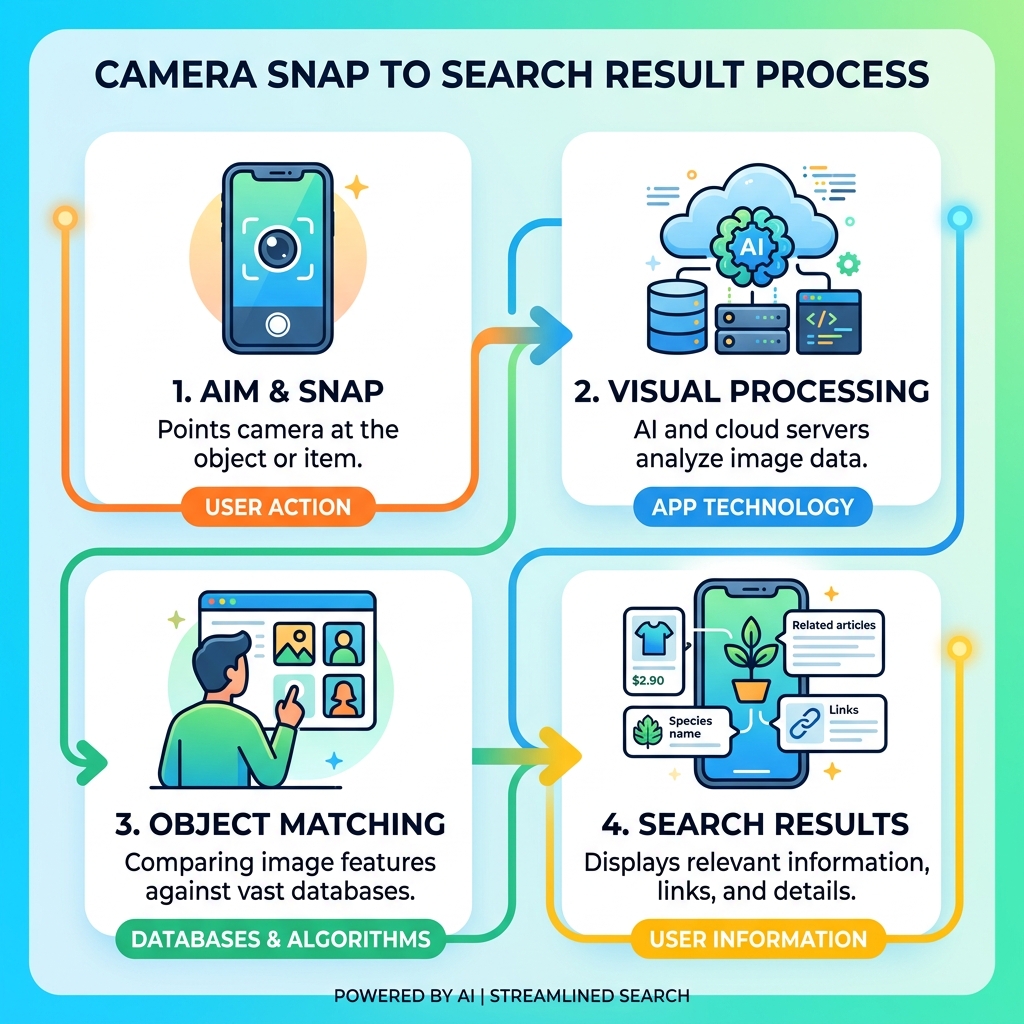
Have you ever seen something you wanted to identify, buy, or learn more about, but didn’t know how to describe it in words? An app for finding items by picture can help you instantly. These apps transform your smartphone camera into a powerful visual search engine, making it easier than ever to discover information about the world around you.
For a quick answer, here are some of the top-rated apps for finding items by picture:
- Google Lens: A highly versatile app that identifies objects, translates text in real-time, solves homework problems, and helps you shop.
- Lens App: An AI-powered identification tool known for its accuracy in recognizing plants, animals, products, coins, and more, often providing direct answers.
- CamFind: A mobile visual search engine that helps you identify physical objects, find similar products, and even create visual reminders from your photos.
These powerful tools use advanced artificial intelligence to understand what your camera sees. Whether you’re curious about a plant, want to find an outfit you spotted, or need to translate a foreign sign, visual search apps offer instant solutions. They can help busy iPhone users like you quickly organize and understand the visual information constantly coming your way.
Top Rated Apps for Finding Items by Picture
When we look for the right app for finding items by picture, we usually prioritize speed, accuracy, and the range of items the app can recognize. The market has evolved from simple “reverse image search” tools to sophisticated AI assistants that can tell the difference between a German Shepherd and a Corgi with 95% precision.
Below is a comparison of the heavy hitters in the visual search space to help you decide which one fits your needs:
| Feature | Google Lens | Lens App | CamFind |
|---|---|---|---|
| Primary Strength | General search & integration | Specialized AI identification | Social discovery & reminders |
| Accuracy Rate | High (Google Search backend) | Over 90% for common items | High (CloudSight API) |
| Shopping Tools | Price comparison in 34 countries | 95% match confidence score | Local & web shopping results |
| Key Categories | Text, plants, animals, math | Coins, antiques, food, nature | General objects, brands |
| Platform | iOS, Android, Web | iOS, Android, Web | iOS, Android |
If you are looking for More info about top-rated apps, we have found that each of these tools serves a slightly different purpose. While one might be better for your weekend hike, another is the undisputed king of the shopping mall. Let’s dive deeper into what makes these apps tick.
Google Lens: The All-in-One Visual Assistant
Google Lens is perhaps the most famous app for finding items by picture, and for good reason. With over 1 billion downloads and a stellar 4.7-rating on Google Play, it has become the gold standard for visual computing. We love how it integrates seamlessly with the Google ecosystem, including Google Photos and Chrome.
One of its most impressive features is real-time translation. It can translate text from over 100 languages just by pointing your camera at a sign or a menu. But it’s not just for travelers; students use it for step-by-step homework help in subjects like math, biology, and physics. When you scan a product, like a pair of jeans, Google Lens doesn’t just show you what they are; it pulls from Google Shopping to show you prices, user ratings, and where to buy them in 34 different countries.
Lens App: The Specialized AI App for Finding Items by Picture
While Google Lens is a “jack of all trades,” the Lens App: AI Image Search App is the specialist we turn to when we need deep details. Used by over 500,000 people, this app is designed to replace multiple niche identifiers. Instead of having one app for plants and another for coins, this Lens App – Free AI Image Search handles it all.
The technical specs are impressive: it processes images and returns results in just two to five seconds. For common species and products, its accuracy exceeds 90%. We especially like the “Scan & Shop” feature, which boasts a 95% match confidence score. If you’re a collector, the coin and antique identifier features are “frighteningly accurate,” often providing estimated values and historical context that general search engines might miss.
CamFind: Searching the Physical World
CamFind markets itself as the “Google for the real world,” and it lives up to the hype by providing results 100 percent of the time. Powered by the CloudSight Image Recognition API, CamFind – Free Visual Search Engine is perfect for those who want a more social and organized search experience.
What sets CamFind apart are the “Visual Reminders.” You can take a picture of an item, add a description, and set an alarm—perfect for remembering a gift idea or a product you saw at a friend’s house. It also features a “Scoops folder” for offline storage, allowing you to save images and search for them later when you have a better connection. Its social feed lets you discover what other users are identifying, turning visual search into a community experience.
How Visual Search and AI Image Recognition Work
It feels like magic, but the technology behind an app for finding items by picture is rooted in complex computer vision and neural networks. When you snap a photo, the app isn’t just “looking” at a picture; it’s breaking it down into thousands of data points.
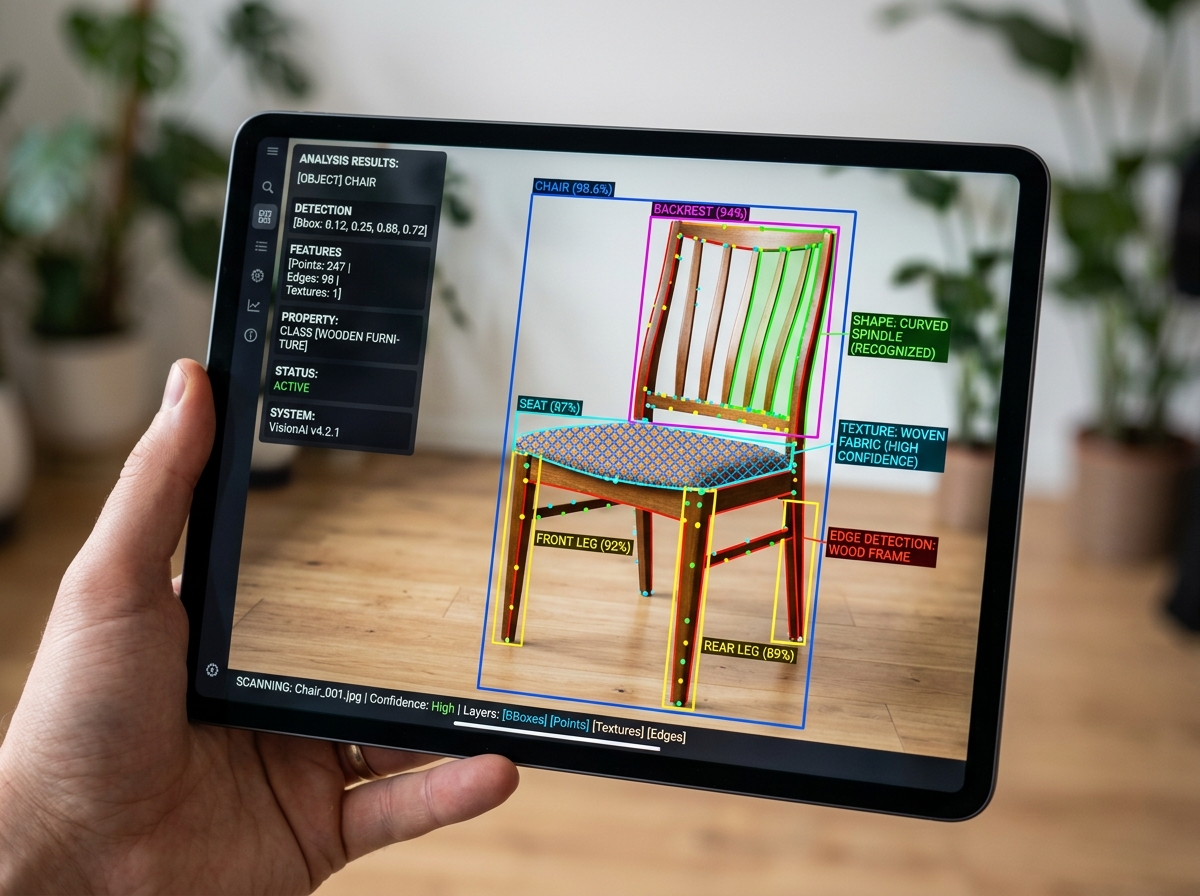
These apps analyze the shape, color, texture, and patterns of an object. For example, if you take a photo of a chair, the AI identifies the curves of the legs, the weave of the fabric, and the specific shade of wood. It then compares these features against a massive database of millions of other images to find the closest match. This is very similar to how we use Efficient Strategies for Organizing Large Media Libraries to categorize our own digital lives—it’s all about pattern recognition.
Reverse Image Search vs. AI Object Identification
It is important to understand the difference between reverse image search and AI object identification.
- Reverse Image Search: This looks for the exact image or visually similar versions of that file online. It’s great for verifying the source of a meme or finding a higher-resolution version of a photo. Apps like the “Image Recognition and Searcher App” (which has a 4.5-star rating) allow you to search across Google, Bing, and Yandex simultaneously.
- AI Object Identification: This is more advanced. It doesn’t look for the photo file; it looks for the object inside the photo. If you take a picture of your dog, AI identification recognizes it as a living creature, identifies the breed, and provides care tips, rather than just looking for other websites where that specific photo appears.
Accuracy and Reliability of AI Tools
How accurate are these tools? For common items, they are incredibly reliable, often hitting that 90% success rate. However, accuracy depends heavily on three factors:
- Lighting: Shadows can confuse the AI’s understanding of texture and color.
- Resolution: A blurry photo makes it hard for the neural network to distinguish fine details.
- Database Depth: If you’re trying to identify a very rare 18th-century antique, the app might only be able to tell you it’s a “wooden cabinet” because it doesn’t have enough reference points for that specific rare item.
For those of us obsessed with organization, using these tools alongside the Best Photo Organizing Apps for iPhone ensures that every mystery item we snap is properly identified and categorized.
Shopping with an App for Finding Items by Picture
One of the most practical uses for an app for finding items by picture is “Snap and Shop.” We’ve all been there: you see someone wearing a great pair of boots or a jacket, but you’re too shy to ask where they got them.
Apps like Snapped — Shop Any Outfit or Home Item From a Photo are game-changers here. Snapped uses AI to isolate individual pieces of clothing in a photo and matches them to products across hundreds of stores. It doesn’t just find the original (often expensive) item; it also finds “dupes” or similar styles at lower price points, including pre-owned options from resale sites.
Similarly, the Shopping Finder by Image feature in Lens App allows you to photograph an item on a store shelf to see if it’s cheaper online. We’ve found that price differences can be significant—sometimes saving you $10 or $20 on a single item just by doing a quick five-second scan. This is a brilliant way to practice Organizing Photos on Smartphone and Cloud while also saving money.
Shop AI: Your Personal Deal Finder
For the serious bargain hunters, Shop AI: Image Search & Deals App is a dedicated assistant. It focuses specifically on retailer aggregation and real-time price tracking. Instead of just identifying what an object is, Shop AI tells you who has it in stock right now and who has the best deal. It’s particularly useful for electronics and accessories where prices fluctuate daily.
Finding Furniture and Home Decor
Finding the right “vibe” for your home can be tough to put into words. “Mid-century modern with a hint of industrial” might return thousands of irrelevant results in a text search. However, taking a picture of a lamp or a rug you love allows these apps to find exact matches or visually similar decor instantly. Many of these apps now allow you to search directly from a screenshot, so if you’re scrolling through social media and see a living room you love, you can identify every piece of furniture in seconds.
Privacy and Safety in Camera-Based Search
With great power comes great responsibility—and privacy concerns. When you use a camera-based search app, you are often sending images to a cloud server for processing. We always recommend checking the privacy settings of any app for finding items by picture you download.
Most reputable apps, like Google Lens and Lens App, take privacy seriously. For instance, Lens App processes images in real-time and deletes them immediately after the search is complete. Google Lens uses SafeSearch filters to ensure explicit content is blocked and allows you to manage or delete your visual search history at any time.
Key privacy tips we follow:
- Location Permissions: While location helps identify landmarks (like distinguishing the Eiffel Tower in Paris from a replica), you can usually turn this off if you’re just identifying household items.
- Data Encryption: Ensure the app encrypts data in transit so your photos aren’t intercepted.
- Permissions: Only give the app access to your full photo gallery if you plan on searching through old photos; otherwise, “Camera Only” access is often safer.
Frequently Asked Questions about Picture Search Tools
Are there free visual search apps available?
Yes, almost all the top-rated apps offer a free tier.
- Google Lens is entirely free to use.
- Lens App offers free daily scans on mobile, with a web version that allows one free scan per day. They do have a “Pro” subscription for unlimited scans, but most casual users find the free version sufficient.
- CamFind is also a free visual search engine, though it may display ads or offer premium features.
How do these apps handle plants, animals, and non-product items?
These apps are surprisingly versatile. For plants, they can often provide not just the name, but care instructions (water needs, sunlight). For animals, they can identify specific breeds and even tell you if an insect is dangerous. Google Lens can even identify landmarks and provide historical facts or opening hours for restaurants based on a photo of their storefront.
Which visual search apps are available on iOS and Android?
Most major players are cross-platform.
- Google Lens: Available on both, though it’s built into the camera on many Android phones.
- Lens App: Available on iOS (requires iOS 17.0 or later for the latest AI features) and Android.
- Shop AI: Primarily focused on the Apple ecosystem (iOS, iPadOS, and even visionOS).
- CamFind: Available on both iOS and Android.
Conclusion
The era of struggling to describe an object in a search bar is over. Whether you are using an app for finding items by picture to identify a rare wildflower on a hike, find a cheaper price for a new TV, or translate a menu in a foreign country, these tools are essential for the modern smartphone user.
At Tamba Tech, we believe that technology should make your life simpler and more organized. By choosing the right visual search tool—whether it’s the all-encompassing Google Lens or the specialized Lens App—you’re turning your phone into a window of infinite information. We encourage you to Explore more comprehensive tech reviews and app guides to keep your digital life running smoothly. Happy snapping!
