
Your Photos Are Out of Control — Here’s How a Photo Duplicate Remover Fixes That
A photo duplicate remover is software or an app that automatically finds and deletes repeated or near-identical images in your photo library, freeing up storage space without you having to sort through thousands of photos by hand.
Quick answer — the best photo duplicate removers in 2024:
| Tool | Platform | Free Option | Best For |
|---|---|---|---|
| Czkawka | Windows/Mac/Linux | Yes (fully free) | Open-source, no malware |
| Duplicate Photo Cleaner | Windows/Mac/Mobile | Trial available | Cross-platform users |
| Duplicate Photos Fixer Pro | Windows/Mac/Android/iOS | Up to 15 deletions free | Similar photo detection |
| Google Photos Duplicate Remover | Chrome extension | Up to 100 photos free | Google Photos users |
| Duplicate Photo Finder | Windows | Trial available | 340+ format support |
Think about the last time you backed up your iPhone, synced to iCloud, then also uploaded the same batch to Google Photos. Sound familiar? Before you know it, the same sunset photo exists in three different places — maybe in slightly different sizes or crops.
This is how most of us end up with thousands of duplicate photos eating up storage.
The problem is bigger than it sounds. It’s not just wasted space. It makes finding the photos you actually want much harder. And manually sorting through a library of thousands of images is exhausting.
That’s exactly what photo duplicate remover tools solve — automatically, in minutes.
Why You Need a Photo Duplicate Remover
We have all been there: your phone pings with that dreaded “Storage Almost Full” notification just as you’re about to record a once-in-a-lifetime video. It is frustrating, but it is often a self-inflicted wound caused by digital hoarding. Most of us don’t realize that our galleries are stuffed with “ghost” files—identical copies of images created during backups, social media downloads, or accidental double-imports.
Using a photo duplicate remover is the fastest way to achieve significant storage recovery. For instance, some of the most popular tools in this category, like Duplicate Photo Finder, boast over 10 million downloads. That is a lot of people trying to reclaim their hard drive space! By clearing out these redundancies, you are not just making room for new memories; you are also Reducing Digital Storage Overload: A Simple Guide for Beginners.
Beyond just clearing space, these tools drastically improve system performance. When your computer or smartphone has to index and generate thumbnails for 50,000 photos—half of which are duplicates—it slows down. By Streamlining Your Laptop by Removing Unnecessary Files, you allow your operating system to breathe.
Furthermore, backup efficiency becomes a breeze. Why pay for a 2TB iCloud or Google One plan when you only actually have 400GB of unique photos? Removing duplicates helps you avoid buying unnecessary cloud storage and is one of the best Strategies for Beginners to Declutter Their Digital Life.
How Modern Tools Detect Similar and Duplicate Images
You might wonder, “Can’t I just search by file name?” Unfortunately, it isn’t that simple. Digital photos are tricky. If you download a photo from Facebook, it gets renamed. If you resize it for an email, the file size changes. A standard file searcher will miss these, but a dedicated photo duplicate remover won’t.
Modern tools use “content-based analysis.” Instead of just looking at the file name or size, the software performs “pixel decoding.” It actually “looks” at the image data to see if the pictures are visually the same.
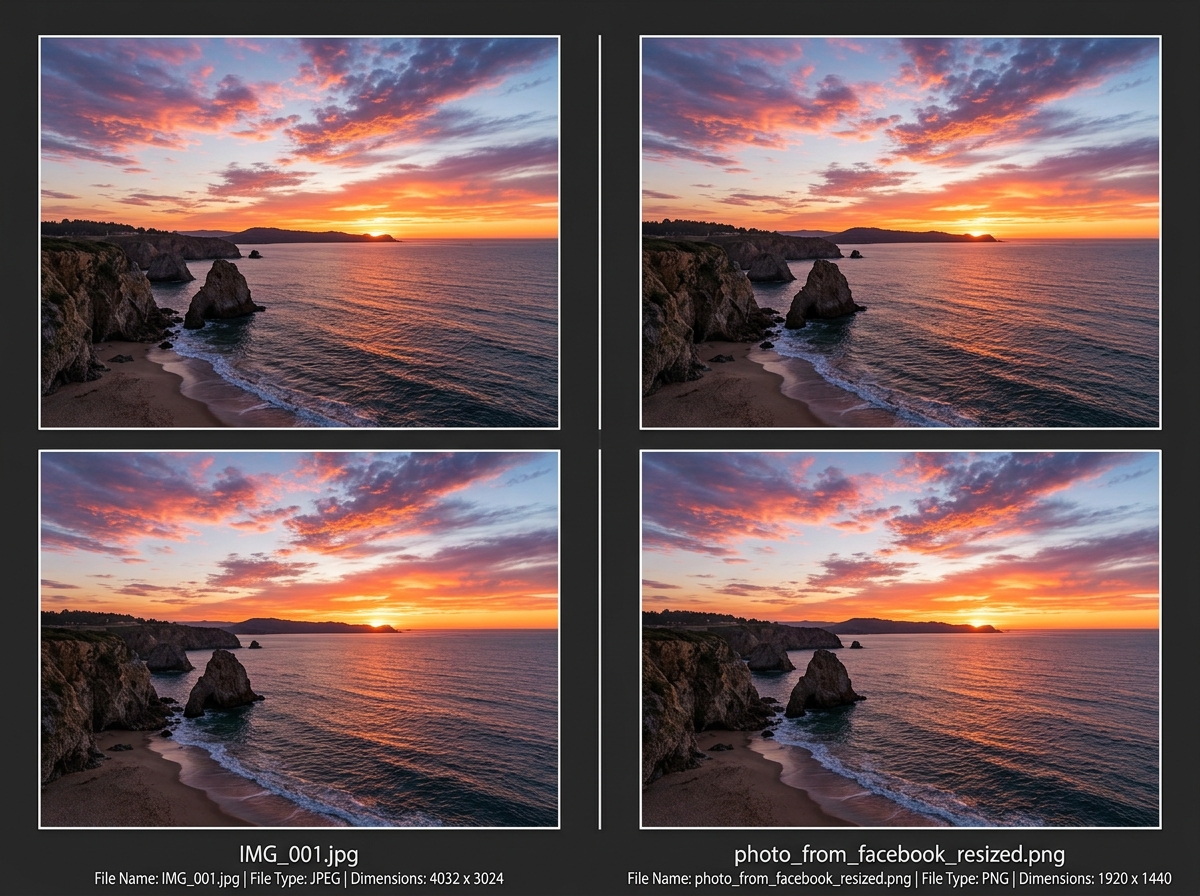
Here are the primary ways these tools identify your photos:
- File Hashes (MD5/SHA-1): This is for exact duplicates. The software creates a unique digital fingerprint for the file. If two fingerprints match perfectly, the files are 100% identical.
- Visual Similarity: This is where the magic happens. Tools like Duplicate Photo Finder – Find and Delete Duplicate Photos use AI to compare the actual content. This allows them to find photos that are slightly different but clearly the same shot.
- Metadata Comparison: Software can look at EXIF tags—the hidden data inside a photo that records the camera model, GPS location, and the exact millisecond the photo was taken. If two photos have the same timestamp and location, they are likely duplicates.
- Smart Comparison: Some high-end tools, such as Duplicate Photo Finder – Find Duplicate and Similar Photos, claim to compare photos “just like a human would,” identifying patterns and subjects even if the lighting or colors have been edited.
How a Photo Duplicate Remover Handles Different File Formats
A major challenge in photo management is the variety of formats. Your old camera might have used JPG, your new iPhone uses HEIC, and your professional DSLR uses RAW.
Professional-grade tools are designed to be format-agnostic. For example, some top-tier software supports over 340 formats. This is crucial for Organizing Photos on Smartphone and Cloud because it ensures that a high-resolution Apple ProRAW file can be matched against its smaller JPG preview.
Whether you are dealing with PSD files from Photoshop, vector graphics, or the newer HEIF formats, a robust photo duplicate remover ensures nothing slips through the cracks. This is particularly helpful when The Ultimate Guide to Taming Your Android Gallery Chaos involves files from multiple sources and apps like WhatsApp or Telegram.
Identifying Edited, Rotated, and Cropped Versions
We have all taken ten photos of the same plate of food to get the “perfect” shot. Or maybe you cropped a photo for an Instagram story and now have two versions of the same image.
Advanced visual matching algorithms can detect:
- Rotated or Flipped Images: If you accidentally saved a photo sideways, the tool still recognizes the content.
- Resolution Changes: It can find a 4K original and its 720p thumbnail version.
- Burst Mode: It groups those 20 nearly-identical shots from your camera’s burst mode so you can pick the best one and toss the rest.
- Cropped Versions: By analyzing the central subject, the software can tell if one photo is just a zoomed-in version of another.
Using the Best Photo Organizing Apps for iPhone often reveals just how many “similar” but not “identical” photos are clogging up your iCloud.
Key Features to Look for in a Photo Duplicate Remover
Not all removers are created equal. When we evaluate these tools, we look for features that make the process safe and efficient. You don’t want a tool that “accidentally” deletes your only copy of a wedding photo!
| Feature | What it Does | Why You Need It |
|---|---|---|
| Exact Match | Finds 100% identical files by hash. | Fast, safe, and binary-perfect. |
| Similarity Detection | Finds edited, resized, or burst photos. | Best for cleaning up real-world galleries. |
| Auto-Marking | Automatically selects which copy to delete. | Saves hours of manual clicking. |
| Selection Assistant | Lets you set rules (e.g., “Always keep the highest resolution”). | Ensures you keep the best quality version. |
| Preview Window | Shows images side-by-side before deletion. | Prevents accidental loss of unique photos. |
A vital feature is the “Selection Assistant.” This allows you to be Deleting Duplicate Files Quickly while maintaining control. You can tell the software to always keep the file with the most metadata or the largest dimensions.
Also, look for “Folder Exclusion.” You might have a backup drive that you want the software to ignore so it doesn’t mess with your archive. This is a staple of Best Practices for File Backup and Storage Management.
Privacy and Safety Standards for Image Scanning
We take privacy very seriously. When you give an app permission to scan your photos, you are giving it a window into your personal life.
The gold standard for privacy is local processing. This means the software does all the “thinking” on your computer or phone, and none of your photos are ever uploaded to a server. This is a key part of Decluttering Cloud Storage Step-by-Step.
If you are using a browser-based tool or a Chrome extension, check if it uses local AI. For example, the Google Photos Duplicate Remover extension processes everything in the browser, ensuring your data never leaves your device. This aligns with the needs of Cloud Storage Apps for Digital Minimalists who want to stay organized without compromising security.
Comparing Free vs. Paid Photo Duplicate Remover Options
Is it worth paying for a photo duplicate remover? The answer depends on the size of your library and your technical comfort level.
Free and Open-Source Options: Tools like Czkawka (which means ‘hiccups’ in Polish!) are fantastic. They are free, open-source, and contain no malware or adware. They are often very fast because they don’t have heavy “fluff” in the interface. However, they might have a steeper learning curve for beginners. You can find many Free Apps for Cleaning Digital Files that do a great job if you are on a budget.
Paid Professional Options: Paid tools usually offer a more “polished” experience. They often include:
- Better AI: More accurate detection of “similar” photos.
- Technical Support: Help if the software crashes or doesn’t find your files.
- Customer Ease: Features like “one-click” cleaning.
- Cross-Platform Support: One license that works on your File Organization Apps for Mac and Windows.
The Difference Between a Free and Paid Photo Duplicate Remover
The biggest difference is often the “Analysis Limit.” Many free versions of paid tools are actually trials. For example, one popular tool might only let you delete 15 photos for free, while another limits you to scanning 100 items.
If you have a massive library, you’ll need Efficient Strategies for Organizing Large Media Libraries, which usually involves investing in a tool that offers unlimited scanning and advanced cloud integration. Paid tools also frequently offer professional plugins for software like Adobe Lightroom, making them essential for photographers.
Frequently Asked Questions about Photo Duplicate Removers
Can these tools find duplicates in cloud services like Google Photos or Dropbox?
Yes! Many modern removers have specific modes for cloud storage. Some work as Chrome extensions that scan your Google Photos library directly in the browser. Others, like Duplicate Photos Fixer Pro – Best Duplicate Photo Finder, can connect to your Dropbox account to find and remove redundant files without you having to download everything to your computer first.
Will deleting duplicates also remove the original high-quality photo?
Not if you use a reputable tool correctly. Most photo duplicate remover software includes a “Selection Assistant” or “Auto-mark” feature. You can set the criteria to “Keep Highest Resolution” or “Keep Oldest File.” This ensures that the high-quality original stays safe while the low-quality copies or thumbnails are sent to the trash. Always use the “Preview” feature if you are unsure!
Do duplicate removers work on external hard drives and SD cards?
Absolutely. Most desktop-based duplicate finders allow you to select any connected drive. This is incredibly useful for photographers who offload SD cards to multiple external drives and end up with “backup of a backup” folders. Tools like Duplicate Photo Finder are specifically designed to handle these large, multi-device libraries.
Conclusion
At Tambas Tech, we believe that technology should serve you, not clutter your life. A photo duplicate remover is more than just a utility; it is a vital tool for maintaining your digital sanity. Whether you choose a robust open-source option like Czkawka or a feature-rich professional suite, the goal is the same: a clean, organized, and fast photo library.
By taking the time to deduplicate your files, you are practicing excellent storage maintenance and ensuring that your most precious memories are easy to find and safely backed up.
Ready to dive deeper into managing your digital world? Check out More info about file management services for our latest guides and reviews.
