
Your Old Photos Are Fading — Here’s How to Save Them
The best apps archive old photos ios users should know about in 2025 are:
- Photo Scan App by Photomyne — Best for fast bulk scanning of entire albums
- Pic Scanner Gold — Best for high-resolution, privacy-first archiving
- Google PhotoScan — Best free option with glare reduction
- Yore: AI Restore Old Photos — Best for AI-powered restoration and colorization
- Renew – Restore Old Photos AI — Best for repairing scratches and faded images
- Slidebox — Best for organizing and decluttering your existing photo library
Think about the shoeboxes sitting in your parents’ closet. Printed photos from decades ago, slowly fading, yellowing, and cracking. There is no backup. Once they are gone, they are gone.
That is the problem millions of iPhone users face right now.
The good news? Your iPhone is already powerful enough to fix this. Modern iOS apps can scan, restore, colorize, and organize old physical photos — often in just a few minutes. Some even use AI to repair damage and bring black-and-white images to life in color.
Whether you have a handful of old prints or entire inherited albums to get through, there is an app on this list that fits your situation.
Key Features to Look for in the Best Apps Archive Old Photos iOS
When we look for the best apps archive old photos ios, we aren’t just looking for a camera app. We need a specialized tool that understands the unique challenges of physical media. If you have ever tried to take a simple photo of a glossy print, you know the struggle: glare, weird angles, and messy backgrounds.
Here are the non-negotiable features we recommend looking for:
- Multi-photo Scanning: The ability to capture 3 or 4 photos in a single frame and have the app automatically split them into individual digital files.
- AI Cropping and Edge Detection: The app should “see” where the photo ends and the table begins, automatically trimming the edges so you don’t have to.
- Glare Removal: This is a game-changer. Some apps use multiple angles to “stitch” out the light reflections that ruin glossy photos.
- Perspective Correction: If you aren’t holding your phone perfectly flat, the app should “un-skew” the image so it looks like a professional scan.
- Metadata Support: This allows you to add dates, locations, and names to the digital file itself. This is vital for long-term preservation.
Digitizing is only half the battle. Once you have these files, you need to ensure they stay safe. We recommend checking out our Archive Old Files Without Losing Data: A How-To Guide to make sure your new digital library doesn’t vanish due to a hardware failure. Additionally, as your collection grows, you’ll want to implement Efficient Strategies for Organizing Large Media Libraries to keep your family history searchable and tidy.
Top-Rated iOS Apps for Scanning and Archiving
The market for photo scanning is split between high-speed bulk tools and high-fidelity restoration apps. To help you choose the right path, we have broken down the top contenders based on their core strengths.
| Feature | Photomyne | Pic Scanner Gold | Google PhotoScan | Microsoft Lens |
|---|---|---|---|---|
| Best For | Bulk Albums | High Resolution | Glare Removal | Documents/Art |
| Batch Scan | Yes (Multiple) | Yes (Multiple) | No (One by one) | No |
| Resolution | High | Max (Up to 48MP) | Standard | Standard |
| Privacy | Cloud-based | 100% On-Device | Google Account | Microsoft Account |
| Pricing | Subscription | One-time Purchase | Free | Free |
Selecting the right tool depends on your end goal. Are you trying to get 500 photos onto your phone quickly, or are you trying to get a 300 DPI scan of a single wedding portrait for reprinting? For more general advice on managing your mobile library, see our guide on the Best Photo Organizing Apps for iPhone.
High-Speed Bulk Scanning with Photomyne
If you are staring at three massive albums and wondering how you will ever finish, the Photo Scan App by Photomyne is likely your best bet. With 89,000 ratings and a 4.7-star average, it is a powerhouse for a reason.
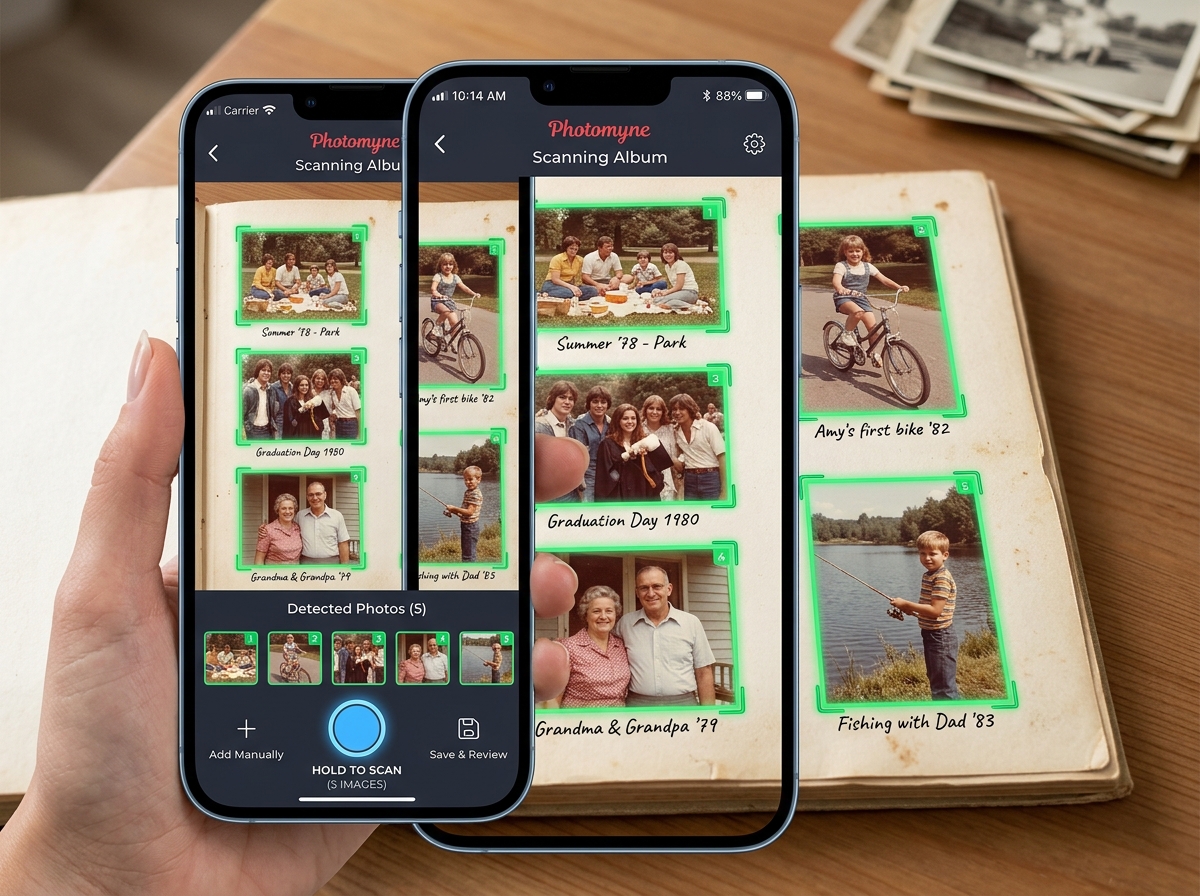
Photomyne’s “magic” lies in its ability to detect multiple photos in a single shot. You can point your iPhone at an entire album page, and the AI will identify each individual photo, crop them, and even auto-rotate them if they are crooked. It’s incredibly fast.
Beyond standard prints, Photomyne also supports scanning negatives and slides. By using your computer screen or a tablet as a backlight, you can use your iPhone to digitize those old film strips that have been sitting in the dark for years. It even offers color restoration filters to bring back the vibrancy of 70s-era Polaroids that have turned orange over time.
Professional Quality and Privacy with Pic Scanner Gold
For those who prioritize quality and privacy above all else, Pic Scanner Gold is a top-tier choice. Launched in 2013 as the world’s first app to scan multiple photos at once, it has built a reputation for being a “pro” tool without the “pro” complexity.
One of its standout features is that it performs 100% on-device processing. Your family photos never touch a third-party server unless you choose to upload them to your own cloud storage. This makes it a great fit for those looking for Encrypted Storage Solutions for Minimalists.
Pic Scanner Gold also excels in technical specifications:
- True 300 DPI: While many apps output at 72 DPI (fine for screens but poor for printing), this app provides the density needed for high-quality reprints.
- EXIF Editing: You can embed the date, location, and person’s name directly into the photo’s metadata.
- No Subscriptions: Unlike many competitors, it typically offers a one-time purchase model, which is a breath of fresh air in the current app landscape.
Using AI to Restore and Colorize Your History
Sometimes, just “scanning” a photo isn’t enough. If the original print is scratched, faded, or was never in color to begin with, you need AI restoration. The best apps archive old photos ios users can find today use neural networks to “guess” missing details and repair damage.
Best Apps Archive Old Photos iOS for AI Restoration
If your archive looks a bit worse for wear, these three apps are the leaders in AI-driven revival:
- Yore: AI Restore Old Photos: This app is a specialist in “fixing the impossible.” It can repair deep scratches and stains, and it even has a unique feature that allows you to combine two separate photos into one or animate a portrait to bring a relative’s smile back to life.
- Renew – Restore Old Photos AI: Renew is incredibly user-friendly. It focuses on sharpening blurry faces and colorizing black-and-white snapshots with high accuracy. It’s perfect for those who want a “one-tap” fix for their entire collection.
- Nostalgia・Fix Old Photo&Repair: Nostalgia excels at turning static memories into dynamic ones. Beyond just repairing tears and deformations, it offers AI-driven animation that can make old photos feel like short videos.
When using these tools, we recommend keeping both the “raw” scan and the “restored” version. This ensures you maintain the historical authenticity while enjoying the modern enhancement. For more on managing these different versions, check out our guide on Organizing Photos on Smartphone and Cloud.
Organizing and Managing Your Digital Archive
Once you have scanned your shoebox of memories, you might find yourself with a new problem: a cluttered camera roll. Digitizing 500 photos in a weekend can make finding your recent vacation pictures a nightmare.
This is where organization tools become essential. You need to be able to sort, tag, and — most importantly — delete the “duds” quickly.
Best Apps Archive Old Photos iOS for Organization
The gold standard for post-scan cleanup is Slidebox. It treats photo organization like a game. You simply swipe up to trash a photo, or tap a folder to file it away. It integrates directly with your iOS Photos app and iCloud, so any changes you make in Slidebox are reflected everywhere.
Proper organization helps you avoid the common pitfalls of digital hoarding. If you find yourself overwhelmed, read our guide on Reducing Digital Storage Overload: A Simple Guide for Beginners.
One major issue with bulk scanning is accidentally creating duplicates. If you scanned the same physical photo twice (it happens to the best of us!), you can save space by Deleting Duplicate Files Quickly. Once organized, we always suggest backing up to a secondary location. You can find great options in our list of Cloud Storage Apps for Digital Minimalists.
Frequently Asked Questions about Photo Archiving
Is a mobile app as good as a flatbed scanner?
For most people, yes. While a dedicated flatbed scanner like a Canon CanoScan LiDE 400 will technically provide higher optical resolution for large prints (like 8x10s), mobile apps are significantly faster and more convenient. The AI processing in apps like Google PhotoScan often does a better job of removing glare than a standard flatbed scanner would.
How do I ensure the best scan quality on my iPhone?
Lighting is everything. We recommend scanning near a window during the day, but not in direct sunlight. Avoid overhead lights, as they create harsh “hot spots” on the photo surface. If you are using an app like Google PhotoScan, follow the prompts to capture the image from four different angles—this is the secret to a glare-free result.
Are these apps safe for my private family photos?
It varies. Apps like Pic Scanner Gold process everything on your device, meaning your photos are never uploaded to a server without your permission. Other apps, especially those with AI restoration features like Photomyne or Nostalgia, may use cloud processing to perform their complex calculations. Always check the privacy policy in the App Store if you are scanning sensitive documents.
Conclusion
Preserving your family history doesn’t require a degree in archival science or expensive equipment. By using the best apps archive old photos ios has to offer, you can transform a dusty shoebox into a vibrant, searchable, and shareable digital legacy in just a few sittings.
Whether you choose the bulk-scanning speed of Photomyne, the high-resolution privacy of Pic Scanner Gold, or the AI magic of Yore, the most important step is simply to start. Physical photos are vulnerable to time, but digital archives can last forever if managed correctly.
For more help keeping your digital life secure, don’t miss our review of Cloud Backup Apps for Home and Work. Ready to discover more tools for your iPhone? Explore more iOS app guides and reviews at Tamba Tech, where Lucas Oliveira and our team of experts help you make the most of your technology.
