
Why Finding the Right Picture Search App for Android Actually Matters
The best picture search app android users can download right now, ranked by rating and usefulness:
| App | Rating | Downloads | Best For |
|---|---|---|---|
| Google Lens | 4.7/5 | 1B+ | All-in-one visual search |
| Search By Image | 4.4/5 | 10M+ | Multi-engine reverse search |
| Reverse Image Search – RIMG | 4.3/5 | 100K+ | Switching between engines |
| Reverse Image Search – Multi | 4.2/5 | 1M+ | Privacy-focused search |
| ImageSearchMan | 3.8/5 | 10M+ | Keyword + image search |
| Image Search – PictPicks | 3.8/5 | 1M+ | Filtered image browsing |
| Image Search by Azrael | 3.6/5 | 1M+ | Batch downloading |
You’ve seen an image somewhere and want to find where it came from. Or you spotted a plant, a product, or a piece of art and want to know what it is — without typing a single word.
That’s exactly what picture search apps are built for.
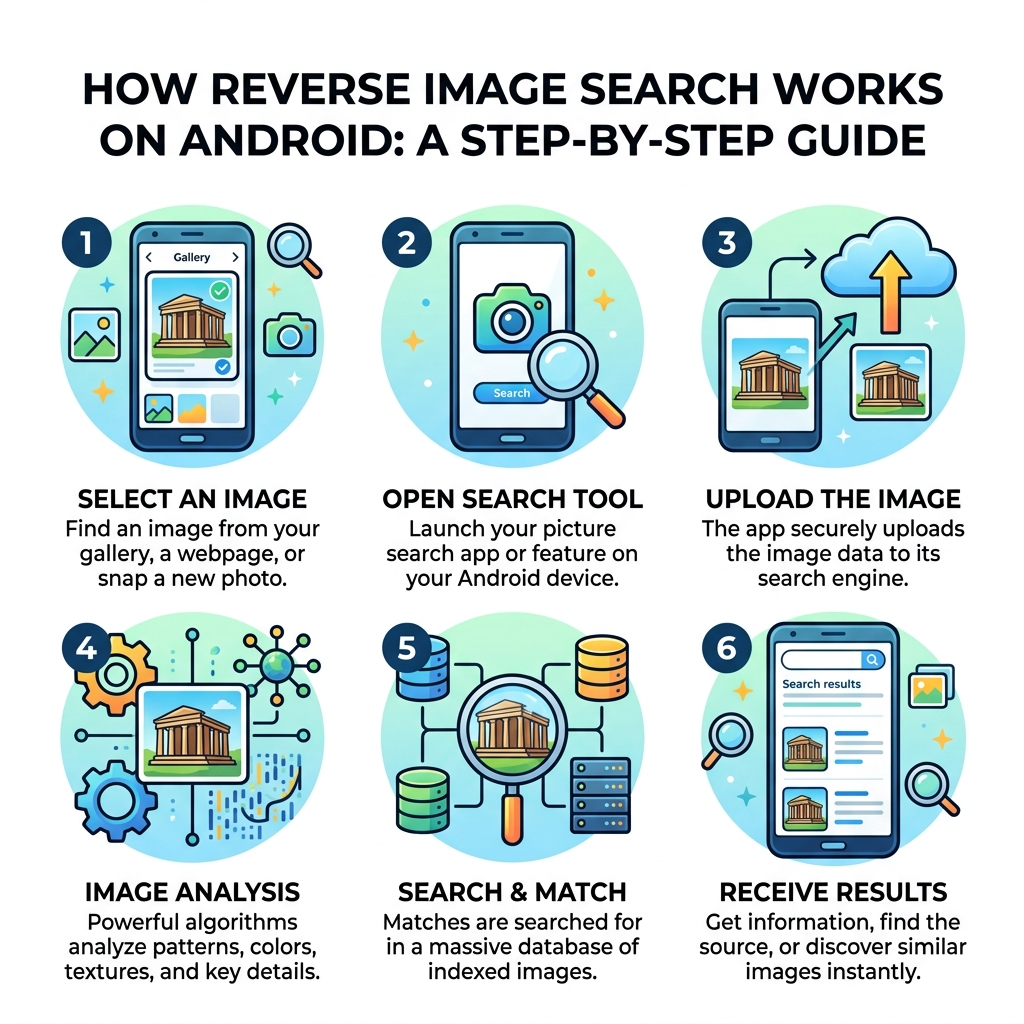
On Android, you have more options than ever. Some apps let you snap a photo and instantly identify objects around you. Others let you upload an image from your gallery and search across Google, Bing, Yandex, and TinEye all at once.
But not all apps are equal. Some are cluttered with ads. Some push you into surprise subscriptions. And some just… stop working after an update.
This guide cuts through the noise. We’ll show you which apps are worth your time, what features actually matter, and what to watch out for before you hit install.
Understanding the Picture Search App Android Landscape
When we talk about a picture search app android, we are looking at a category of software that has evolved far beyond simple keyword searches. These apps act as a bridge between the physical world and digital information. They primarily function through image recognition technology, where complex algorithms analyze the pixels of a photo to identify patterns, landmarks, or specific objects.

Most modern Android devices handle these apps in two ways: camera input and gallery upload. You can either point your phone at something in real-time or pull a saved screenshot from your files. This flexibility is vital for users who need to verify a meme’s origin or identify a mystery bug in their garden.
However, as your collection of saved images grows, you might find your gallery becoming a bit chaotic. If you are struggling to keep track of all the photos you’ve searched and saved, check out our guide on efficient strategies for organizing large media libraries to keep your digital life tidy.
Core Features of a Picture Search App Android
A high-quality picture search app android shouldn’t just show you a list of results; it should give you the tools to refine them. Through our research, we’ve identified several “must-have” features that separate the great apps from the mediocre ones:
- Keyword & Image Hybrid Search: The ability to search by uploading a file or typing a description.
- Advanced Image Filters: This allows you to sort results by size, color, content type (like “Face” or “Photo”), and even the time the image was uploaded.
- Batch Downloading: For power users, the ability to select multiple images and save them all at once is a massive time-saver.
- Format Support: Great apps handle more than just JPEGs; they should support GIFs and SVGs as well.
- In-App Editing: Before you hit search, you often need to rotate, flip, or crop the image to focus on a specific object.
One app that excels in providing these granular controls is Search By Image – Apps on Google Play, which includes a built-in editor to ensure your search query is as precise as possible.
Comparing Search Engines in a Picture Search App Android
One of the biggest misconceptions is that every app uses the same search engine. In reality, the “engine” under the hood dictates the quality of your results.
- Google Lens: This is the gold standard for object identification and translation. It uses Google’s massive AI database to recognize everything from dog breeds to restaurant menus.
- Bing: Often favored for shopping results and finding similar products.
- Yandex: Surprisingly effective for facial recognition and finding higher-resolution versions of an existing image.
- TinEye: The specialist for “reverse” searching—it’s great at telling you if an image has been modified or where it first appeared online.
Apps like Reverse Image Search – Multi – Apps on Google Play take a “Swiss Army Knife” approach, allowing you to toggle between these different engines to compare results. This is incredibly useful because while Google might be best for identifying a plant, Yandex might be better at finding the original artist of a digital painting.
Top-Rated Visual Search Tools for Android Users
Choosing the right tool depends on your specific needs. Here is a breakdown of how the top contenders stack up based on our analysis of the current Android market.
| Feature | Google Lens | ImageSearchMan | RIMG | PictPicks |
|---|---|---|---|---|
| Primary Strength | AI Identification | Keyword Filtering | Engine Switching | Visual Browsing |
| Download Count | 1B+ | 10M+ | 100K+ | 1M+ |
| Editor Included | Basic Crop | No | No | No |
| Multi-Engine | No (Google only) | Yes | Yes (G, B, Y) | No |
For those who want a dedicated tool that doesn’t feel as “heavy” as the standard Google suite, Reverse Image Search – RIMG is a fantastic choice. It focuses on creating a “secure channel” to pass your images to engines like Bing and Yandex without unnecessary fluff.
Practical Use Cases and Benefits of Visual Search
Why bother with a picture search app android in the first place? Beyond the “cool factor,” these tools solve real-world problems every day.
- Shopping & Price Comparison: See a pair of shoes you love? Snap a photo and find out where they are sold and who has the lowest price.
- Object & Nature Identification: We’ve all been on a hike and wondered about a specific flower or bird. These apps act as a pocket encyclopedia.
- Real-Time Translation: Google Lens can translate text from over 100 languages instantly, making it an essential travel companion.
- Source Verification: In an era of “fake news,” reverse image search helps you find the original context of a screenshot or photo to see if it’s been manipulated.
- Educational Help: Some apps now offer “Homework Help,” where you can take a photo of a math problem or history question to find explainers and videos.
If you find yourself downloading dozens of images for research or shopping, you might end up with a cluttered phone. We recommend looking into Android apps for digital decluttering to help manage the influx of new data.
Privacy, Safety, and Monetization Considerations
While these apps are incredibly useful, they aren’t always “free” in the traditional sense. Most third-party apps utilize one of two monetization models: intrusive ads or subscriptions.
Data Privacy Concerns When you upload a photo to a picture search app android, you are often sending that data to a server. It is crucial to check the “Data Safety” section on the Play Store.
- Encryption: Ensure the app encrypts data in transit.
- Third-Party Sharing: Some apps, like Search By Image, may share your location or app activity with third parties. Others, like Reverse Image Search – Multi, explicitly state they share nothing.
- Data Deletion: Be aware that some apps do not allow you to delete your data once it has been collected.
The “Free Trial” Trap A common user complaint involves apps that offer a “free trial” but require credit card information upfront. Users have reported being charged significant amounts (sometimes upwards of $30) because they forgot to cancel within a narrow 14-day window. Always read the fine print before clicking “Submit” on a payment screen.
To better understand how to keep your personal files safe while using cloud-connected apps, read our guide on organizing photos on smartphone and cloud.
Common Limitations and User Criticisms
No app is perfect, and even the most popular ones have their quirks. User feedback highlights several recurring issues that you should keep in mind.
Blurry or Repeating Results Some apps, like ImageSearchMan, have faced criticism for showing “repeating” images. A user might see 20 relevant results, and then the app simply loops those same 20 pictures indefinitely. Others struggle with quality, pulling low-resolution thumbnails from social media platforms like Instagram or Threads rather than high-quality originals.
Connection Errors “Check your connection” is a dreaded error message. Even with high-speed Wi-Fi, some apps struggle to communicate with search engine APIs, leading to sudden stops in service.
The “Shopping Bias” Many users have noted that modern image search is becoming heavily biased toward commerce. Instead of finding information about an object, the app might only show you where to buy it. This is particularly frustrating when you are trying to identify a person or a historical landmark.
Apps like Image Search – PictPicks try to combat this by offering better filters, but the “shopping-first” trend is a widespread industry shift.
Frequently Asked Questions about Android Image Search
How do I perform a reverse search on Android?
The easiest way is to use the Google app. Tap the camera icon (Google Lens) in the search bar, select a photo from your gallery, and wait for the results. For a more comprehensive search, use a third-party app like “Search By Image” to check Bing and Yandex simultaneously.
Are there completely free picture search apps without ads?
Finding a completely ad-free third-party app is rare because developers need to cover server costs. However, Google Lens is effectively ad-free (though it may show shopping results). Some third-party apps offer a one-time “pro” purchase to remove ads forever, which is usually a better deal than a monthly subscription.
Which app is best for identifying plants and animals?
Google Lens is currently the leader in this category due to its massive AI training set. It can identify thousands of species with remarkable accuracy, often providing links to Wikipedia or local conservation sites for more context.
Conclusion
At Tamba Tech, we believe that technology should empower you to understand the world more clearly. Finding the right picture search app android users can rely on is about more than just novelty—it’s about efficiency, safety, and discovery. Whether you choose the sheer power of Google Lens or the multi-engine flexibility of a third-party tool, these apps turn your smartphone into a window of infinite information.
Our expert writer, Lucas Oliveira, recommends starting with Google Lens for everyday tasks and keeping a secondary app like “Search By Image” for those times when you need a deeper, more technical dive into an image’s origins.
Ready to take control of your digital library and discover more helpful tools? Explore more expert app reviews and guides at Tamba Tech today.
