
The Best Top Lightweight Calendar iOS Apps at a Glance
If you want a quick answer, here are the top lightweight calendar apps for iPhone right now:
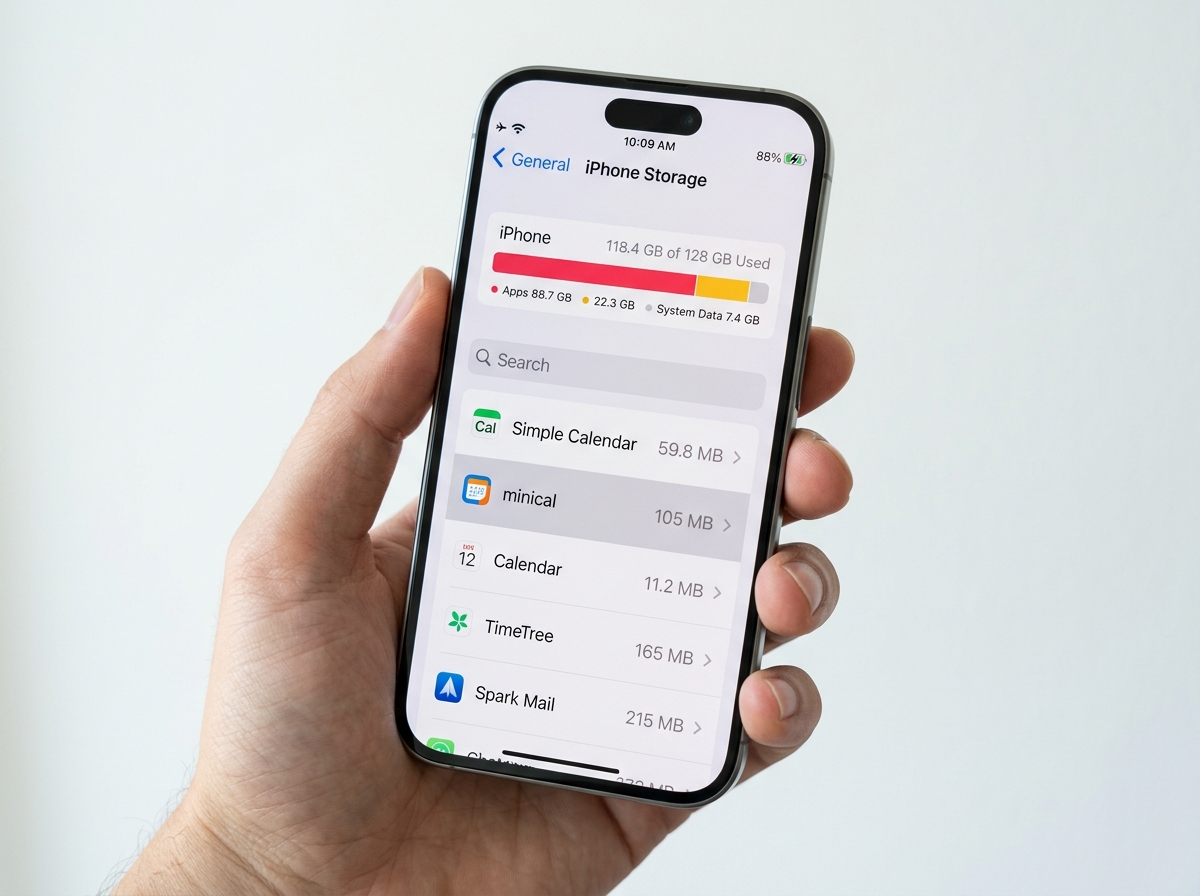
| App | Size | Pricing | Best For |
|---|---|---|---|
| Across | 26.4 MB | $14.99 one-time | Power users wanting customization |
| Dawn | 18.4 MB | Free / $1.49/mo | Ultra-minimalist scheduling |
| Apple Calendar | Built-in | Free | No-frills simplicity |
| Simple Calendar | 59.8 MB | Free / $12.99 one-time | Stress-free daily planning |
| minical | 105 MB | Free | Widget-first experience |
Your iPhone calendar should help you think clearly — not add to the noise.
But most popular calendar apps have become exactly that: noise. Bloated with features you’ll never touch, slow to load, and hungry for battery life. It’s a real problem, especially when all you need is a clean view of your week.
The good news? A growing number of top lightweight calendar iOS apps are built around the opposite philosophy — small file sizes, fast performance, and interfaces that get out of your way.
Some users on Reddit put it well: even feature-rich apps like Fantastical (183.7 MB) can feel “too busy” and expensive at up to $57/year, pushing people toward simpler, leaner alternatives. And that shift makes sense.
Whether you’re dealing with app fatigue, a cluttered home screen, or just want something that loads instantly, the right lightweight calendar can make a real difference to your day.
What Defines a Top Lightweight Calendar iOS Experience?
When we talk about a “lightweight” app, we aren’t just talking about a small download size—though that is a big part of it. A true top lightweight calendar ios experience is defined by how it respects your device’s resources and your own mental bandwidth.
Minimal Storage and RAM Efficiency
In an era where some apps take up nearly a gigabyte of space after a few months of use, a lightweight calendar stays lean. We look for apps that keep their footprint small—ideally under 60 MB. This isn’t just about saving space for photos; it’s about RAM efficiency. A smaller app usually loads faster and doesn’t “hang” when you are trying to quickly check a meeting time while walking down a busy street.
Battery Longevity and Performance
Heavy apps often run complex background processes that drain your iPhone’s battery. A lightweight calendar focuses on “zero bloat.” It uses native iOS frameworks to ensure that background refresh and synchronization don’t leave you searching for a charger by lunchtime. If you’ve been feeling the sting of “app fatigue,” switching to a leaner option is a great first step in Decluttering Smartphone Apps: A Guide for Beginners.
Intuitive UI and Fast Launch
Speed is a feature. A lightweight app should open the millisecond you tap the icon. There should be no splash screens, no “loading” spinners, and no intrusive ads. The UI should be so intuitive that you don’t need a tutorial to find your way around. By choosing App Alternatives to Reduce Digital Clutter, you reclaim the time usually spent navigating through layers of unnecessary menus.
The Best Lightweight Calendar Apps for iPhone
Finding the perfect balance between “useful” and “minimal” is tough. However, the current market for iOS 18+ apps has some incredible gems. These apps integrate deeply with the Apple ecosystem, meaning they can pull data from your existing iCloud or Google accounts without requiring you to start from scratch. For those looking to overhaul their digital life, checking out Minimalist Calendar Apps for Productivity can provide even more context on why these specific designs work.
Across: The Best Top Lightweight Calendar iOS for Power Users
If you think “minimal” means “lacking features,” Across will change your mind. Coming in at a tiny 26.4 MB, it is a masterclass in efficient coding. It’s designed as a modern calendar that fully integrates with Apple Calendar and Reminders.
What makes Across a top lightweight calendar ios contender is its serverless architecture. Your data stays on your device or in your iCloud, ensuring it is fast and works perfectly offline. It offers 11 different calendar views and 70 color themes, yet it never feels cluttered. For a one-time purchase of roughly $14.99 (depending on your region), you get a premium experience without the “subscription tax” that plagues other apps.
- Pros: Ultra-fast, one-time purchase, deep Reminders integration.
- Cons: The level of customization might be overkill for someone who wants zero settings to tweak.
- Link: Across: Modern Calendar App – App Store
Dawn: The Most Minimalist Approach to Scheduling
Dawn is perhaps the most visually striking app on this list. At only 18.4 MB, it is incredibly light. It treats your day as a story, featuring an “adaptive homepage” called the Today page that changes as your day progresses.
Dawn introduces the “Spaces” organizer, which allows you to visually group tasks and events. It’s perfect for those who want to manage a project or a vacation itinerary without opening a heavy project management tool. It also includes a dedicated Focus mode to help you stay on task. While it offers a subscription for $1.49/month to sync with external calendars, the free version is a fantastic standalone planner.
- Pros: Beautiful adaptive UI, tiny file size, focuses on “Today.”
- Cons: Advanced syncing features require a subscription.
- Link: Dawn – Minimal Calendar App – App Store
Simple Calendar: Effortless Time Management
Living up to its name, Simple Calendar is designed for a stress-free experience. It weighs in at 59.8 MB and focuses on high-speed event creation. One of its standout features is the ability to add the same event to multiple dates instantly—perfect for shift workers or students planning out a semester.
It supports both vertical and horizontal scrolling, which is a rare but welcome feature for those who find the standard Apple “dot” view frustrating. It’s a clean, no-nonsense tool that keeps the focus on your time, not the app itself.
- Pros: Multi-date event registration, very easy to use, clean widgets.
- Cons: Includes ads in the free version (removable with a one-time $12.99 purchase).
- Link: Simple Calendar: Clean&Minimal App – App Store
Essential Features for Minimalist Scheduling
When we strip away the bloat, what remains are the “essential” features that actually help you stay organized. For many of us, the goal is “minimal tech” that yields maximum results. You can read more about this philosophy in our guide on Productivity Apps for Minimal Tech.
Natural Language Input
The hallmark of a top lightweight calendar ios is how quickly you can get information into it. Natural language processing (NLP) allows you to type “Lunch with Sarah at 1 PM tomorrow” and have the app automatically fill in the date and time. Apps like Across and TapCal excel at this, saving you from fiddling with date pickers and scroll wheels.
Widget Efficiency and Home Screen Strategy
A lightweight app shouldn’t require you to open it ten times a day. Instead, it should provide high-density information through widgets.
- Heatmaps: Show you how busy your month is at a glance.
- Real Titles: Unlike the native Apple Calendar, which often just shows dots in the month view, apps like TapCal show actual event titles on the widget.
- Lock Screen Support: Quick-glance widgets for iOS 18 ensure you know your next meeting without even unlocking your phone.
Privacy and Offline Functionality in a Top Lightweight Calendar iOS
In free apps, you are often the product. However, many lightweight calendars prioritize privacy. TinyCal, for example, emphasizes “Local Only” storage. This means your schedule isn’t floating around on a developer’s server; it lives on your iPhone. This makes it an excellent choice for those looking for Apps for Reducing Smartphone Distractions because it doesn’t constantly ping servers for updates.
- Across is serverless, meaning it works entirely offline.
- Proton Calendar (while slightly heavier) offers end-to-end encryption for the privacy-conscious.
- TinyCal Link: TinyCal – Simple & Intuitive Calendar App for iOS & Android
Advanced Customization Without the Bloat
Just because an app is lightweight doesn’t mean it has to look like a spreadsheet from 1995. minical and TapCal prove that you can have style and substance.
- minical: Offers 38 color themes and 21 app icons while maintaining a minimalist aesthetic. It’s reached over 4 million downloads because it stays simple while allowing users to make it their own. minical – Planner & Calendar App – App Store
- TapCal: Known for its “no bloat” philosophy, it includes built-in 10-day weather icons directly in your calendar view so you can plan your outfit and your commute simultaneously. TapCal
Frequently Asked Questions About Lightweight iOS Calendars
Do lightweight calendars sync with Google and iCloud?
Yes! Almost every top lightweight calendar ios we recommend acts as a “shell” or a “client” for your existing accounts. When you grant them permission, they pull in your events from iCloud, Google Calendar, Exchange, or Outlook. This means you don’t have to invite your friends again or re-enter your work meetings. They also support background refresh, so your schedule is always up to date when you open the app.
Are there any completely free lightweight calendar apps?
The native Apple Calendar is the ultimate free, lightweight option. It comes pre-installed and has zero ads. However, if you find it too basic, apps like minical and Dawn offer very generous free tiers. Many users prefer “one-time purchase” models (like Across or Simple Calendar) over monthly subscriptions because they are more cost-effective in the long run.
How do these apps impact iPhone battery life?
Because these apps avoid heavy animations, complex AI “auto-scheduling,” and constant data mining, they typically have a much lower impact on battery life than “heavy” alternatives. They use fewer CPU cycles to render their views and are optimized for the latest versions of iOS.
Conclusion
At Tambas Tech, we believe that the best tools are the ones that disappear into your workflow. Choosing a top lightweight calendar ios isn’t just about saving a few megabytes of storage; it’s about choosing a calmer, more focused way to manage your time.
Whether you opt for the power-user features of Across, the artistic minimalism of Dawn, or the widget-heavy utility of minical, you’re making a choice to reduce digital clutter and improve your daily productivity. If you’re looking to further refine your mobile setup, don’t miss our guide on Task Management Apps for Minimalist Workflow.
We hope this guide helps you find the perfect digital companion for your iPhone. For more expert reviews and deep dives into the best apps on the market, visit us at Tamba Tech.
— Lucas Oliveira and the Tambas Tech Team
