
Your Photos Deserve Better Than a Swipe Away
The best app for storing private photos keeps your personal images locked, hidden, and completely out of reach from anyone but you. Here are the top picks:
Top Apps for Storing Private Photos:
| App | Best For | Platform | Free Tier |
|---|---|---|---|
| HiddenVault | iPhone users, zero-knowledge local storage | iOS only | Yes |
| Keepsafe | Android users, cloud backup | iOS & Android | Yes (200 photos) |
| Private Photo Vault | Intruder tracking, decoy passwords | iOS & Android | Yes |
| Mylio | Local device storage, no cloud required | Multi-platform | Yes |
Think about how many private photos are sitting in your main camera roll right now. Anyone who picks up your unlocked phone can scroll straight to them.
Your regular gallery app was never designed for privacy. It shows everything. No locks. No hiding. No warning when someone snoops.
That’s exactly why private photo vault apps exist. They pull your sensitive images out of the public gallery and lock them behind encryption, PINs, and biometric authentication. Some go even further, with features like decoy passwords, intruder alerts, and zero-knowledge encryption — meaning even the app developer can’t see your photos.
Whether you’re protecting personal memories, sensitive documents, or anything in between, the right app makes a real difference.
Essential Security Features for Photo Privacy
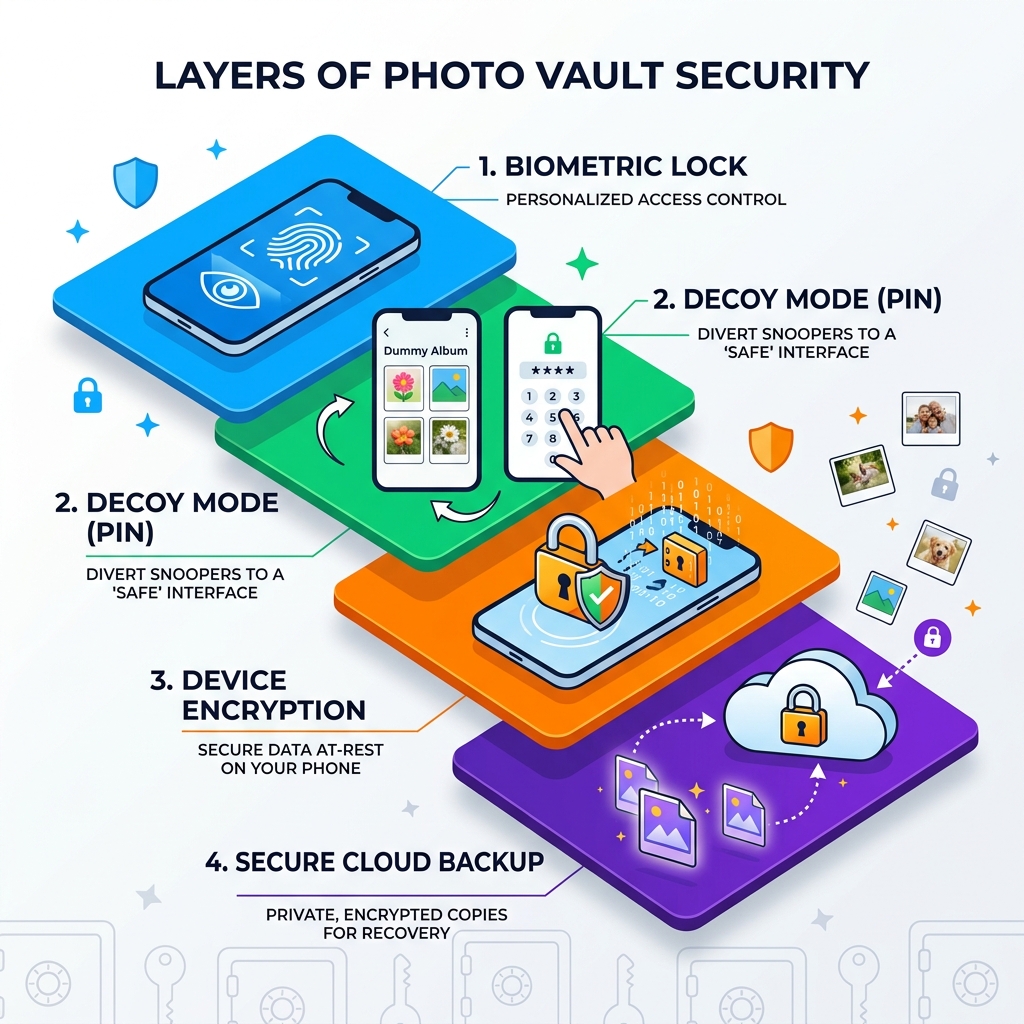
When we talk about the best app for storing private photos, we aren’t just looking for a simple folder with a password. True digital privacy requires a multi-layered defense system. If one layer fails, the next one should be there to stop an intruder in their tracks.
Here are the non-negotiable features we look for:
- Biometric Locks: This allows you to use FaceID or Fingerprint scanning to enter your vault. It is faster than typing a PIN and significantly harder for a “shoulder surfer” to steal.
- Zero-Knowledge Architecture: This is the gold standard of privacy. It means the app developer does not have the “key” to your vault. Your data is encrypted using a password only you know. If the company’s servers were ever hacked, your photos would remain unreadable strings of code.
- End-to-End Encryption (E2EE): If you choose to sync your photos to the cloud, E2EE ensures they are encrypted on your device before they ever leave. They stay encrypted during transit and while sitting on a server.
- Face-Down Auto-Lock: Imagine you are looking at private photos and someone walks into the room. With this feature, you simply flip your phone face down on the table, and the app instantly locks and closes.
- Break-In Alerts: Some apps use the front-facing camera to take a “secret selfie” of anyone who enters the wrong PIN. They might even log the GPS location of the attempt.
- Decoy PINs: This is a clever bit of “social engineering” defense. You set up a secondary PIN that opens a “fake” vault filled with harmless, decoy photos. If someone forces you to open the app, you give them the fake PIN, and your real secrets stay hidden.
Using these tools is about more than just hiding embarrassing selfies; it’s a vital part of Protecting Sensitive Documents Digitally. From scans of your ID to credit card photos, these vaults keep your most vital data away from prying eyes.
Best App for Storing Private Photos: Top Recommendations
Choosing the right vault depends on your specific needs. Do you want your photos stored only on your phone, or do you need them synced across your tablet and computer? Are you willing to pay for a subscription, or do you need a robust free version?
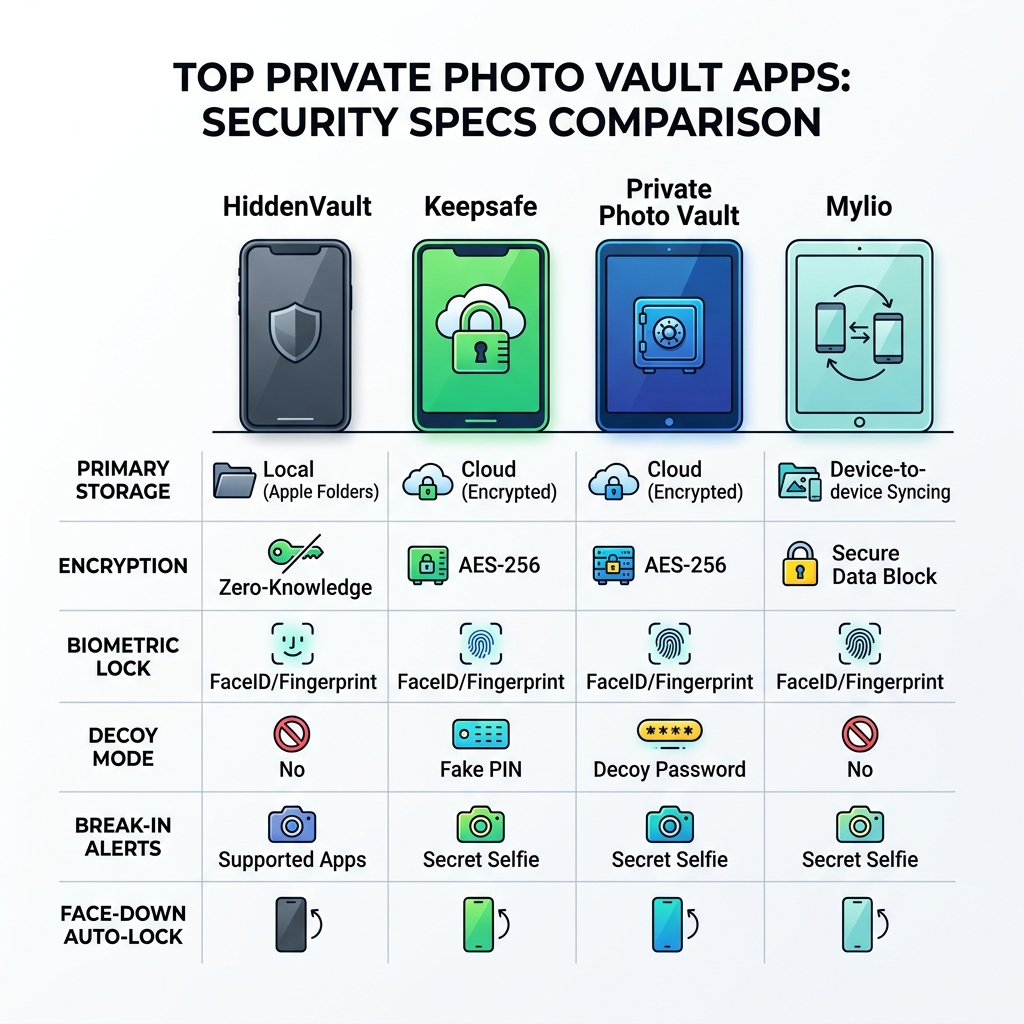
| Feature | HiddenVault | Keepsafe | Private Photo Vault | Mylio |
|---|---|---|---|---|
| Primary Storage | Local (Apple Folders) | Cloud (Encrypted) | Local & Cloud | Local (Device-to-Device) |
| Encryption | Zero-Knowledge | AES-256 | AES-256 | AES-256 |
| Decoy Mode | No | Yes (Fake PIN) | Yes (Decoy Password) | No |
| Intruder Selfie | No | Yes | Yes | No |
| Stealth Mode | No | Hides from Recent Apps | No | No |
For those who want to keep things simple and secure, we often recommend Encrypted Storage Solutions for Minimalists that don’t bloat your device with unnecessary features.
Why Keepsafe is a Contender for the Best App for Storing Private Photos
With over 70 million users and a staggering one billion photos secured, Keepsafe Photo Vault is arguably the most famous name in the industry. It’s a comprehensive solution that balances ease of use with “military-grade” encryption.
One of its standout features is Safe Send. This allows you to share a photo with another Keepsafe user, but the photo disappears 20 seconds after they view it—similar to Snapchat but with much higher security. We also love the Space Saver feature. It compresses the photos on your phone to save storage space while keeping the high-resolution originals backed up in your encrypted “Private Cloud.”
Keepsafe is particularly helpful if you are struggling with The Ultimate Guide to Taming Your Android Gallery Chaos, as it allows you to easily move items out of your main gallery and into organized, locked albums.
Pros:
- Cross-platform sync (iOS and Android).
- Trash recovery (Premium) lets you get back accidentally deleted items.
- Disguise options, like the “Calculator Vault” icon.
Cons:
- Free version is limited to 200 items.
- Subscription costs can add up over time.
HiddenVault: The Best App for Storing Private Photos on iOS
If you are an iPhone purist who distrusts the cloud, HiddenVault Secret Photo Vault App is likely the best app for storing private photos for you.
What makes it unique is its Zero-Knowledge security architecture. Unlike other apps that might upload your data to their own servers, HiddenVault stores your photos right on your iPhone using the built-in Apple “Folders” system. This means the developer never sees, saves, or accesses your data. Since it stays on your device, there is no risk of a server-side data breach.
It integrates perfectly with the Apple ecosystem, making it one of the Best Photo Organizing Apps for iPhone. You can use FaceID to jump right in, and the interface feels like a natural extension of iOS.
Pros:
- True zero-knowledge privacy.
- No external servers involved.
- Includes a private web browser and password manager.
Cons:
- No cloud backup (if you lose your phone, you lose the photos).
- iOS only.
Private Photo Vault for Advanced Intruder Tracking
Private Photo Vault is the choice for users who are genuinely worried about someone trying to guess their password. While other apps focus on encryption, this one focuses on active defense.
Its Break-in Report is legendary. If someone tries to enter your vault and fails, the app secretly snaps a photo of them with the front camera and logs their GPS location. You’ll know exactly who tried to snoop and where they were when they did it. It also features a Decoy Password. If a nosy friend or partner demands you open the vault, you can enter the decoy password to show them a completely different set of harmless photos.
Pros:
- Top-tier intruder tracking.
- Wireless photo transfer via iTunes or Wi-Fi.
- Integrated private browser that lets you download photos directly into the vault.
Cons:
- The interface can feel a bit dated compared to Keepsafe.
- Free version contains ads that some users find intrusive.
Local vs. Cloud Storage: Choosing Your Privacy Model
When searching for the best app for storing private photos, you must decide where your data actually lives. This is the “Local vs. Cloud” debate.
Local Storage (e.g., HiddenVault, Mylio): Your photos stay on your physical device.
- Pros: You have total control. No one can hack a server to get your pictures. It works offline.
- Cons: If you lose your phone or it breaks, your photos are gone forever unless you manually backed them up to a hard drive.
Cloud Storage (e.g., Keepsafe, Private Photo Vault Cloud): Your photos are encrypted and uploaded to a secure server.
- Pros: You can access your photos from any device. If you lose your phone, you just log into the app on a new device to get them back.
- Cons: You are trusting a third party with your data. Even with encryption, some users feel uneasy about their private lives sitting on a server.
For those with massive collections, we recommend looking into Efficient Strategies for Organizing Large Media Libraries to decide which model fits your workflow best.
Private Vaults vs. Mainstream Cloud Services
You might be wondering: “Why can’t I just use the ‘Hidden’ folder in Google Photos or iCloud?”
While mainstream services have improved, they are generally not as secure as a dedicated vault app. Services like Google Photos and iCloud are designed for convenience first, privacy second.
- Metadata Privacy: Mainstream clouds often scan your photos to identify faces, locations, and objects for search purposes. A private vault with zero-knowledge encryption doesn’t “look” at your photos at all.
- Shared Accounts: If you share an iCloud or Google One plan with family, it is much easier to accidentally share a private photo or leave a device logged in.
- Target for Hackers: Because billions of people use these services, they are the primary targets for large-scale phishing and hacking attempts.
To stay safe, always prioritize Securing Cloud Storage Accounts with two-factor authentication, even if you use a vault app. For those who want to minimize their digital footprint entirely, check out our guide on Cloud Storage Apps for Digital Minimalists.
Frequently Asked Questions about Private Photo Storage
Can I recover my photos if I forget my vault password?
In many cases, the answer is no, especially with zero-knowledge apps like HiddenVault. Because the developer doesn’t store your password, they cannot reset it for you. This is the price of true privacy. However, apps like Keepsafe allow for recovery if you have set up a verified email. Always write down your master keys or backup phrases and store them in a physical safe. For more tips on management, see Organizing Photos on Smartphone and Cloud.
Are there free apps that offer enterprise-level privacy?
Most of the best apps for storing private photos follow a “freemium” model. You can get military-grade encryption for free, but you will be limited by the number of photos you can store (usually 200 to 500). To store thousands of photos or use features like Break-In Alerts, you’ll usually need a subscription. Keepsafe Basic is a great starting point for testing these features without spending a dime.
Do these apps hide photos from the main phone gallery?
Yes! That is their primary job. When you import a photo into a vault app, the app will usually ask if you want to delete the original from your phone’s public gallery. You must say yes for the photo to be truly hidden. Once deleted from the main gallery, the photo only exists inside the encrypted vault.
Conclusion
Finding the best app for storing private photos is about taking back control of your digital life. Whether you choose the intruder-thwarting features of Private Photo Vault, the seamless iOS integration of HiddenVault, or the massive cloud capacity of Keepsafe, you are making a conscious choice to protect your pixels.
At Tamba Tech, we believe your privacy shouldn’t be a luxury. By moving your sensitive media out of the public square and into a secure vault, you can hand your phone to a friend or colleague without that nagging feeling of anxiety.
Ready to lock down the rest of your digital world? Explore more expert app reviews at Tamba Tech to find the best tools for security, productivity, and organization.
