
Why Finding the Right Software to Find and Organize Photos Changes Everything
The best software to find and organize photos in 2026, based on our research and expert testing, includes:
| Software | Best For | Price Model | Platform |
|---|---|---|---|
| Excire Foto 2025 | AI-powered search & culling | Perpetual license | Mac, Windows |
| Lightedium | Large libraries + privacy | Free | Windows |
| Mylio Photos | Cross-device, offline-first | Subscription | Mac, Windows, iOS, Android |
| digiKam | Free & open-source | Free | Mac, Windows, Linux |
| ImageRanger | NAS & offline storage | One-time purchase | Mac, Windows |
| ACDSee Photo Studio | All-in-one editing + organizing | Perpetual / subscription | Mac, Windows |
| Adobe Lightroom Classic | Professional workflows | Subscription | Mac, Windows |
Here’s a problem most of us know too well.
You took a great photo two summers ago. You know it exists. But is it on your phone? An old hard drive? A cloud backup from a service you barely use anymore? Good luck finding it in under ten minutes.
One photographer described managing a library of over 1.2 million photos — and still feeling like the files were running the show, not him. If that sounds familiar, you’re not alone.
The average person’s photo collection is scattered across devices, drives, and apps. And it keeps growing. Without the right tool, finding anything specific becomes a frustrating guessing game.
The good news: modern photo organizing software — especially AI-powered tools — can turn a chaotic library into something you can actually search, browse, and enjoy. Some tools can even process a million-image library and return results in seconds, all without uploading a single file to the cloud.
This guide cuts through the noise and shows you exactly which tools are worth your time.
Top Software to Find and Organize Photos in 2026
When we look for the best software to find and organize photos, we aren’t just looking for a digital shoebox. We want a command center. In 2026, the market has split into two main camps: the AI-driven powerhouses that do the heavy lifting for you, and the traditional digital asset management (DAM) systems that offer granular control.
Excire Foto 2025: The AI Speed Demon
If you want to spend less time clicking and more time looking at your memories, Excire Foto is a top contender. It is designed around “X-prompt AI,” a feature that allows you to search your catalog using natural language. Instead of hunting through folders, you simply type “red motorcycle on a highway” or “smiling people at the beach,” and the software finds them instantly.
One of the most impressive stats we’ve seen is that an Excire user successfully manages a collection of 1,254,836 photos. Despite this massive volume, the database remains lean, requiring only about 250 MB of storage per 100,000 photos. It’s a specialized tool for those who want their computer to do the “thinking” part of organization.
Lightedium: The Privacy-First Powerhouse
For those who are wary of big tech, Lightedium – Smart Photo Management Tool is a breath of fresh air. It is built on a “zero data collection” principle. It manages million-level photo libraries with what we call “second-level response”—meaning you get your search results almost the moment you finish typing. It’s currently one of the most efficient free options for Windows users who need professional-grade AI features like face clustering and OCR (text recognition within images) without a price tag.
ImageRanger: The Master of Disconnected Drives
Do you have photos spread across three different USB sticks and a NAS (Network Attached Storage) drive? ImageRanger: photo and video files manager excels here. It allows you to index entire drives, even if they aren’t always plugged in. It’s a “buy once, own forever” model, which many of our readers prefer over monthly bills. It even includes private facial recognition where the data is written directly into the image’s EXIF metadata, keeping your organization portable.
Mylio Photos: The Ultimate Sync Tool
If your life happens across a Mac, a Windows PC, and an iPhone, Photo organizing software for Mac, Windows, Android, iOS is likely your best bet. Unlike Google Photos, Mylio doesn’t require you to store your original files on their servers. Instead, it uses peer-to-peer syncing to move your photos between your own devices. It’s like having a private cloud that you own and control.
digiKam: Open-Source Flexibility
For the power users and Linux enthusiasts, digiKam remains the gold standard for open-source software. It can easily handle libraries containing more than 100,000 images and offers deep metadata editing tools that rival expensive professional suites. Because it’s open-source, it’s completely free, though it does have a steeper learning curve than consumer-focused apps.
Best Software to Find and Organize Photos for Offline Privacy
In an era where every app wants to “train” its AI on your personal family photos, privacy has become a luxury. We’ve found that the best software to find and organize photos in 2026 focuses heavily on local processing.
Excire: AI-Powered Photo Management Software for Mac & PC | Try It Today! is a leader in this space. Its AI models are trained on millions of images in a lab, but once the software is on your computer, it stays there. It doesn’t need an internet connection to recognize a sunset or a golden retriever. This is crucial for GDPR compliance and general peace of mind.
If you are looking for a lighter touch, Excire Foto Light offers a free entry point into this world of offline organization. It provides the core AI keywording and facial recognition features without the complexity (or cost) of the full suite.
Tools like ImageRanger and Lightedium also prioritize this “local-first” approach. By keeping the facial recognition data and search indexes on your own hardware, you eliminate the risk of a cloud data breach exposing your private moments. For those with a NAS, ImageRanger can index your files directly over your local network, ensuring your mass storage remains organized without ever touching the public internet.
Professional Software to Find and Organize Photos for Large Libraries
Managing 10,000 photos is a hobby; managing 100,000+ is a job. Professional photographers and serious archivists need software that doesn’t “choke” when the library grows.
When we talk about million-level management, we are looking at tools that offer:
- Second-level response: No one wants to wait 30 seconds for a search result.
- RAW Support: Professionals need to manage 12+ different RAW formats (like .ARW, .CR2, or .NEF) without losing metadata.
- XMP Support: This allows your organization (tags, ratings) to travel with the file, so if you open the photo in another program, your hard work isn’t lost.
We’ve previously discussed organizing photos on smartphone and cloud, but for massive local libraries, the system requirements get more serious. We recommend at least 16GB of RAM for libraries over 100,000 images. Software like digiKam and Excire Foto Office Edition are specifically built for these high-stakes environments, offering shared databases so multiple people can work on the same collection across a local network.
Advanced AI Capabilities: From Facial Recognition to Natural Language Search
The “magic” in modern software to find and organize photos comes from AI. But not all AI is created equal.
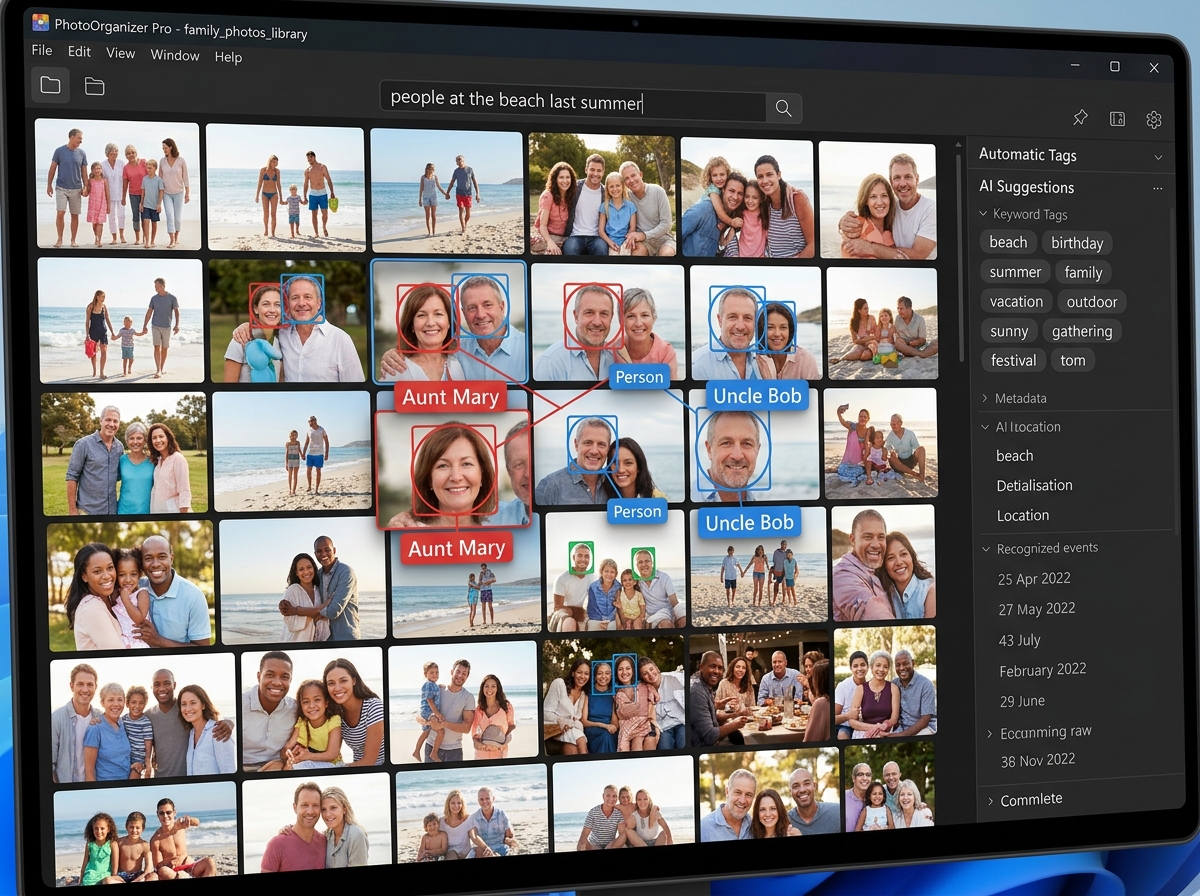
Face Clustering and Recognition
Modern tools like Lightedium boast a face clustering recognition accuracy of 99.2%. This means the software doesn’t just see a face; it groups every photo of “Aunt Mary” together across twenty years of birthdays. Some tools even include “Face Focus Checks,” which automatically flag photos where the subject’s eyes aren’t perfectly sharp—a lifesaver for wedding photographers.
Natural Language and Similarity Search
The days of tagging every photo with “beach,” “sand,” and “ocean” are over. Natural language search allows you to find “people at the beach last summer” by analyzing the content of the image in real-time. Furthermore, “Similarity Search” (found in Excire and ImageRanger) lets you click one photo you like and say, “Find me more that look like this.” The AI analyzes the color, composition, and subject to find visual matches.
Aesthetic Ratings and Smart Deduplication
One of our favorite 2026 features is the “Aesthetic Rating.” AI models like Excire’s “X-tetics” can score your photos based on composition and technical quality. This helps you quickly “cull” (delete the bad ones) from a shoot of 500 photos down to the best 50.
Duplicate detection has also reached new heights. Lightedium features a smart deduplication recognition rate of 99.9%. It doesn’t just look for identical file names; it looks for “near-duplicates”—photos taken seconds apart that are virtually identical—helping you reclaim gigabytes of storage space.
Best Practices for Naming, Tagging, and Folder Structures
Even with the best software to find and organize photos, a little bit of manual structure goes a long way. We always say there is no “right” way to organize, only the way that works for you. However, consistency is king.
Naming Conventions
Don’t leave your photos named “IMG_4829.jpg.” Use a clear naming convention like YYYY-MM-DD-Event-Sequence. For example: 2024-07-29-Stonehenge-01.jpg. This ensures that even if you move the files out of your software, they remain in chronological and thematic order.
Folder Hierarchy
We recommend a “Date-First” or “Event-First” hierarchy.
- Date-First: 2024 > 07-July > Summer_Vacation
- Event-First: Vacations > 2024_Italy > Rome
Metadata Tagging
Think of tags like hashtags on social media. Tag for:
- Subject: (Nature, Family, Architecture)
- Mood: (Happy, Gloomy, Peaceful)
- Technical: (Bokeh, 50mm, Macro)
If you’re primarily a mobile shooter, check out our guide on the best photo organizing apps for iPhone to see how these principles apply to your phone.
Backup Strategies: The 3-2-1 Rule
Never trust a single drive. We recommend the 3-2-1 rule:
- 3 copies of your data.
- 2 different media types (e.g., an internal SSD and an external HDD).
- 1 copy off-site (e.g., a cloud backup or a drive at a friend’s house).
Mylio’s “Vault” system and Excire’s integration with Dropbox/Google Drive make this much easier to manage.
Frequently Asked Questions about Photo Management
What is the best free software for mass photo storage?
For users who want zero cost and high power, digiKam is the best open-source option for deep management. If you prefer a modern, AI-driven interface, Lightedium is the best free tool for Windows users, offering facial recognition and smart search for million-level libraries. Excire Foto Light is also a fantastic free entry point for those wanting to test AI keywording.
How do I handle duplicate photos across multiple drives?
We recommend using a tool with “Smart Deduplication” like ImageRanger or Lightedium. These tools can scan multiple drives (even NAS and USB) and identify photos that are visually identical, even if they have different file names or sizes. This is the fastest way to clean up a “messy” archive.
Can I organize photos without uploading them to the cloud?
Absolutely. In fact, we recommend it for privacy. Software like Excire Foto, ImageRanger, and Mylio Photos are designed to work entirely offline. They process all AI tasks (like face tagging and object recognition) locally on your computer’s processor. Your photos stay on your hard drives, and no data is sent to third-party servers.
Conclusion
At Tamba Tech, we know that your photos are more than just files—they are your digital legacy. Whether you are a professional photographer managing a million-image archive or a parent trying to find that one video of a first step, the right software to find and organize photos is the bridge between a cluttered hard drive and a vivid memory.
Our expert recommendation for 2026 is to choose a tool that matches your primary “pain point.” If you hate tagging, go with Excire Foto. If you are worried about privacy, Lightedium or Mylio are your best friends. And if you have a mountain of old drives, ImageRanger will help you conquer them.
Stop searching and start seeing. Your memories deserve to be found.
For more tips on keeping your digital life in order, visit our more info about file management services section for the latest reviews and guides.
