
Your Phone Is Full — Here’s How to Fix It for Free
The best app to store photos for free depends on how much storage you need and what features matter most to you. Here’s a quick answer:
| App | Free Storage | Best For |
|---|---|---|
| Google Photos | 15 GB | Most users — best all-around |
| TeraBox | 1 TB | Maximum free space |
| Amazon Photos | Unlimited (Prime members) | Amazon Prime subscribers |
| Microsoft OneDrive | 5 GB | Windows users |
| Flickr | 1,000 photos | Photography enthusiasts |
| iCloud Photos | 5 GB | iPhone-only users |
Most people do just fine with Google Photos — it’s free, automatic, and works on any device.
Your photo library grows faster than you think. A family trip, a birthday, a random funny moment — before long, your iPhone is screaming “Storage Almost Full” at the worst possible time.
The good news? You don’t have to pay to keep your memories safe.
Free photo storage apps have gotten remarkably good. Google Photos offers 15 GB free with every Google account — that’s three times more than many competing services. TeraBox goes even further with a full 1 TB at no cost. And if you’re an Amazon Prime subscriber, you already have unlimited full-resolution photo storage sitting unused.
But more storage isn’t always better if the app is slow, confusing, or quietly compressing your photos.
This guide cuts through the noise and shows you exactly which free apps are worth your time — and which ones come with catches you should know about before you trust them with your memories.

Top Contenders for the Best App to Store Photos for Free
When we look for the best app to store photos for free, we aren’t just looking at the number of gigabytes. We look at reliability, ease of use, and how well the app plays with your existing devices. After testing dozens of options, a few heavy hitters consistently rise to the top.
Google Photos: The Gold Standard
Google Photos remains the top recommendation for most people. Why? Because every Google account comes with 15 GB of free cloud storage. While this space is shared with Gmail and Google Drive, it is still three times more than what Apple or Microsoft offer for free.
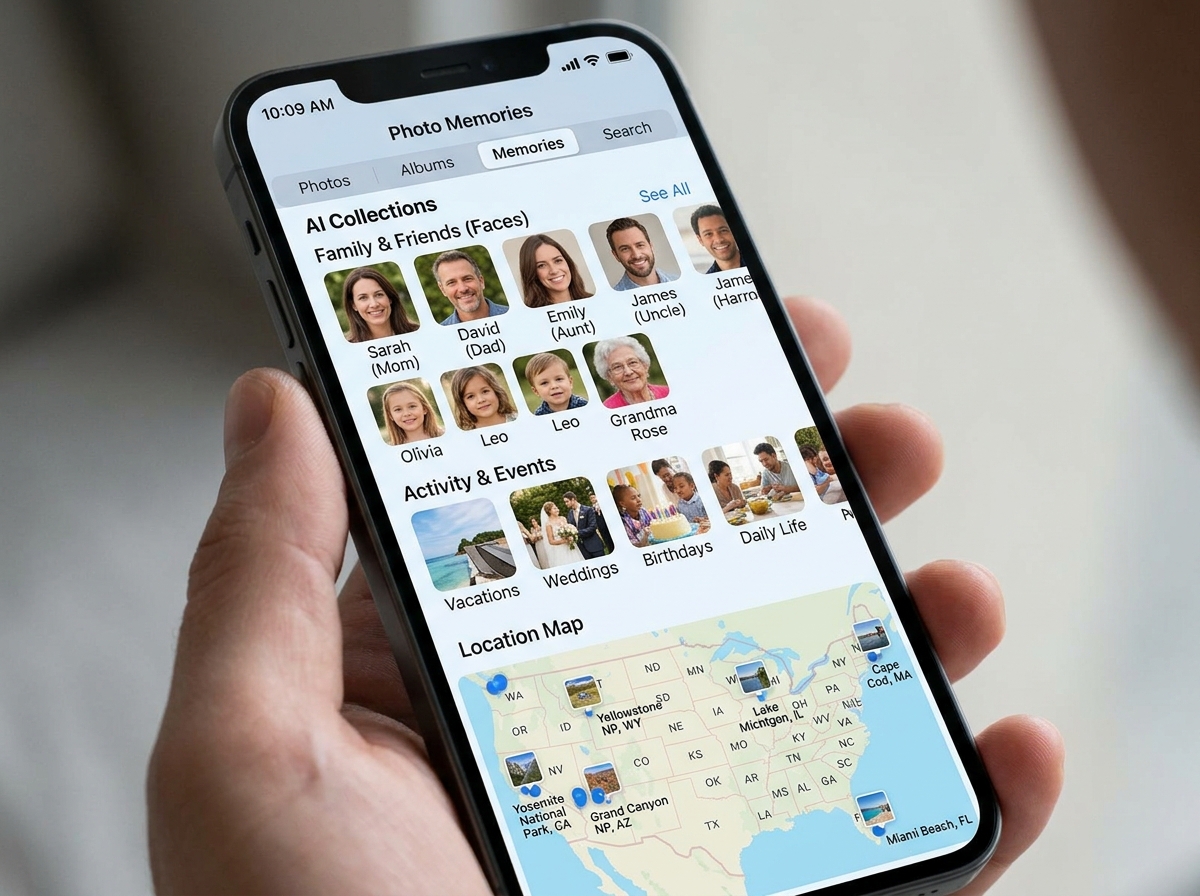
The real magic of Google Photos lies in its intelligence. It doesn’t just sit there; it organizes. It groups faces, recognizes pets, and can even find that one photo of “pizza in Chicago” from three years ago without you ever adding a tag. For those who want a set-it-and-forget-it solution, its automatic backup is seamless on both Android and iOS devices.
TeraBox: The Storage Giant
If you are a “digital hoarder” (we say that with love!), TeraBox is a game-changer. It offers an unprecedented 1 TB (1,000 GB) of free cloud storage. This is the most free storage we have seen among tested services. It is an excellent choice for offloading massive libraries of high-resolution images that would normally require a expensive monthly subscription elsewhere. However, keep in mind that the free tier is often supported by ads.
Amazon Photos: The Hidden Perk
Many people don’t realize that if they pay for Amazon Prime, they already have access to one of the best photo storage deals on the planet. Amazon Photos offers unlimited, full-resolution photo storage for Prime members. Unlike Google, which counts every byte, Amazon lets you upload as many photos as you want without compression. If you already have Prime for the shipping, this is effectively a “free” unlimited backup tool.
Specialized Alternatives
Beyond the big three, other apps fill specific niches:
- Flickr: Offers 1,000 free photo uploads at full resolution. It’s perfect if you want to be part of a photography community rather than just a private storage vault.
- Microsoft OneDrive: Provides 5 GB free. It’s the best app to store photos for free for Windows users who want their phone photos to appear instantly in their PC’s File Explorer.
- iCloud: The default for iPhone users, offering 5 GB. While it’s the most integrated, that 5 GB fills up incredibly fast.
Essential Features for Organizing Your Digital Gallery
Storing photos is easy; finding them again is the hard part. The best app to store photos for free should act like a digital librarian. When you have thousands of images, you need more than just a chronological list.
AI-Powered Search and Facial Recognition
Modern apps use artificial intelligence to scan your images. Google Photos, for example, allows for natural language search. You can type “Emma painting in the backyard” or “kayaking on a lake,” and the AI will pull up the relevant memories. It also features “Photo Stacks,” which automatically groups duplicate or similar-looking shots to declutter your view.
Smart Albums and Automatic Categorization
We love apps that do the heavy lifting for us. Some apps, like Google’s lightweight Gallery app, work offline to categorize your photos into groups like People, Selfies, Nature, and Documents. This is a fantastic way to keep your smartphone and cloud library organized without spending hours dragging files into folders.
Seamless Backup and Cross-Platform Sync
A photo taken on your iPhone should be viewable on your Android tablet or Windows laptop instantly. The best free apps offer “Camera Upload” features that work in the background. As soon as you take a picture, it’s sent to the cloud. This not only protects your memories if you lose your phone but also allows you to use “Free Up Space” tools that delete the local copy while keeping the cloud version safe.
Privacy and Security: Keeping Your Memories Safe
When you use a free service, you have to ask: how secure are my private moments? Security is a non-negotiable part of finding the best app to store photos for free.
Data Encryption and Infrastructure
Reputable providers like Google and Microsoft use advanced security infrastructure. Your photos are typically encrypted “in transit” (while being uploaded) and “at rest” (while sitting on the server). It is also worth noting that Google Photos explicitly states they do not sell your photos or videos to anyone for advertising purposes.
Private Photo Vaults
For those who have sensitive documents or private images they want to keep under lock and key, some apps offer a “Locked Folder” or “Vault” feature.
- Private Photo Vault: This app is a top-rated choice for iOS users. It uses PIN protection, pattern locks, and even “Break-in Reports” that take a photo and GPS location of anyone trying to guess your password.
- Google Photos Locked Folder: This allows you to hide specific photos from your main grid, protecting them with your device’s screen lock.
Data Ownership and Deletion
Always check the privacy policy. You want an app that makes it easy to download your entire library if you decide to leave. Services that comply with GDPR standards generally offer better transparency regarding what data they collect (like location metadata) and allow you to request data deletion easily. For more on this, check out our guide on securing cloud storage accounts.
Frequently Asked Questions
Is there a truly unlimited best app to store photos for free?
There is usually a “catch” to unlimited storage. SnapCloud is one of the few apps that markets itself as “forever free” with unlimited space and no ads. However, for most users, the most reliable “unlimited” option is Amazon Photos, provided you are already an Amazon Prime subscriber.
Historically, Google Photos offered unlimited “High Quality” storage, but they ended that policy in 2021. Now, most services that claim to be unlimited for free will either compress your images heavily or show you a significant number of ads to pay for the server costs.
Which is the best app to store photos for free for Android users?
For Android users, Google Photos is the undisputed king because it is baked into the operating system. It handles everything from editing to printing services. However, if you find Google Photos too “bloated” or you have a phone with low RAM, Google’s Gallery app is a brilliant, lightweight alternative. It works offline, supports SD cards, and helps you tame your Android gallery chaos without using much data.
Do free storage apps reduce image quality?
Many free apps use “compression” to save space.
- Google Photos: Offers a “Storage Saver” mode that reduces photo size to 16MP and video to 1080p. While this sounds like a downside, the difference is often invisible to the naked eye on a smartphone screen.
- Dropbox and OneDrive: These typically store the “Original Quality” by default but give you very little space (2 GB to 5 GB).
- TeraBox: Allows for large storage but may limit the speed of your uploads unless you watch ads or upgrade.
If you are a professional photographer, you should always look for apps that support RAW files and offer “Original Quality” uploads, even if it means having less total storage space. You can find more cloud storage management tips here to help you balance quality and capacity.
Conclusion
Finding the best app to store photos for free is all about balance. If you want the smartest features and a decent amount of space, Google Photos is our top pick. If you strictly want the most room possible, TeraBox and its 1 TB limit cannot be beaten. For those already in the Amazon ecosystem, Amazon Photos is a powerful, unlimited resource that many people forget they own.
The best backup strategy is one you actually use. Enable those automatic uploads today so you never have to worry about a “Storage Full” notification again. Managing your digital life doesn’t have to be expensive or stressful—it’s about choosing the right tools for your specific needs.
For more expert advice on managing your digital world, explore more expert app reviews at Tamba Tech.
