
The Duplicate File Problem Is Bigger Than You Think
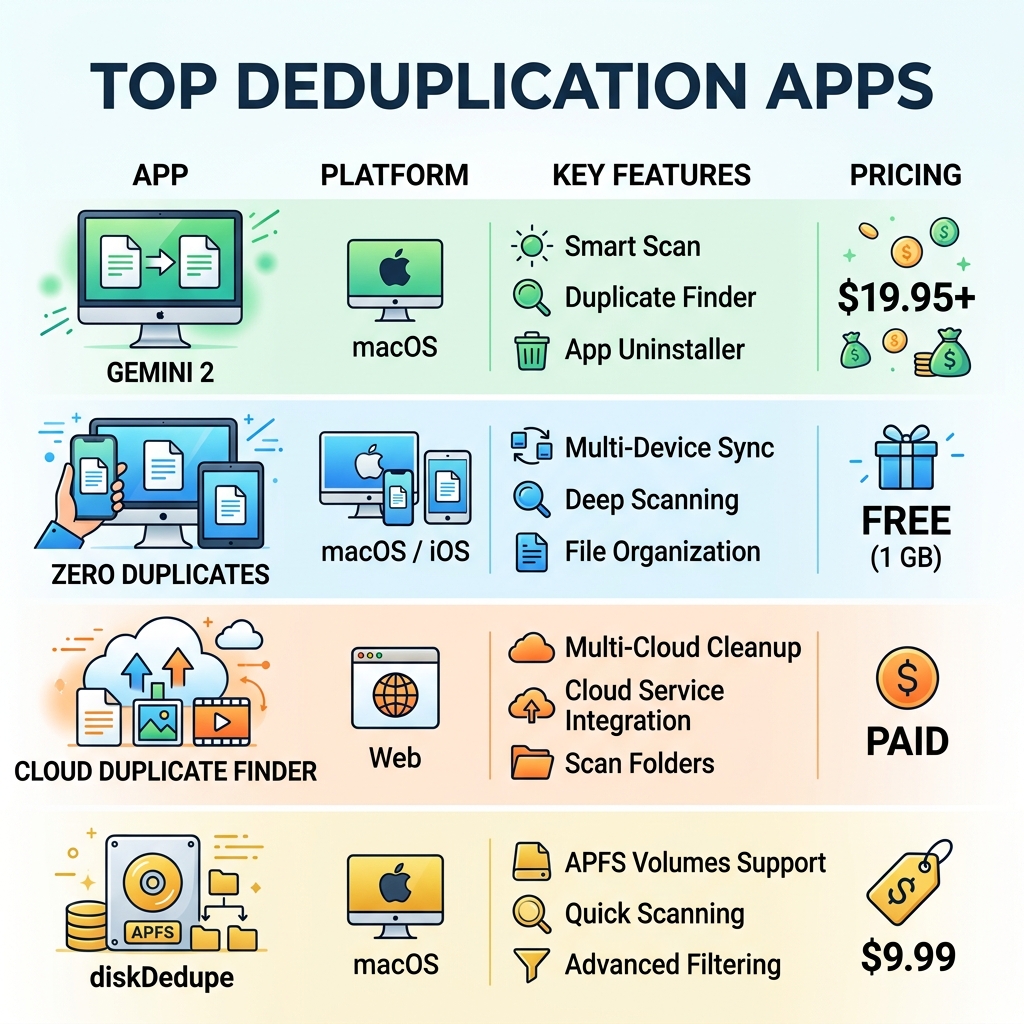
The best app for deduplication depends on where your files live — on your Mac, your iPhone, or in the cloud — but here are the top picks to get you started fast:
Quick Answer: Best Deduplication Apps at a Glance
| App | Best For | Platform | Price |
|---|---|---|---|
| Gemini 2 | Mac power users | macOS | From $19.95 |
| Zero Duplicates | Mac, iPhone & iPad | macOS / iOS | Free (1 GB) |
| DeDuplicate | Cloud storage | iOS, macOS, Android, Windows | Free + IAP |
| Cloud Duplicate Finder | Multi-cloud cleanup | Web | Paid |
| diskDedupe | APFS Mac volumes | macOS | $9.99 |
| dupeGuru | Cross-platform / power users | macOS, Windows, Linux | Free |
Your phone backs up photos automatically. You sync files across devices. You restore from a backup after a crash. Before long, your storage is packed — not with new files, but with the same files saved over and over again.
Major cloud services like Google Drive, OneDrive, and Dropbox offer no built-in tools to find and remove these duplicates. And going through thousands of files by hand isn’t realistic. As one developer put it, that approach isn’t exactly practical when you’re staring down 500 GB of files.
The good news? There are some excellent apps that do this work for you — quickly, safely, and without putting your data at risk.
Understanding File Deduplication and Why It Matters
At its core, file deduplication is the process of identifying and eliminating redundant copies of data. While it sounds technical, it is a vital part of storage optimization. Every duplicate file on your hard drive or in your cloud account is “dead weight”—it consumes space that could be used for new memories, important documents, or system performance.
When we talk about Reducing Digital Storage Overload A Simple Guide for Beginners, we often focus on deleting what we don’t need. But duplicates are unique because you do need the file; you just don’t need it five times. Beyond just saving disk space, deduplication helps maintain data integrity. Having multiple versions of the same document spread across different folders makes it nearly impossible to know which one is the “master” copy.
Furthermore, storage costs add up. If you are paying for a 2TB Google Drive or iCloud plan, and 30% of that is occupied by identical “IMG_1234.JPG” files, you are essentially paying a “clutter tax.” By following Best Practices for File Backup and Storage Management, you ensure that your backups are lean, efficient, and easy to navigate. Good file organization starts with a clean slate, and the best app for deduplication is the tool that helps you achieve that without the headache of manual sorting.
How the Best App for Deduplication Works: Content vs. Metadata
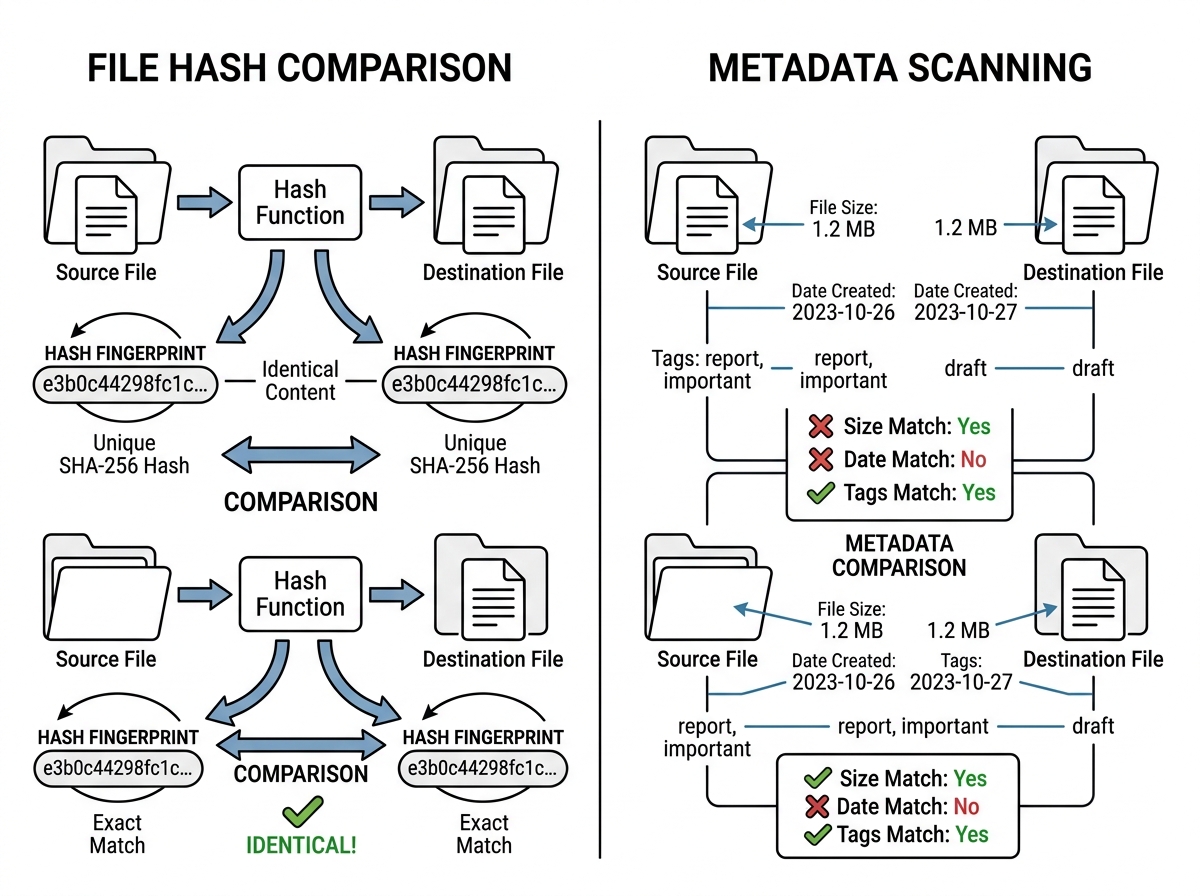
Not all deduplication tools are created equal. The way an app “sees” a duplicate determines how accurate and safe it is. Generally, apps use three main methods to spot twins:
- Exact Content Matching (Hash Values): This is the gold standard. The app generates a unique digital fingerprint (a hash value) for every file. If two files have the same hash, they are identical, even if they have different names.
- Metadata Scanning: This is common for cloud-based tools. Instead of downloading your 5GB video to check it, the app looks at the file size, creation date, and other “tags.” This is great for bandwidth efficiency.
- Fuzzy Matching: This is used for “similar” files. Think of three photos taken a second apart. They aren’t identical, but you probably only want to keep the best one.
One of the most efficient ways of Deleting Duplicate Files Quickly on modern Macs is through APFS cloning. Instead of just deleting a file, some advanced apps can replace duplicates with “clones” that point to the same data on the disk, saving space instantly without actually removing the file’s entry in your folder.
| Feature | Local Deduplication | Cloud Deduplication |
|---|---|---|
| Processing | Done on your computer’s CPU | Done via API or web server |
| Speed | Limited by disk read speed | Limited by network/API limits |
| Data Usage | None (offline) | High (if downloading) / Low (if metadata-only) |
| Privacy | High (files stay on device) | Variable (depends on app access) |
For those interested in the more technical side, scientific research on duplicate detection highlights how algorithms have evolved to differentiate between a true copy and a different version of the same file.
Top-Rated Apps to Eliminate Digital Clutter
When choosing the best app for deduplication, you need to consider the pricing model and resource consumption. Some apps offer a one-time purchase, while others prefer a subscription model. If you are on a budget, there are several Free Apps for Cleaning Digital Files that allow you to scan for free but might charge a small fee to perform the actual deletion.
Scanning speed is another huge factor. A high-quality app like DeDuplicate can scan roughly 100,000 files in under 10 minutes. However, if an app is poorly optimized, it might hog your RAM and slow your computer to a crawl.
Finding the Best App for Deduplication for Mac Users
Mac users are spoiled for choice, but three names consistently rise to the top:
- Gemini 2: The Duplicate Finder App: This is often cited as the overall best app for deduplication for macOS. It features a “Duplicates Monitor” that runs in the background to catch new copies the moment they are created. It’s also famous for finding “similar” files—perfect for cleaning up those 10 nearly identical burst-mode photos of your cat.
- Zero Duplicates: This app is a fantastic choice if you want a “Privacy First” approach. It performs 100% local scanning, meaning your files never leave your Mac, iPhone, or iPad. It offers a generous free tier where you can delete up to 1 GB of duplicates for free.
- diskDedupe: This is a specialist tool for users on the APFS file system. Instead of just deleting, it uses APFS clones to save space while keeping your folder structure intact.
Using these tools is a key step in File Organization Apps for Mac and Windows workflows, ensuring your desktop doesn’t become a digital junkyard.
The Best App for Deduplication for Cloud Storage
Cloud storage is where duplicates go to hide. Because most cloud providers don’t have built-in cleanup tools, you need a specialized “Cloud Cleaner.”
DeDuplicate – Cloud Cleaner is a standout here. It supports seven major services, including Google Drive, OneDrive, Dropbox, MEGA, and Box. What makes it the best app for deduplication for the cloud is that it does not download your files. It scans metadata and hash values directly through the cloud’s API, saving you gigabytes of bandwidth. You can find it on the DeDuplicate App Store for iOS and Mac.
Following Cloud Storage Management Tips is essential for anyone using these services for work. If you’re feeling overwhelmed, we recommend a Decluttering Cloud Storage Step-by-Step approach: start with one service, run a scan, and clear the easy wins first.
Cross-Platform and Specialized Tools
If you live in a multi-OS household (Windows at work, Mac at home, Linux for fun), dupeGuru is your best friend. It is an open-source, cross-platform tool that is incredibly powerful. It features specialized modes:
- Music Mode: It scans tags (like artist and album) to find duplicate songs even if the file names are different.
- Picture Mode: Uses fuzzy matching to find photos that are visually similar.
For those managing large libraries of PDFs or Word docs, Apps for Organizing Digital Documents often work best when paired with dupeGuru’s filename fuzzy matching to catch “ReportFinal.pdf” and “ReportFinal_Copy(1).pdf.”
Ensuring Data Safety and Privacy During Cleanup
The biggest fear when using a deduplication app is: “What if it deletes the wrong thing?”
The top apps include several safety nets:
- Smart Selection: They automatically pick the “copy” to delete based on rules (e.g., keep the oldest, or keep the one in the “Work” folder).
- Previews: Always look at the files before hitting delete. Most apps have a built-in viewer.
- Undo Options: Many apps move files to the System Trash or a “Duplicates” folder rather than deleting them permanently. This gives you a chance to change your mind.
- Local Processing: For maximum privacy, choose apps that process data on your device rather than uploading file lists to a third-party server.
By following Best Practices for Online File Management A Beginners Guide, you can clean up with confidence. Streamlining Your Laptop by Removing Unnecessary Files is a maintenance task, like changing the oil in a car—it keeps everything running smoothly.
Frequently Asked Questions about Deduplication
Can deduplication apps find similar photos that aren’t exact copies?
Yes! Apps like Gemini 2 and dupeGuru use “fuzzy matching” or “visual similarity” algorithms. They can detect photos taken in the same burst or images that have been resized or saved in a different format (like a JPEG vs. a PNG of the same shot).
Is it safe to delete duplicates directly in the cloud without downloading them?
It is safe if you use a reputable app like DeDuplicate or Cloud Duplicate Finder. These apps use official APIs provided by Google or Microsoft. However, always check if the app moves files to the “Trash” first. Some services, like Google Drive, may not allow third-party apps to restore files once they are fully purged.
Do these apps support external hard drives and network volumes?
Most desktop apps (Gemini 2, Zero Duplicates, dupeGuru) fully support external USB drives, SSDs, and even network-attached storage (NAS). This is vital for photographers and videographers who store their archives off-device.
Conclusion
At Tamba Tech, we believe that digital organization is the key to a stress-free tech life. Whether you choose a high-end tool like Gemini 2 or a cloud-native solution like DeDuplicate, the best app for deduplication is the one that fits into your existing workflow and gives you back your storage space.
Don’t let duplicates slow you down. If you’re ready to take full control of your files, check out our Step-by-Step Guide to Decluttering Cloud Storage or Explore more file management guides on our site.
