
Top Providers for free photo storage in 2026
When we look for the best free photo storage, we have to weigh the total gigabytes against the “catch.” Most of us already have an account with one of the “Big Three” (Google, Microsoft, or Apple), but their free tiers vary significantly.
Google Photos: The Heavyweight Champion
Google Photos remains the most popular choice for a reason. Every Google Account comes with 15 GB of free storage. While that sounds generous—and it is, considering it’s 3x more than many other cloud services—there is a caveat: that 15 GB is shared across Google Photos, Gmail, and Google Drive. If your inbox is full of large attachments, your photo space shrinks.
Despite the shared quota, the Google Photos app is a powerhouse. It offers high-end organization and search tools that make other apps feel dated. For those of us managing massive collections, we recommend checking out Efficient Strategies for Organizing Large Media Libraries to make that 15 GB stretch as far as possible.
Microsoft OneDrive: The Productivity Partner
Microsoft 365 Free provides 5 GB of cloud storage through OneDrive. This is a solid option if you are already entrenched in the Microsoft ecosystem (using Word or Excel online). It features a “Personal Vault” for extra security, which we’ll discuss later. However, 5 GB fills up quickly if you’re backing up 12 MP photos or 4K videos.
Dropbox: The Reliable Starter
Dropbox starts users with a modest 2 GB of free photo storage. While this is the smallest starting point among the major players, Dropbox is famous for its syncing speed and “online-only” file features. It’s a great secondary backup for your most essential “work-in-progress” photos, but likely won’t house your entire life’s history without a paid upgrade.
| Service | Best For | Storage Limit |
|---|---|---|
| Google Photos | AI Search & Editing | 15 GB (Shared) |
| OneDrive | Windows Users | 5 GB |
| Dropbox | Fast Syncing | 2 GB |
| Shutterfly | Physical Prints | Unlimited* |
| SnapCloud | Ad-free Alternative | Unlimited* |
Essential Features: AI, Search, and Automatic Backup
The best free photo storage isn’t just a digital box where you dump files; it’s an intelligent assistant that helps you find that one photo of your cat from three years ago.
AI-Powered Magic
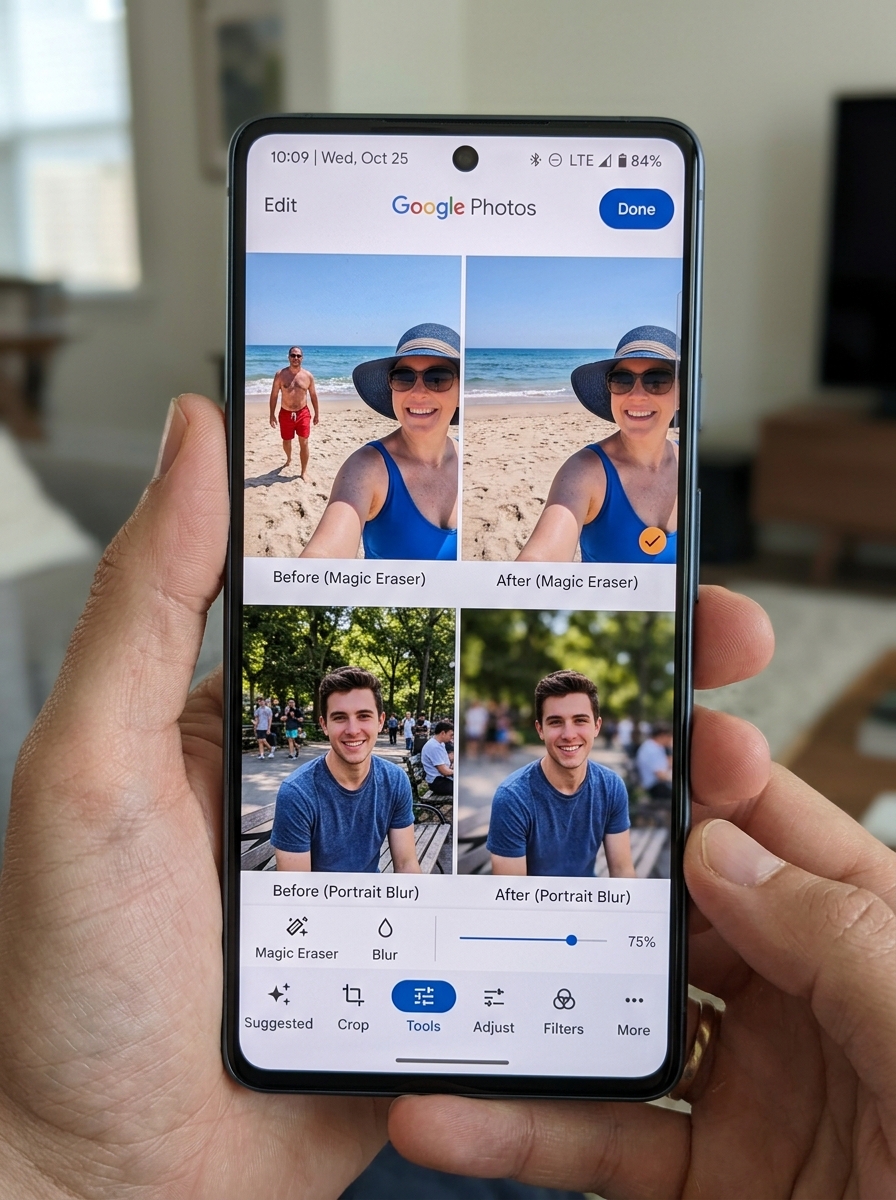
Modern storage services use Artificial Intelligence to take the heavy lifting out of management. Google Photos, for instance, includes tools like “Magic Eraser” to remove photobombers and “Photo Unblur” to save those slightly shaky shots. These features make editing, organization, and search feel like magic.
Natural Language Search
Gone are the days of scrolling through endless folders. You can now search using descriptive phrases. Instead of looking for “IMG_4522.jpg,” you can type “Alice and me laughing” or “Kayaking on a lake” to find exactly what you need. AI can even recognize people, pets, and places, grouping them automatically into “Face Groups.” If you’re an Apple user looking for similar organizational power on your device, see our guide on the Best Photo Organizing Apps for iPhone.
Automatic Camera Roll Backup
We’ve all been there—dropping a phone in water or losing it on a bus. Automatic backup is the ultimate insurance policy. Most apps, including Google Photos, allow you to toggle on “Backup” so every photo you take is instantly mirrored in the cloud. This ensures that even if your hardware fails, your memories remain intact. This new kind of help from Google and other providers means your “Create” tab is always populated with fresh collages and highlight videos made from your latest uploads.
Understanding the Conditions of “Unlimited” Storage
The word “unlimited” is the holy grail of free photo storage, but it usually comes with a “Yes, but…” attached.
The Shutterfly Model
Shutterfly offers unlimited free photo storage, but there is a catch: you must remain an “active customer.” To Shutterfly, this means making at least one purchase every 18 months. If you don’t buy a pack of prints or a personalized mug within that window, your account may be deactivated or archived. They do send reminders, but it’s a manual task you’ll need to track.
The SnapCloud Approach
SnapCloud is a newer player that claims to offer “forever free” unlimited storage with no ads. They position themselves as a privacy-focused alternative to the tech giants. While the prospect of unlimited space is exciting, users should always stay informed on how to manage their digital footprint. If you find yourself overwhelmed by multiple accounts, our Step-by-Step Guide to Decluttering Cloud Storage can help you consolidate.
Hidden Trade-offs
Many “unlimited” plans rely on compression. To save space, the service might shrink your 20 MB professional shot down to a 2 MB “high-quality” version. For casual viewing on a phone, you won’t notice. But if you plan to print a massive canvas later, that loss of detail matters.
Privacy and Security in the Cloud
When we upload our lives to the internet, security isn’t just a feature—it’s a necessity. We need to know that our private moments stay private.
Encryption and Vaults
Most reputable providers use advanced encryption to protect data during transfer and while it’s sitting on their servers. Microsoft OneDrive takes this a step further with its “Personal Vault.” This is a protected area within your storage that requires a second form of identity verification (like a fingerprint or a code sent to your phone) to open. This is perfect for scans of passports or sensitive family documents.

Data Ownership and Ads
A common concern is whether companies “use” our photos. Google Photos explicitly states that your data is yours and is not used for advertising purposes. However, it’s always wise to follow Best Practices for File Backup and Storage Management and regularly audit your Securing Cloud Storage Accounts settings.
Ransomware and Recovery
Cloud storage provides a “version history” or a “trash” folder. If your phone is hit by malware or you accidentally delete a decade of photos, services like Dropbox and Google Photos often allow you to restore files within a 30 to 60-day window. This safety net is one of the biggest advantages of using a cloud-based free photo storage solution over a simple physical hard drive.
Managing Your Library When Limits Are Reached
What happens when that 15 GB or 5 GB hits 100%? Your digital life doesn’t have to grind to a halt.
The Storage Overflow Effect
When you exceed your limit, the consequences vary. In the Google ecosystem, a full storage quota can actually stop you from receiving emails in Gmail. Most services will stop allowing new uploads until you either delete files or buy more space.
Space-Saving Strategies
Before reaching for your wallet, try these Cloud Storage Management Tips:
- Delete Duplicates: Most AI-powered apps now have a “cleanup” tool that identifies blurry photos or duplicate shots.
- Use Compression: If you don’t need “Original Quality,” switching to “Space Saver” mode can significantly reduce the footprint of your library.
- Clear the Trash: Deleted photos often still count against your quota until the 30-day “trash” window expires. Manually emptying it can give you an instant boost.
For those just starting their digital cleanup journey, our guide on Reducing Digital Storage Overload: A Simple Guide for Beginners offers a stress-free roadmap.
Frequently Asked Questions
Can I get free photo storage for both iPhone and Android?
Absolutely. Most of the services we’ve discussed, including Google Photos, OneDrive, and Dropbox, have dedicated apps for both iOS and Android. They also offer web access, so you can view your photos on a desktop or tablet. This cross-platform compatibility is essential for families who use different types of devices. For more options, check out our list of Cloud Backup Apps for Home and Work.
What happens to my photos if I exceed the free storage limit?
Usually, your existing photos are safe, but you won’t be able to back up anything new. You might also receive warnings that your account is “over quota.” If you stay over the limit for a long period (usually two years), some services reserve the right to delete content, though they will send many warnings first. To avoid this, learn how to Archive Old Files Without Losing Data: A How-To Guide.
Is there a truly unlimited free photo storage option?
Technically, yes, but with conditions. Shutterfly is unlimited if you make periodic purchases. SnapCloud claims unlimited space for free. However, for the average user, “unlimited” often means accepting some level of photo compression. If you prefer to keep only the essentials, you might explore Cloud Storage Apps for Digital Minimalists.
Conclusion
Finding the right free photo storage is about balancing your need for space with your desire for features like AI search and high-level security. Whether you choose the massive 15 GB starting point of Google Photos or the “purchase-to-stay-active” unlimited model of Shutterfly, the most important step is simply starting a backup.
At Tamba Tech, we believe your digital legacy should be easy to manage and impossible to lose. By using the right tools and following smart Organizing Photos on Smartphone and Cloud habits, you can stop worrying about storage warnings and get back to capturing the moments that matter.
Ready to take full control of your digital life? Explore more file management strategies on our site today.
