
Why a Photo Album Creator Is the Smartest Way to Preserve Your Memories
A photo album creator is an online tool or app that lets you design, customize, and print a professional-quality photo book — or share one digitally — without any graphic design skills.
Quick answer: the top photo album creators right now:
| Tool | Best For | Starting Price |
|---|---|---|
| Canva | Beginners, free templates | Free (print from ~$19.50) |
| Mixbook | Large books, collaboration | From ~$14.99 |
| Shutterfly | AI-assisted design, gifts | Frequent 50% off deals |
| Blurb | Professionals, portfolios | From ~$12.00 |
| Artifact Uprising | Premium, eco-conscious | From ~$19.00 |
| MyAlbum | Digital sharing, free storage | Free |
Most people have thousands of photos scattered across their phone, cloud drives, and old hard drives. They mean to do something with them. They just never do.
Sound familiar?
The average person’s camera roll is a chaotic mess of blurry selfies, duplicate shots, and random screenshots — mixed in with genuinely precious moments that deserve better than being buried forever.
That’s exactly where a photo album creator comes in. These tools transform your scattered photos into something tangible and beautiful. Whether that’s a printed hardcover book sitting on your coffee table, or a digital album shared instantly with family across the world.
Modern photo album creators are nothing like the old days of cutting and pasting physical prints. Today’s tools offer drag-and-drop editors, AI-powered auto-fill, 1,000+ templates, and archival-quality printing — often starting completely free.
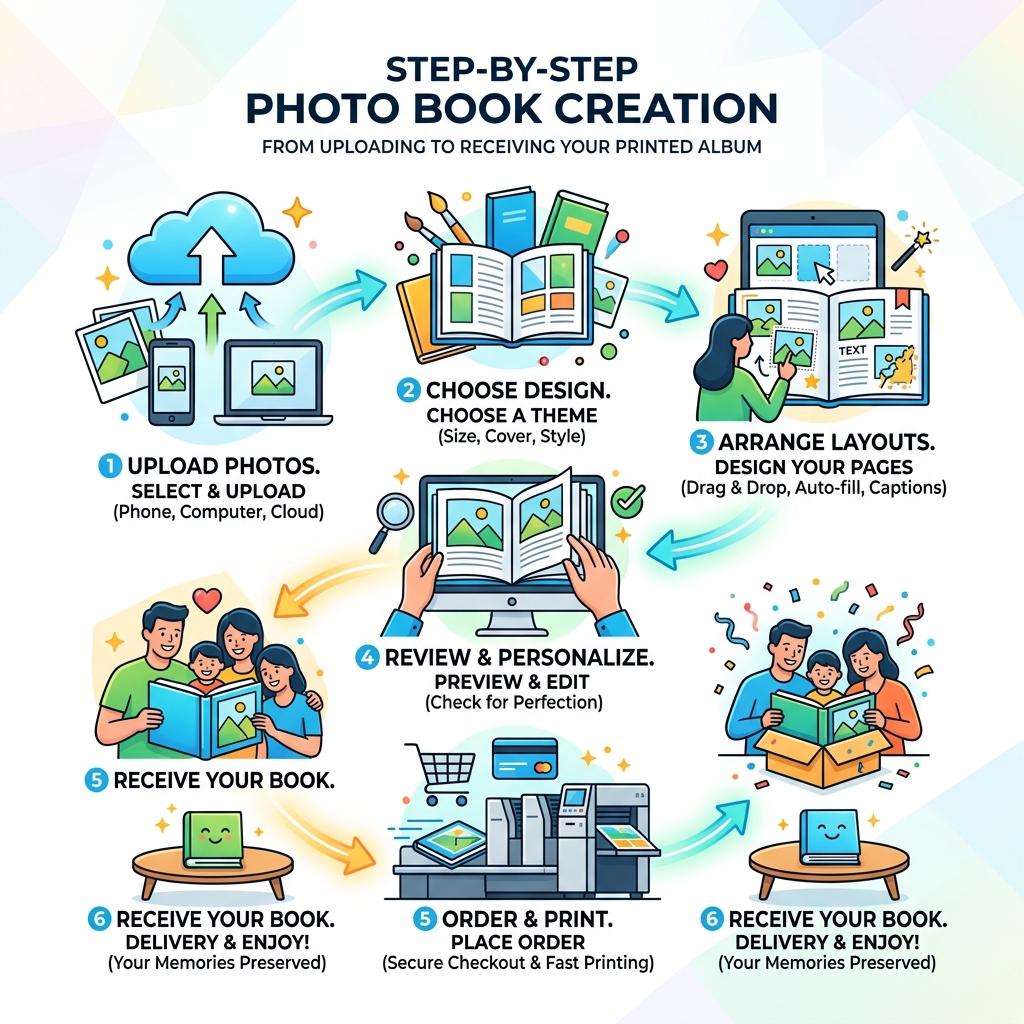
Understanding the Modern Photo Album Creator
When we talk about a photo album creator, we aren’t talking about those plastic-sleeved binders our parents kept in the attic. We are talking about sophisticated, digital-first platforms that allow you to curate your life story. These tools utilize digital layouts to arrange your images, text, and even digital stickers into a cohesive narrative.
One of the biggest shifts in the industry is the rise of the Online Photo Album Maker. Design a Photo Album – Flipsnack, which allows for an interactive “page-flip” effect. This bridges the gap between a static PDF and a physical book, giving your digital viewers a tactile feel even on a screen.
The beauty of these modern creators lies in “print-on-demand” technology. You no longer need to order 50 copies of a book to get a good price. You can create a single, high-end masterpiece for your coffee table or order a dozen small softcover versions for the whole family. However, before you even open an editor, we always recommend organizing photos on smartphone and cloud storage. Starting with a clean, curated set of images makes the design process significantly faster.
Most top-tier creators focus on user-friendly interfaces. If you can drag a file from one folder to another, you can build a photo book. These drag-and-drop tools have eliminated the “learning curve” that used to keep people from making their own albums.
Key Features of a Top-Tier Photo Album Creator
What separates a mediocre tool from a great one? In our experience at Tamba Tech, it usually comes down to how much work the software does for you.
- AI-Autofill and Magic Tools: Services like Shutterfly and Mixbook now use AI to analyze your photos. They can detect the “best” shots (focused, smiling faces) and automatically place them into a layout. Some even offer “Magic Writers” to suggest captions based on the metadata of your photos (like location and date).
- Clutter Removal: We’ve all been there—scrolling through twenty near-identical shots of a sunset. Tools like Smart Albums – Waldo Photos use AI to weed out the duplicates and blurry shots, leaving you with only the highlights.
- Pre-designed Templates: You don’t need to be an artist. Most platforms offer over 1,000 layout options. Whether you want a minimalist “editorial” look or a colorful “scrapbook” style, there’s a template ready for you.
- Cloud Integration: A great photo album creator will connect directly to your Google Photos, iCloud, or Dropbox. This saves you the hassle of downloading and re-uploading massive files.
If you’re shooting primarily on mobile, it’s worth checking out our guide on the best photo organizing apps for iPhone to ensure your favorites are tagged and ready for the album creator.
Collaborative Tools in a Photo Album Creator
Memory preservation doesn’t have to be a solo sport. In fact, some of the best albums are the ones where everyone contributes. Modern platforms have introduced robust team editing features that allow multiple people to work on the same book simultaneously.
For events like weddings or reunions, Photo Sharing – Create a Shared Album | Memento is a game-changer. It allows you to use a QR code at your event so guests can upload their own candid shots directly into a shared folder. From there, the photo album creator can pull those images into a professional layout.
Other collaborative features include:
- Real-time Slideshows: Watch the album grow as photos are added during an event.
- Social Media Integration: Pull photos directly from Instagram or Facebook.
- Multi-user Access: Let Grandma add her captions to the family history book from her own computer.
Benefits of Digital Memory Preservation
Why bother with a digital photo album creator when you could just keep photos on your phone? The answer is simple: digital decay and physical clutter. Phones get lost, cloud subscriptions lapse, and physical prints fade.
Digital photo books offer archival quality. Many premium services use acid-free paper and specialized inks designed to last over 200 years without yellowing or fading. Furthermore, they are incredible space-savers. A single 10×10 inch book can hold up to 400 pages of memories—that’s thousands of photos in the space of one standard book.
For those on a budget, using Free Photo Book Maker tools allows you to design the entire book for free, only paying when (or if) you decide to print. This is a great way to start taming your Android gallery chaos without an upfront financial commitment.
We also love the shift toward sustainability in this industry. Many creators now use FSC-certified (Forest Stewardship Council) papers and eco-friendly materials. Some even have “One Print, One Tree” initiatives, ensuring that your memory preservation doesn’t come at the cost of the planet.
Choosing a Photo Album Creator Based on Occasion
Not every project requires the same tool. The “best” photo album creator depends entirely on what you are making.
- Weddings and Anniversaries: You want “Heirloom Quality.” Look for services like Artifact Uprising or Shutterfly’s Flush Mount albums. These feature ultra-thick pages and premium leather or linen covers.
- Baby Books: Durability is key. Look for “Board Books” with thick, wipeable pages that can withstand tiny, sticky hands.
- Travel Journals: Softcover books are perfect here. They are lightweight, easy to pack, and have a “magazine” feel that suits adventure photography.
- Web Sharing and Portfolios: If you don’t need a physical book, a Photo Album Maker – Create & Share for Free | Photo-Pick is ideal. It allows you to create secure, private web galleries with tracking tools to see who is viewing your work.
- Family Histories: Collaboration is the most important feature here. Choose a platform that allows multiple family members to contribute stories and scan old photos.
Technical Specifications: Materials and Binding
When you move from digital design to physical product, the technical specs matter. You don’t want your hard work to arrive feeling flimsy. Here is a breakdown of what to look for:
Binding Types Comparison
| Binding Type | Best For | Pros | Cons |
|---|---|---|---|
| Softcover | Travel, Everyday | Lightweight, affordable | Can crease over time |
| Hardcover | Gifts, Year-in-Review | Durable, classic look | More expensive |
| Layflat | Panoramas, Weddings | Photos spread across two pages | Lower page limit |
| PUR Binding | High-use books | Adhesive relaxes over time | Doesn’t stay flat initially |
Most standard photo books use 148gsm paper. For context, standard printer paper is about 80gsm. If you want a premium feel, look for weights above 190gsm. You also have to choose between Gloss and Matte finishes. Gloss makes colors pop but can show fingerprints; Matte (or Soft Touch) feels velvety and is easier to read under bright lights.
If you’re worried about your photos looking a bit “dull” before they go to print, check out our tips on from drab to fab aesthetic photo apps to give them that professional polish.
Another technical detail to watch for is ImageWrap technology. This is where your photo is printed directly onto the hardcover material, creating a seamless, modern look without the need for a separate dust jacket.
Advanced Design Tips for Your Photo Album Creator Project
Creating a stunning book isn’t just about the software; it’s about the design choices you make.
- Image Resolution: This is the #1 mistake. Most creators will warn you if a photo is “low resolution,” but always aim for 300 DPI (dots per inch) for print. If you’re pulling photos from WhatsApp or Facebook, they might be too compressed for a large-scale print.
- Use Intelligent Tech: Tools like PhotoBase Album Maker use AI to help with curation, which is the hardest part of the process. Let the AI do the first pass of selecting the best shots, then you do the final artistic tweaks.
- Embrace White Space: Don’t cram ten photos onto every page. Giving your best shots room to “breathe” with white space makes the book feel more expensive and professional.
- Visual Hierarchy: Make your favorite photo the “hero” of the page by making it larger than the supporting shots.
- Page Count Strategy: Most books start with 20 pages. While some services like Blurb allow up to 440 pages, keep in mind that a very thick book can be heavy and the binding can become stressed.
Frequently Asked Questions about Photo Books
What is the difference between a photo book and a traditional photo album?
A traditional photo album is a binder where you manually slide physical 4×6 prints into plastic pockets. A photo book is a digitally designed book where the images are printed directly onto the paper. Photo books are more customizable, more durable, and look like professional coffee table books.
How many photos can I include in a single digital photo book?
It varies by the photo album creator. Some software allows for up to 1,000 photos, but we generally recommend 50 to 100 images for a standard 20-40 page book. This averages out to about 2-4 images per page, which keeps the layout from looking cluttered.
What are layflat pages and why are they preferred for panoramas?
Layflat pages are made from a single continuous sheet of paper that is folded and glued back-to-back. Unlike standard books, there is no “gutter” (the dip in the middle where pages meet). This is the gold standard for panoramic shots because you can spread a single image across two pages without losing any of the detail in the center fold.
Conclusion
At Tamba Tech, we believe that your memories are your most valuable digital assets. Using a photo album creator isn’t just a fun weekend project; it’s an insurance policy for your history. As AI-driven trends continue to shape the industry, we expect to see even more automated curation and “smart” storytelling features that make the process even faster.
From sustainable printing practices to collaborative shared albums, there has never been a better time to take your photos out of the cloud and put them into your hands. If you’re feeling overwhelmed by the sheer volume of files you have, start with our guide on File Management and Organization to get your digital life in order.
Happy creating! We can’t wait to see the stories you tell.
