
Why Photo Backup Free Options Matter More Than Ever
Photo backup free solutions have come a long way — and right now, you have more good options than ever before. Here’s a quick look at the best free services to get you started:
| Service | Free Storage | Best For |
|---|---|---|
| Google Photos | 15 GB | Most users, AI features |
| OneDrive | 5 GB | Windows/Microsoft users |
| Ente Photos | 10 GB | Privacy-focused users |
| Dropbox | 2 GB | File sharing |
| G Cloud Backup | 3 GB | Android switching |
| Shutterfly | Unlimited* | Print buyers |
*Requires one purchase every 18 months to stay active.
Think about how many photos are sitting on your iPhone right now. Hundreds? Thousands? Most people never back them up — until something goes wrong.
A cracked screen. A stolen phone. A software glitch. Gone.
The good news: keeping your photos safe doesn’t have to cost a thing. Free backup services from Google, Microsoft, and others give you real, usable storage at no cost. Google Photos alone gives every account 15 GB of free storage — that’s three times more than many competing services.
But free plans aren’t all equal. Some compress your photos. Some have hidden activity requirements. Some share your storage across multiple apps, so it fills up faster than you’d expect.
This guide breaks it all down so you can pick the right free backup method for your life — no tech degree required.
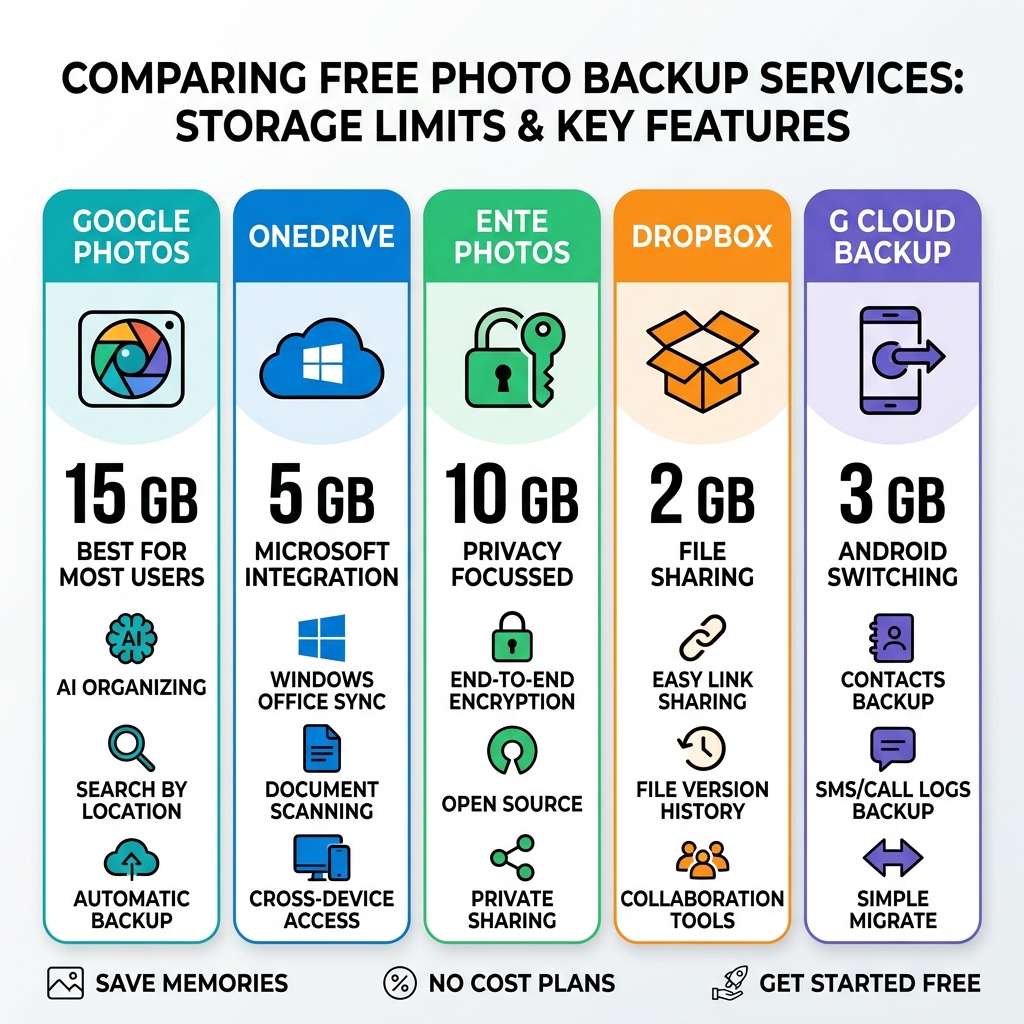
Top Services for Photo Backup Free of Charge
When we look for the best ways to keep our memories safe without opening our wallets, a few heavy hitters always rise to the top. These services have built massive infrastructures to ensure that even their “free” users get a premium experience.
Google Photos: The Industry Standard
Google Photos remains the king of the mountain for most users. Every Google account comes with 15 GB of free storage, which is shared across Google Photos, Gmail, and Google Drive. According to industry data, this is 3x more storage than many other cloud services offer out of the gate.
What makes it a top choice for photo backup free seekers isn’t just the space; it’s the intelligence. The app uses advanced AI to organize your library automatically. You can search for “pizza” or “San Francisco,” and it will pull up the relevant shots instantly. If you want to dive deeper into how to manage these digital assets, check out our guide on organizing photos on smartphone and cloud.
You can Download Google Photos: Edit, organise, search and back up your photos to get started on almost any device, including iOS, Android, and desktop.
Microsoft OneDrive: The Windows Companion
If you are already deep in the Microsoft ecosystem, OneDrive is a natural fit. It offers 5 GB of free storage. While this is smaller than Google’s offering, it integrates perfectly with Windows 10 and 11, making it incredibly easy to sync photos from your phone directly to your PC’s file explorer. It’s a solid choice for those who prefer a traditional folder-based organization system.
Dropbox: The Syncing Specialist
Dropbox is a veteran in the cloud space, starting users with 2 GB of free storage. While the storage limit is modest, Dropbox excels in cross-device syncing and file integrity. It supports previews for over 35 image file types, including professional RAW formats and HEIC, without needing extra software. This makes it a great choice for hobbyist photographers who need to move specific high-quality shots between devices quickly.
Maximizing Your Photo Backup Free Storage
Getting the storage is one thing; keeping it from filling up is another. Since many services share their “free” quota across different apps (like Google sharing space with your emails), you need to be strategic.
One of the most effective ways to stretch your gigabytes is through smart storage management. We recommend decluttering cloud storage step-by-step to remove blurry shots, accidental screenshots, and duplicate memes that eat up space.
Compression vs. Original Quality Most free services give you a choice:
- Original Quality: Backs up the file exactly as it is. This uses up your storage quota very quickly.
- Storage Saver (Compression): Reduces the file size slightly while maintaining great visual quality. For most people viewing photos on a phone or laptop, the difference is unnoticeable, but it allows you to store thousands more images.
For more expert advice, see our top tips for effective cloud storage management.
Hidden Limitations of Free Storage Plans
“Free” rarely means “no strings attached.” It is important to read the fine print so you don’t lose your memories due to a technicality.
Activity Requirements Some services, like Shutterfly, offer “unlimited” photo storage, but there is a catch. To keep your account active and your photos safe, you must make at least one purchase every 18 months. This can be a small discounted print or a photo book. If you fail to do this, your account may be flagged as inactive, and your photos could eventually be archived or deleted.
Upload and File Limits Other free plans might impose “caps” that you won’t notice until you’re in a hurry. These can include:
- Upload Speed Caps: Free users might experience slower backup speeds compared to paying subscribers.
- File Size Limits: Some apps won’t let you back up very large video files (like 4K footage) on the free tier.
- Ad-Supported Interfaces: You might have to navigate through prompts to upgrade to a paid plan every time you open the app.
Privacy-Focused and Niche Storage Options
If you aren’t comfortable with big tech companies scanning your photos for AI training, there are excellent privacy-focused alternatives that still offer a photo backup free tier.
Ente Photos: The Privacy Leader
Ente Photos is a rising star for digital minimalists and privacy advocates. They offer 10 GB of free storage forever with a major twist: everything is end-to-end encrypted (E2EE). This means only you have the keys to see your photos; not even the employees at Ente can view them. It is open-source and audited, making it a perfect fit for those looking for cloud storage apps for digital minimalists.
G Cloud Backup: The Total Phone Protector
G Cloud Backup is trusted by over 5 million users and offers a 3 GB free forever plan. Unlike some apps that only focus on the gallery, G Cloud can back up your photos, videos, contacts, and even call logs with a single tap. It’s particularly useful when switching between Android and iOS. You can find more details at G Cloud Backup — Free Cloud Backup for Photos, Videos & Files.
SnapCloud: The Unlimited Alternative
SnapCloud positions itself as a clean, ad-free alternative. They claim to offer unlimited free cloud storage for photos with automatic camera uploads. While “unlimited” is a bold claim for a free service, it is a popular option for users who want a straightforward interface without the clutter of larger social-media-integrated apps.
Security Features in Photo Backup Free Apps
Even on a free plan, your data security should be a priority. We always look for these key features:
- End-to-End Encryption: Ensures data is scrambled from the moment it leaves your device.
- Zero-Knowledge Architecture: The provider has “zero knowledge” of your password or data.
- Two-Factor Authentication (2FA): Adds a second layer of protection so even if someone gets your password, they can’t get your photos.
For a deeper dive into securing your files, explore our list of cloud backup apps for home and work.
Key Features to Look for in Free Backup Apps
When choosing your primary app for photo backup free of charge, don’t just look at the storage limit. Look at the tools that make managing those photos easier.

AI Organization and Search Modern apps do more than just store files. Google Photos, for example, uses AI to create “Photo Stacks,” which groups similar photos together so your gallery doesn’t look cluttered. It also offers “Magic Eraser” and “Photo Unblur” to fix your shots with a single tap.
Automatic Syncing A backup service is only useful if it actually runs. The best apps offer “Camera Uploads,” which automatically detect when you’ve taken a new photo and send it to the cloud in the background. This ensures that even if you drop your phone in a lake five minutes after taking a great sunset shot, that photo is already safe.
Cross-Platform Accessibility You want to be able to see your photos on your laptop, your tablet, and your phone. Most top-tier free services offer web-based portals and apps for both iOS and Android. If you are an Apple user specifically, you might want to check out our curated list of the best photo organizing apps for iPhone.
Frequently Asked Questions about Free Photo Backup
What happens when I exceed my free storage limit?
When you hit your limit (like the 15 GB mark on Google), several things happen. First, the service will stop backing up new photos. In the case of Google, you might also stop receiving emails if your Gmail quota is full.
Most services will provide a storage management tool to help you find large videos or blurry photos to delete. If you can’t delete enough to make room, you’ll usually be offered a paid upgrade, such as Google One (starting at $1.99/month for 100 GB) or Dropbox Professional.
Are there truly unlimited free photo storage options?
“Truly” unlimited is rare and usually comes with conditions.
- Shutterfly offers unlimited storage, but you must remain an “active customer” by making a purchase every 18 months.
- SnapCloud claims unlimited storage, though users should always keep a secondary backup for extremely important files.
- Amazon Photos offers unlimited full-resolution photo storage, but only for Amazon Prime members. While the storage is “free,” the Prime membership is not.
How do I migrate photos between free services?
If you want to move from Google Photos to Ente or OneDrive, you don’t have to do it one by one.
- Use Export Tools: Services like Google Takeout allow you to download your entire library in bulk.
- Desktop Migration: Many privacy-focused apps have desktop tools where you can “drag and drop” your downloaded library to upload it to the new service.
- Maintain Metadata: Ensure your migration tool preserves “EXIF” data (the date, time, and location the photo was taken) so your timeline stays in order.
Conclusion
Finding a reliable photo backup free solution is about more than just saving money; it’s about peace of mind. Whether you choose the massive 15 GB capacity of Google Photos, the high-end encryption of Ente, or the all-in-one protection of G Cloud Backup, the most important step is simply turning the backup feature on.
At Tamba Tech, we believe that your digital memories are your most valuable assets. By using a combination of these free services and practicing good storage hygiene, you can ensure your photos are protected for years to come without ever seeing a monthly bill.
Ready to take full control of your digital life? Master your digital files with our expert guides and never worry about a “Storage Full” notification again!
