
Your iPhone Photo Library Is Probably a Mess — Here’s How to Fix It
The best photo management app ios options available right now are:
| App | Best For | Price |
|---|---|---|
| Google Photos | Automatic backup & AI search | Free (15 GB) |
| LuminaClean | Deleting duplicates & clutter | Free |
| Slidebox | Swipe-based manual cleanup | Free / $19.99 one-time |
| HashPhotos | All-in-one organization & editing | Free / from $1.99/mo |
| Mylio Photos | Privacy-first cross-device sync | Paid |
| Darkroom | Pro editing + organization | Free / $39.99/yr |
| Photo Manager Pro | Folder-based file management | $2.99 |
| Utiful | True folder system for camera roll | Free |
The average person has over 2,000 photos on their phone at any given time. For most of us, that number is much higher — and growing every day.
You snap 10 shots to get one good one. Screenshots pile up. Duplicates multiply. Blurry photos from three years ago sit right next to ones you actually care about.
Apple’s built-in Photos app handles the basics. But it doesn’t give you true folder control, smart duplicate detection, or the kind of bulk cleanup tools that actually make a dent in a chaotic library. The iOS 18 redesign made things worse for many users — albums and tabs merged into a single scroll, thumbnails got smaller, and navigating large libraries became more frustrating than ever.
That’s exactly why so many iPhone users are turning to third-party apps to take back control.
This guide breaks down the best options — whether you want to declutter fast, organize deeply, protect your privacy, or sync across every device you own.
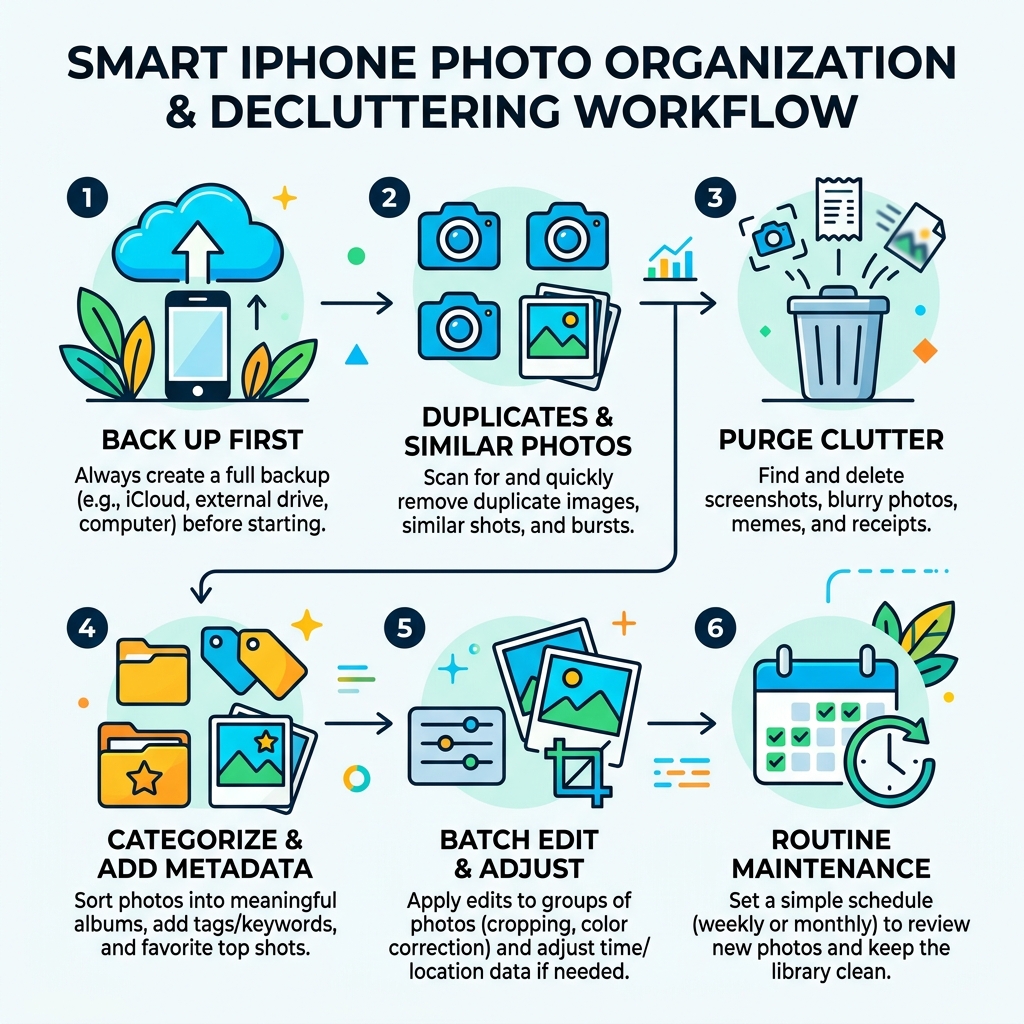
Why Users Switch to a Third-Party Photo Management App iOS
If you’ve ever felt like your iPhone’s camera roll is a bottomless pit, you aren’t alone. While Apple Photos is great for snapping a quick pic, it often falls short when you need to actually manage a library of thousands.
The biggest frustration we hear is about “clutter.” In Apple’s ecosystem, every photo stays in the Recents folder even if you put it in an album. This means your main feed is always a mess of work screenshots, receipts, and family memories. A dedicated photo management app ios solves this by offering true file management.
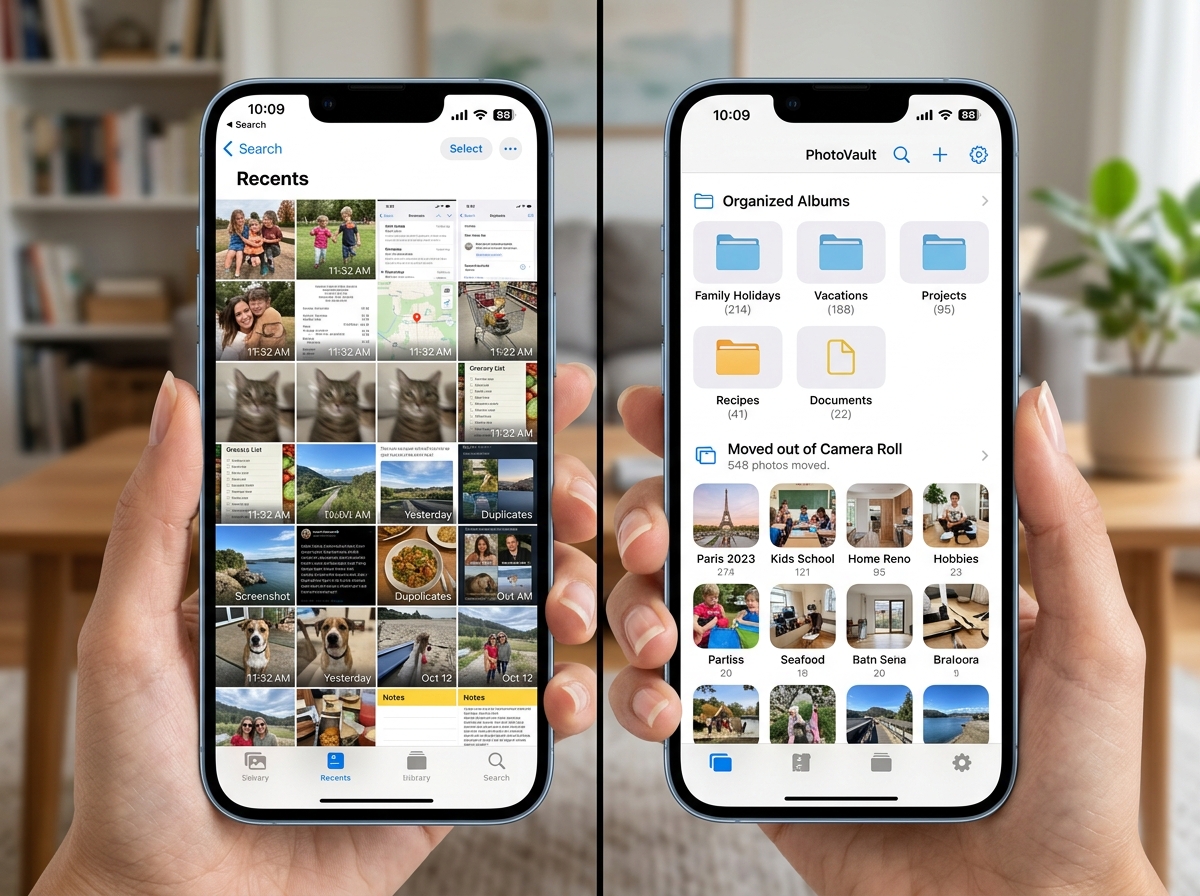
For example, an app like Utiful has already helped users organize over 250,000,000 photos. Why? Because it allows you to physically move photos out of the camera roll and into separate folders. This “move vs. copy” distinction is a game-changer for anyone trying to separate their personal life from their work life.
Furthermore, many users find the native app lacks advanced metadata control and batch tagging. If you want to add specific keywords to 500 photos at once or edit EXIF data to fix a wrong date, Apple makes it difficult. Third-party apps provide the granular control needed for organizing photos on smartphone and cloud storage efficiently.
| Feature | Apple Photos | Third-Party Apps |
|---|---|---|
| Organization Style | Tag-based (remains in Recents) | True Folders (can move out of Recents) |
| Duplicate Detection | Exact duplicates only | AI-powered similar/blurry detection |
| Metadata Editing | Limited | Full EXIF/IPTC control |
| Privacy | Basic Hidden Folder | PIN, Face ID, and Decoy Vaults |
Top Apps to Declutter and Organize Your iPhone Gallery
Before you can organize, you have to clean. Trying to sort 10,000 photos is a nightmare; sorting 2,000 curated ones is a breeze. Here are the heavy hitters we recommend for the initial “purge.”
LuminaClean: The Privacy-First Cleaner
If you want to free up gigabytes of space without your photos ever leaving your phone, LuminaClean – Clean Up Duplicate Photos on iPhone | Free Photo Organizer is our top pick. It has already helped users clean over 1.8 million photos using 100% on-device AI. It finds blurry shots, screenshots, and those “10 shots of the same sunset” instantly.
Slidebox: The “Tinder” for Photos
Slidebox makes cleaning feel less like a chore and more like a game. Using a swipe-based interface, you swipe up to delete and tap to sort into albums. It has a stellar 4.8-star rating because it syncs directly with iCloud, so your changes reflect everywhere immediately. It’s the perfect way to turn from-drab-to-fab-the-best-apps-for-aesthetic-photos-you-need-now by keeping only your best shots.
HashPhotos: The Power User’s Swiss Army Knife
For those who want everything in one place, HashPhotos – The Best Photo Gallery and Editor App for iPhone/iPad! is the ultimate alternative. You can find it on the HashPhotos App – App Store . It offers a “Tray” feature for temporary collection, a 5-star rating system, and a “Compare and Pick” tool that helps you choose the best shot from a burst.
MyPics and Clever Cleaner
If you prefer a folder-based approach that feels like a traditional computer, MyPics is excellent for custom album covers and calendar views. If you’re looking for a completely free option, Clever Cleaner uses surprisingly accurate AI to spot similar images and large video files that are eating your storage.
Advanced Features of a Comprehensive Photo Management App iOS
A truly comprehensive photo management app ios does more than just delete; it understands what it’s looking at. Modern apps use machine learning to identify objects, people, and even the “quality” of a photo.
- AI Object Detection: Apps like Google Photos and Mylio can search for “dog,” “beach,” or even “wedding” without you ever typing a tag.
- RAW and ProRAW Support: For serious photographers, Darkroom: Photo & Video Editor App – App Store provides desktop-quality tools. It handles RAW files and 8K video color grading with ease, making it a staple for efficient-strategies-for-organizing-large-media-libraries.
- Metadata and Histograms: Professional-grade apps like Photo Manager Pro and HashPhotos allow you to view detailed histograms and edit EXIF data (like the location or camera model) directly.
- Smart Albums: These are albums that update themselves based on criteria you set, like “Photos taken in 2023 with a 5-star rating.”
Choosing the Right Photo Management App iOS for Your Workflow
Not every app is right for every person. When choosing, consider your “user profile” and how much you’re willing to spend.
- The Casual User: You just want to delete duplicates and find your vacation photos. LuminaClean or Slidebox are your best bets. They are intuitive and solve the “storage full” message quickly.
- The Power User: You have 50,000+ photos and need deep organization. HashPhotos or Photo Manager Pro offer the folder structures and tagging you need. Check out our guide on the best-photo-organizing-apps-for-iphone for a deeper dive into these features.
- The Privacy Advocate: You don’t want your photos in the cloud. Mylio Photos is the king here. It uses peer-to-peer syncing, meaning your photos jump from your iPhone to your PC over your home Wi-Fi without ever touching a company’s server.
- The Creative Pro: You need editing and organization in one. Darkroom is the gold standard, winning the Apple Design Award for its seamless integration and powerful AI-depth editing.
If you’re coming from another ecosystem, you might also find our the-ultimate-guide-to-taming-your-android-gallery-chaos helpful for seeing how the two platforms differ in file management.
Privacy, Security, and Cloud Syncing Strategies
In an era of data mining, where you store your photos matters. Many “free” services use your images to train AI or build advertising profiles.
Local vs. Cloud Processing
Apps like LuminaClean and Mylio prioritize local processing. This means the AI that recognizes your face or finds duplicates runs on your iPhone’s chip, not on a server in another country. This is the gold standard for security.
Secure Vaults
For sensitive documents or private photos, apps like Keepsafe offer PIN locks and Face ID protection. Some even offer a “Fake Passcode” feature — if someone forces you to open the app, entering the fake code shows a decoy folder of boring landscapes instead of your private data.
The Google Photos Trade-off
Google Photos: Backup & Edit App – App Store is the most popular choice for a reason. It offers 15GB of free storage and the best search in the business. However, it is a cloud-first service. While Google uses advanced security, you are still “locking in” to their ecosystem. If you value “zero data mining,” you might prefer the Mylio SecureCloud approach, which encrypts your data before it ever hits the cloud.
Safe Sharing
Before you post a photo to social media, it often contains “metadata” like your exact GPS coordinates. Apps like HashPhotos allow you to “SafeShare,” which strips this sensitive info before the file leaves your device.
Frequently Asked Questions about iOS Photo Management
How do these apps handle duplicate and similar photos?
Most modern apps use AI-powered analysis to look at the pixels in your photos. They don’t just find exact copies; they find “similar” shots, like when you take five photos of the same group to make sure no one is blinking. They group these together, suggest the “best” one based on focus and lighting, and let you bulk-delete the rest. This is the fastest way to free up iCloud storage.
Can I manage my photos across iOS, Android, and Desktop?
Yes! If you need cross-platform access, Google Photos is the easiest “set-it-and-forget-it” cloud option. For those who want to avoid the cloud, Mylio Photos allows for peer-to-peer syncing between an iPhone, an Android tablet, and a Windows PC. Photo Manager Pro also offers built-in FTP/HTTP servers to move files to a computer without needing a cable.
What are the typical costs for premium photo management features?
Pricing varies wildly:
- Free: Apps like LuminaClean offer free daily deletions. Google Photos gives you 15GB for free.
- Subscriptions: Many apps charge between $4.99 and $9.99 per month for cloud storage or advanced AI features.
- One-time Purchases: Some apps like Slidebox ($19.99) or HashPhotos (various packs) offer a lifetime “buy it once” model, which is often the best value for long-term users.
Conclusion
Managing a modern photo library is a massive task, but you don’t have to do it alone. Whether you’re a professional photographer needing RAW support or a parent just trying to find that one photo of a dance recital, the right photo management app ios can save you hours of scrolling and gigabytes of space.
At Tamba Tech, our expert writers like Lucas Oliveira are dedicated to testing these tools so you don’t have to. We believe technology should work for you, not the other way around. Ready to take the next step in your digital organization journey? Explore more expert app reviews and guides to keep your digital life running smoothly.
