
Your Photos Are a Mess — Here’s How to Fix That for Free
Free photo management software lets you organize, tag, search, and back up your entire photo library without spending a cent.
Here are the best free options available right now:
| Software | Best For | Platform |
|---|---|---|
| Google Photos | Cloud backup, AI search | Windows, Mac, iOS, Android |
| digiKam | Large libraries, open-source power | Windows, Mac, Linux |
| Darktable | RAW processing, Lightroom alternative | Windows, Mac, Linux |
| FastStone Image Viewer | Fast, lightweight browsing | Windows |
| Shotwell | Simple Linux organization | Linux |
| XnView | 500+ format support, batch tools | Windows, Mac, Linux |
| Adobe Bridge | Adobe ecosystem users | Windows, Mac |
| Ashampoo Photo Organizer | Cross-device sync, metadata | Windows |
Sound familiar? You’ve got photos on your phone, scattered across cloud folders, sitting on an old hard drive, and buried in downloads. Finding a specific photo feels like digging through boxes in an attic — except the attic has 10,000 identical boxes.
The good news: you don’t need to pay for a solution.
Free photo management tools have come a long way. Some can handle libraries of over 100,000 images. Others use AI to tag and search your photos automatically. A few even process professional RAW files.
The tricky part is knowing which one fits your situation — your devices, your library size, and how much you care about privacy.
This guide breaks it all down.
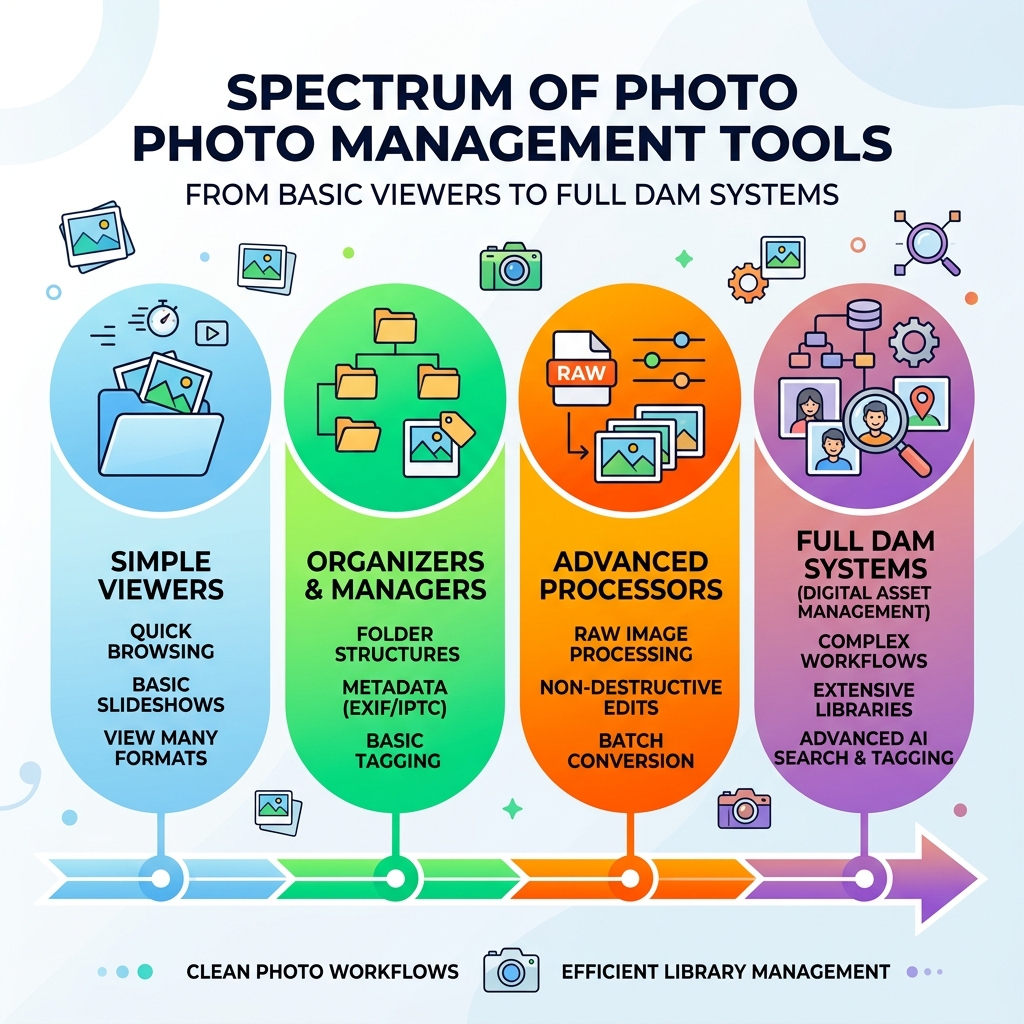
Essential Features of Free Photo Management Software
When we talk about free photo management software, we aren’t just talking about a simple folder viewer. Modern tools offer a range of professional-grade features that were once locked behind expensive subscriptions. If you have ever felt like you were digging through folders like Indiana Jones searching for a lost JPEG, these features are your map and compass.
Core Organization and AI Tools
The backbone of any good manager is how it handles metadata. Metadata is the “data about your data”—things like the date a photo was taken, the camera settings used (EXIF data), and the location (geotagging).
Modern free photo management software often includes:
- Tagging and Keywords: Instead of naming folders “Trip 1” or “Final Trip (Really Final),” you can apply tags like #Beach or #Family. This allows you to find a specific image in seconds regardless of which folder it lives in.
- Facial Recognition: Tools like digiKam and Google Photos use AI to identify people. Once you label a face, the software finds every other instance of that person in your library.
- Duplicate Detection: Storage space disappears faster than you’d think. High-quality managers scan your drive for identical or near-identical files to help you reclaim gigabytes of space.
- Star Ratings and Labels: This is essential for “culling”—the process of picking the best shots from a hundred similar ones.
For those managing massive collections, we recommend looking into efficient strategies for organizing large media libraries to ensure your computer doesn’t slow to a crawl.
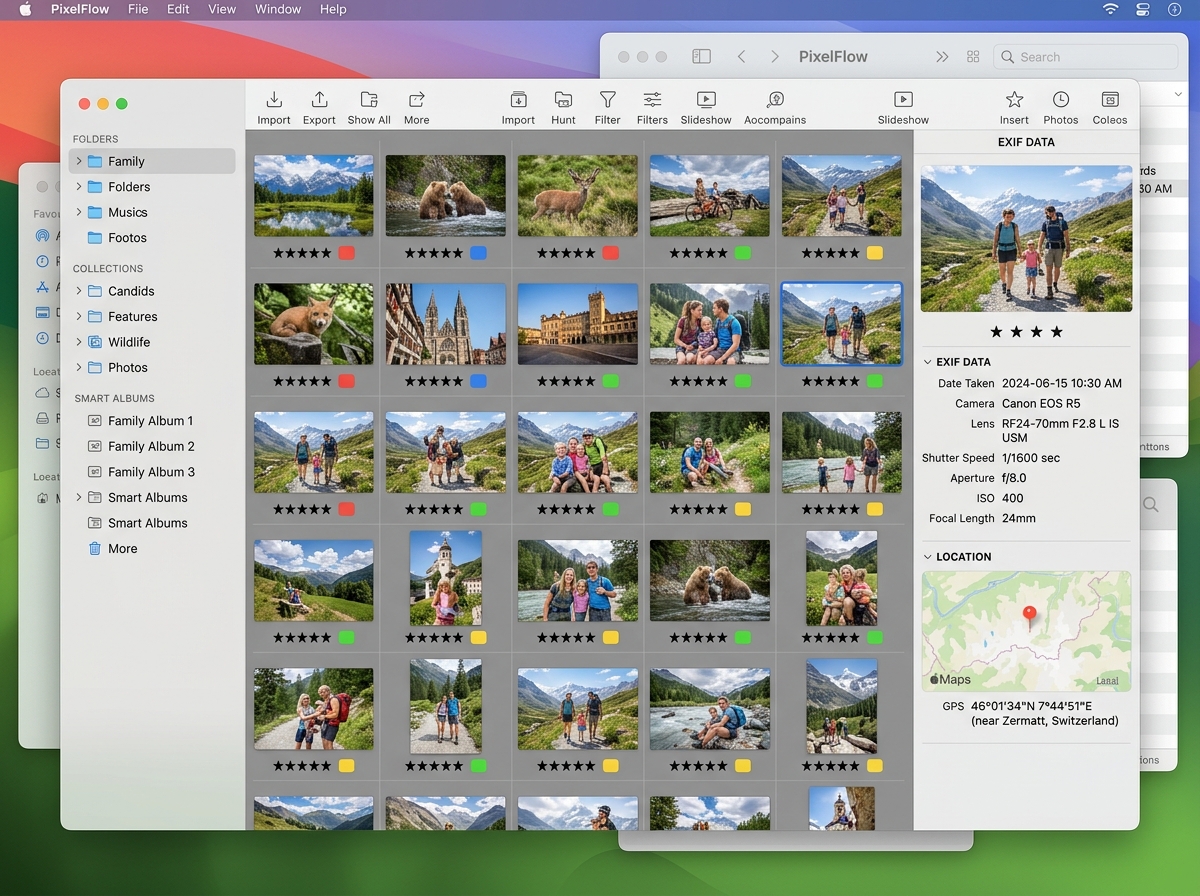
Editing and RAW Processing Capabilities
You don’t always need Photoshop to make your photos pop. Many free tools now include “non-destructive” editing. This means the software remembers your changes (like brightness or cropping) but keeps the original file untouched.
For hobbyists and pros, RAW support is the gold standard. RAW files are “digital negatives” that hold much more information than a standard JPEG. Software like digiKam and Darktable are world-class at processing these files, offering tools for color correction, noise reduction, and lens distortion fixes. If you’re looking to turn a boring shot into something stunning, check out our guide on the best apps for aesthetic photos you need now.
Top Desktop-Based Free Photo Management Software
While cloud tools are convenient, desktop software offers better privacy, faster performance for large files, and no monthly storage fees. For many of us, the “tipping point” for needing a dedicated manager is realizing we need to actually use our photos, not just store them.
Best Free Photo Management Software for Windows Users
Windows users are spoiled for choice. One of our top recommendations is Ashampoo Photo Organizer. It’s 100% free and focuses on “fully transparent” libraries. Unlike some tools that move your files into a proprietary database, Ashampoo keeps your files exactly where they are on your hard drive, adding a layer of organization on top. You can learn more about its features at the Ashampoo Photo Organizer overview.
Another Windows favorite is FastStone Image Viewer. While its interface looks a bit like a relic from the early 2000s, its speed is “exhilarating.” It handles RAW files beautifully and includes a great “Compare” tool that lets you look at four images side-by-side to find the sharpest one.
For those who want to bridge the gap between their PC and their mobile devices, understanding how to organize photos on smartphones and the cloud is a vital part of a modern workflow.
Top Free Photo Management Software for Mac and Linux
If you are on a Mac or Linux, you likely value clean design and open-source transparency.
- Shotwell: This is the standard for many Linux distributions. It’s fast, supports non-destructive editing, and makes it easy to tag photos by subject or event. You can find more details at the Shotwell project page.
- XnView MP: This is a powerhouse available for Windows, Mac, and Linux. It supports over 500 image formats. If you have an obscure file type from an old camera, XnView can probably open it.
- Darktable: Often called the free alternative to Adobe Lightroom, Darktable is built for photographers who need advanced RAW processing and a professional-grade database to manage thousands of images.
Cloud vs. Local: Navigating Storage and Privacy
Choosing between cloud-based and desktop-based free photo management software usually comes down to a trade-off: convenience versus control.
Accessibility and Cross-Platform Syncing
Cloud options like Google Photos are incredibly easy. They offer 15GB of free storage (shared across your Google account) and feature AI search that feels like magic. You can type “dog” or “sunset,” and it finds the photos instantly. However, as of 2025, you’ll need a Google One subscription for uncompressed, full-resolution images.
Desktop tools like ACDSee Free or PhotoStructure offer a different kind of accessibility. PhotoStructure, for example, allows you to host your own “cloud” on your home computer. You get the benefit of web-based browsing on your phone without your data ever leaving your house.
For mobile users, we’ve put together a specific list of the best photo organizing apps for iPhone and a guide to taming your Android gallery chaos.
Privacy and Data Ownership
Privacy is a major concern in the digital age. When you use “free” cloud services, you are often paying with your data. Open-source tools like Piwigo or digiKam ensure that your metadata—including your location and the faces of your family—remains on your own hardware.
Some tools, like PhotoStructure, explicitly state they will never make money through data sharing or ads. This “subscriber-supported” or “donation-ware” model is often the safest bet for those who want to keep their digital lives private.
Frequently Asked Questions about Photo Tools
What are the limitations of free photo management software?
While these tools are powerful, there are usually some catches:
- Storage Caps: Cloud services like Google Photos or Ente limit your free gigabytes.
- Learning Curve: Professional open-source tools like Darktable can be intimidating for beginners.
- AI Accuracy: Free AI keywording (like in ON1 Photo RAW’s free trials) can sometimes prioritize volume over accuracy, leading to some funny mislabels.
- Support: You won’t have a 24/7 help desk. You’ll likely rely on community forums and documentation.
Can free software handle professional RAW files?
Absolutely. Darktable and digiKam are specifically designed for this. Even lightweight viewers like XnView and ACDSee Free allow you to view RAW files without the “tedious importing” process required by paid software. They treat your digital negatives just like regular JPEGs, allowing for quick browsing.
Who is free photo management software best suited for?
- Casual Users: People who want to clean up their phone gallery and find photos of their kids quickly (Google Photos, Ashampoo).
- Hobbyists: Photographers who want to experiment with RAW editing without a monthly bill (Darktable, digiKam).
- Genealogists: Users who need robust tagging and facial recognition to organize decades of family history (Tonfotos, digiKam).
- Privacy-Conscious Users: Anyone who doesn’t want big tech companies scanning their personal memories (PhotoStructure, Piwigo).
Conclusion
At Tambas Tech, we believe you shouldn’t have to pay a premium just to keep your memories organized. Whether you are a casual snapper or a budding pro, there is a free photo management software option that can turn your digital chaos into a streamlined library.
Our expert writers, including Lucas Oliveira, spend hundreds of hours testing these tools so you don’t have to. If you found this guide helpful, we invite you to explore more expert app reviews to keep your digital life running smoothly. Don’t let your photos sit in a “Final Trip (Really Final)” folder any longer—pick a tool and start organizing today!
