
Your iPhone Camera Roll Is Out of Control — Here’s What Actually Helps
The best iPhone photo organizer apps in 2026 are:
- Utiful — best for creating real folders and physically moving photos out of the camera roll
- Google Photos — best for automatic cloud backup and cross-platform access
- Clever Cleaner — best free AI-powered duplicate and clutter remover
- Slidebox — best for fast swipe-based manual sorting and album management
- HashPhotos — best for advanced tagging, metadata editing, and power users
- LuminaClean — best for private, on-device duplicate detection with no account needed
- Picnic — best for making cleanup fun with streaks and gamification
- Mylio Photos — best for managing large libraries across devices without the cloud
- Keepsafe — best for keeping sensitive photos locked and encrypted
You take a photo. Then another. Then fifty more at your kid’s birthday party. Before long, you’ve got thousands of images crammed into one endless scroll — and finding anything feels impossible. In the modern era, our smartphones have become the primary repositories of our lives. From receipts and screenshots to precious family milestones, the sheer volume of data is staggering. By 2026, the average user is expected to have over 30,000 images stored on their device, making manual organization not just difficult, but statistically impossible without specialized tools.
You’re not alone. One iPhone user on the Apple Community forum reported 25,000 photos piling up in their Recents album with no clear way to sort them. Another had around 4,000 construction site photos they couldn’t move out of the camera roll even after organizing them into albums.
Here’s the core problem: Apple Photos doesn’t actually move your photos anywhere. Albums are just overlays on top of your main library. Everything still lives in Recents, no matter how many albums you create. That’s why so many people turn to third-party apps — and why picking the right one matters.
Why Native Apple Photos Falls Short for Large Libraries
We’ve all been there: you spend an hour meticulously creating albums for “Work,” “Family,” and “Vacation,” only to realize that every single one of those photos is still sitting right there in your “Recents” album. It feels like you haven’t actually cleaned anything.
The primary limitation of the native Apple Photos app is its “Copy” vs. “Move” logic. When you add a photo to an album in iOS, the system essentially creates a pointer to that image. It doesn’t physically move the file. This is why users with massive libraries—some reaching 25,000+ images—find it impossible to achieve a truly “clean” camera roll. This “flat” structure means that even if you are highly disciplined, your main feed remains a chaotic jumble. For professionals—such as real estate agents or project managers—this lack of true file separation can lead to critical errors, such as accidentally sharing a private family photo in a work thread.
Furthermore, the iOS 18 redesign brought significant changes that left many users frustrated. With merged albums, excessive whitespace, and view resets, the native experience can feel more like a hurdle than a help. The update prioritized “discovery” over “organization,” which has pushed many power users toward third-party alternatives that offer more granular control. For those managing professional assets or high volumes of media, these limitations lead to “storage bloat” and mental fatigue. To combat this, we recommend looking into efficient-strategies-for-organizing-large-media-libraries to understand how to structure your digital life beyond just the default settings.
Choosing the Best iPhone Photo Organizer for Your Needs
Finding the best iphone photo organizer depends entirely on your specific pain point. Do you want to delete junk, or do you want a professional-grade filing system?
Management Features Comparison
| Feature | Utiful | HashPhotos | Darkroom |
|---|---|---|---|
| Logic | Real Folders (Move) | Advanced Gallery (Overlay) | Editor + Management |
| Metadata | Preserves original | EXIF Viewer/Editor | ProRAW Support |
| Privacy | Folder Passcodes | Decoy Passcodes | Standard iOS |
| Best For | Decluttering Recents | Power Users/Tagging | Creators/Editors |
If your goal is a “real folder” system, Utiful – Photo Organizer App with Real Folders for iPhone & Android is a game-changer. It is one of the only apps that allows you to physically move photos out of the camera roll into a separate file system. This is the “missing folder system” Apple forgot to include. Utiful is particularly effective for those who want to treat their iPhone like a computer. It creates a separate storage partition, ensuring that once a photo is filed, it no longer clutters your creative workflow.
For those who need deep technical control, HashPhotos – The Best Photo Gallery and Editor App for iPhone/iPad! offers a “Tray” feature for temporary batching, keyword tagging, and a 5-star rating system. It’s perfect for someone who wants to find a specific photo based on its dimensions or ISO settings. HashPhotos serves as a bridge for those who love the Apple ecosystem but hate its limitations, offering a “Map View” that is far more responsive than the native version.
If you are a mobile photographer, Darkroom: Photo & Video Editor App – App Store bridges the gap between a high-end editor and an organizer. It allows for batch editing and meticulously organized collections, winning an Apple Design Award for its seamless integration. For a broader look at your options, check out our guide on the best-photo-organizing-apps-for-iphone.
Top Apps for Decluttering and Storage Recovery
Before you can organize, you have to declutter. There is no point in carefully filing away 400 blurry shots of your cat. This is where AI-driven cleanup apps shine. The psychological barrier to cleaning a photo library is often the fear of deleting something important. AI-driven apps mitigate this by grouping “burst” photos together and suggesting only the sharpest, best-composed shot for retention. This “triage” approach saves hours of manual labor.
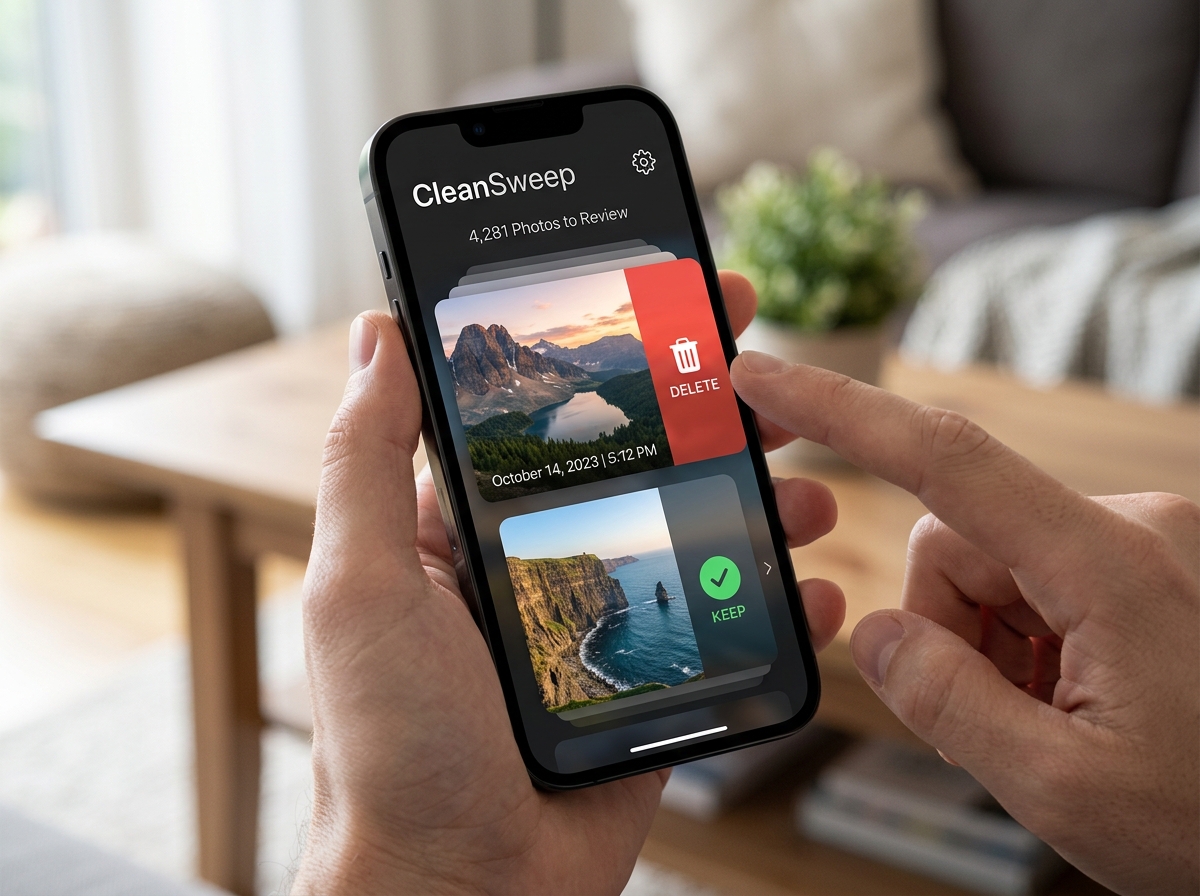
The Power of the Swipe
Many modern organizers use a “Tinder-style” interface. You swipe right to keep and left to delete. It turns a boring chore into a fast, almost addictive game.
- LuminaClean: This app is a standout for privacy-conscious users. LuminaClean – Clean Up Duplicate Photos on iPhone | Free Photo Organizer processes everything 100% on-device using the iPhone’s neural engine. It uses AI to find similar shots, blurry images, and screenshots without ever uploading your data to a server. It even works in airplane mode!
- Swipix: If you want simplicity, Swipix – Organize Your Photos with a Swipe offers a gesture-based system that helps you make decisions at lightning speed. It also includes “Time Travel” features to revisit memories by year, making the cleanup process feel nostalgic rather than tedious.
- Picnic: For those who struggle with the motivation to clean, Picnic—The best app to organize photos on iPhone gamifies the experience. It tracks “streaks” and uses reminders to help you maintain a clean gallery daily. Users have reported freeing up over 100GB of space using its duplicate comparison tools.
When you use these apps, you aren’t just deleting files; you’re optimizing your cloud costs. By removing duplicates, you can often avoid moving to a more expensive iCloud or Google Photos storage tier. Furthermore, by reducing your library size, you significantly decrease the time it takes for iCloud to sync across your Mac and iPad. Learn more about balancing these two worlds in our article on organizing-photos-on-smartphone-and-cloud.
Frequently Asked Questions
How can I move photos out of the Recents album permanently?
As we mentioned, the standard Photos app doesn’t allow this. To achieve a “real folder” system where photos are physically moved, you need an app like Utiful. Utiful acts as a separate file system. When you move a photo into a Utiful folder, it is exported from the iOS library and stored within the app’s own directory. This effectively “hides” or removes it from your main camera roll, allowing you to keep your Recents album strictly for new, unsorted memories. This is the only way to achieve a “Zero Inbox” status for your photos.
What is the best iphone photo organizer for privacy?
Privacy is a major concern when giving an app access to your entire life’s history.
- LuminaClean is excellent because of its “Zero Data Collection” policy and on-device machine learning. It ensures that your biometric data and personal images never leave the device.
- Keepsafe (Secret Photo Vault) is the gold standard for encryption. It offers PIN and Face ID locks for specific albums and even features a “decoy” passcode that opens a fake vault if someone forces you to show them the app.
- HashPhotos also provides a private album feature and allows you to strip metadata (like GPS location) from photos before you share them, protecting your home address from being leaked.
Are there any free best iphone photo organizer options?
Yes, but watch out for ads and data policies. When choosing a free organizer, it is vital to understand the business model.
- Clever Cleaner is one of the few completely free AI tools with no hidden costs or intrusive ads. It’s great for finding large video files and screenshots.
- LuminaClean offers a robust free version for duplicate detection.
- Google Photos provides 15GB of free storage, though this space is shared with your Gmail and Google Drive.
- Slidebox and MyPics offer free versions with limits on the number of photos or albums you can manage before needing a “Pro” upgrade. Always check the “Data Linked to You” section in the App Store to ensure your privacy isn’t the price of the “free” service.
Conclusion
At Tamba Tech, we know that a cluttered gallery isn’t just a storage issue—it’s a digital weight that makes it harder to enjoy your memories. Whether you need the “real folders” of Utiful, the AI-powered cleaning of LuminaClean, or the professional metadata tools of HashPhotos, there is a solution that fits your workflow. The goal of using the best iphone photo organizer isn’t just to save gigabytes; it’s to ensure that your most meaningful moments aren’t buried under a mountain of digital noise.
Our expert writer, Lucas Oliveira, recommends a “little and often” approach. Use an app like Picnic or Slidebox for five minutes a day to clear out the junk. Over time, your 25,000-photo mess will transform into a curated collection you actually want to look at. A clean gallery allows you to rediscover the joy of photography and share your life with others more easily.
For more tips on keeping your digital life in order, check out our More info about file management services section for the latest reviews and guides.
