
Your Photos Are a Mess — Here’s How to Fix It
Organize digital photos software is the fastest way to sort thousands of scattered images by person, date, and location — automatically.
Here are the best tools to get started:
| Software | Best For | Price |
|---|---|---|
| Excire Foto | AI keywording + culling | Free trial / paid |
| Mylio Photos | Cross-device, privacy-first | Free / subscription |
| ACDSee Photo Studio Home 2026 | Windows DAM + editing | $150 perpetual |
| digiKam | Open-source power users | Free |
| PhotoSortPro | Simple on-device AI sorting | Free / $39.99/year |
| PhotoStructure | Self-hosted, duplicate detection | Free / paid |
| FastStone Image Viewer | Lightweight Windows viewer | Free |
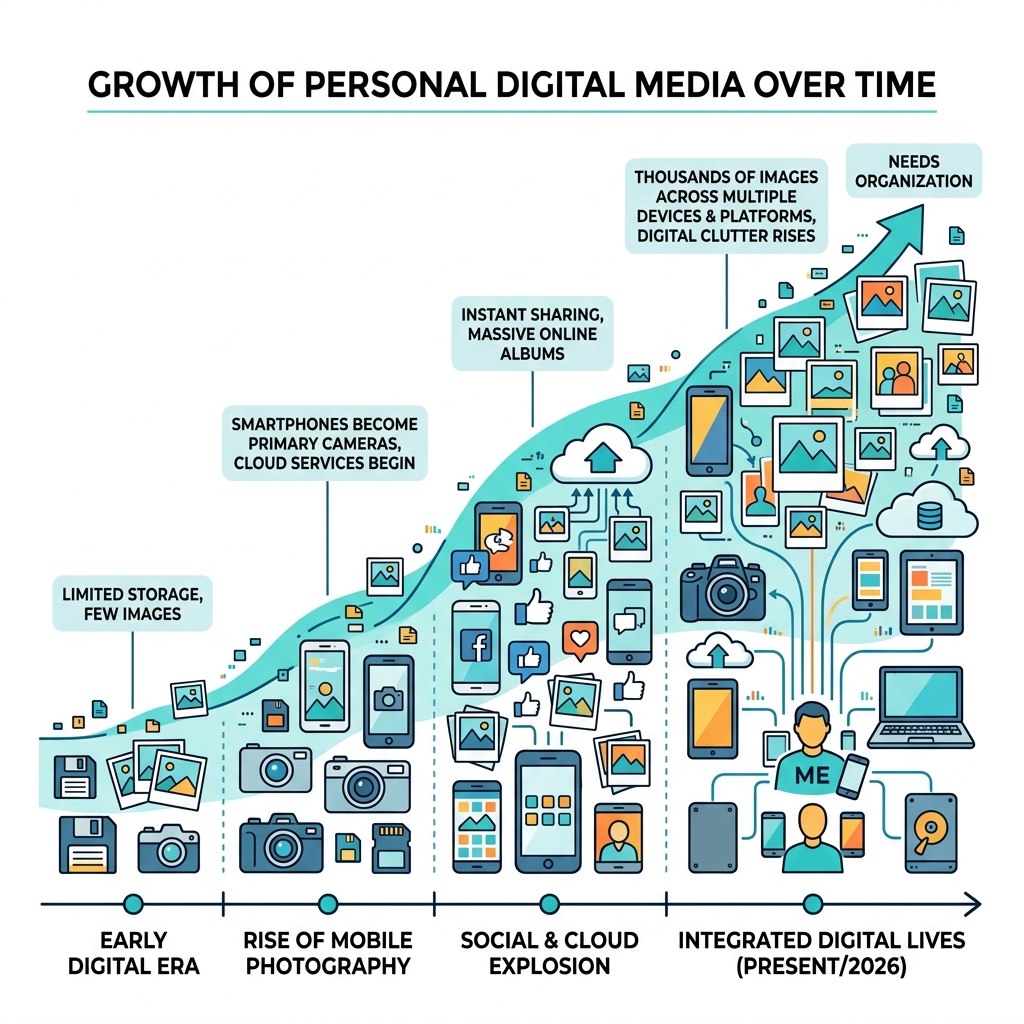
You take photos constantly. Your phone. Your camera. That old SD card in a drawer somewhere.
The result? Thousands of images spread across multiple devices, drives, and apps — with no clear way to find anything.
You’re not alone. One user described having six external drives, SD cards, an Android tablet, and an Apple Photos library before finally pulling everything into one place. Another discovered their 210,000-photo library was full of duplicates and clutter they didn’t even know existed.
This is digital hoarding — and it sneaks up on everyone.
The good news: the right software can do most of the heavy lifting for you. Modern tools use AI to sort by face, date, and location. They find duplicates automatically. Some can even process 500 to 5,000 photos in just a few minutes.
You don’t need to be a professional photographer to get organized. You just need the right tool for your situation.
This guide walks you through exactly how to choose and use organize digital photos software — whether you have 1,000 photos or 100,000.
Essential Features to Look for in Organize Digital Photos Software
When we talk about managing a massive library, we are looking for more than just a folder viewer. We are looking for a Digital Asset Management (DAM) system. A true DAM doesn’t just show you a file; it understands what is inside that file.
The first thing to consider is how the software handles your data. Does it require a slow import process, or can it connect directly to your hard drive? Tools like ACDSee Photo Studio Home 2026 are built to link directly to your existing folders, which saves hours of “ingesting” time. If you are looking for more options, check out our guide on File Organization Apps for Mac and Windows.
Technical performance is another major factor. Managing 100,000+ images is resource-intensive. While most basic tools run on 8GB of RAM, we recommend at least 16GB of RAM for catalogs exceeding that 100,000-image mark to ensure the interface stays snappy and the search results appear instantly.
Metadata and Tagging in Organize Digital Photos Software
Metadata is the “secret sauce” of organization. It includes EXIF data (technical info like camera model and shutter speed) and IPTC data (descriptive info like captions and keywords).
Effective organize digital photos software allows you to add star ratings, color labels, and custom keywords in batches. Instead of naming one file “GrandmaBirthday01.jpg,” you can tag 500 photos with “Grandma,” “Birthday,” and “2024” in three seconds. If your current library is cluttered with blurry shots and screenshots, you might want to look into Free Apps for Cleaning Digital Files before you start tagging.
Integration with Editing Tools in Organize Digital Photos Software
We often want to do more than just look at our photos; we want to make them look better. Many top-tier organizers include built-in editing or play nicely with external editors. For example, digiKam – Professional Open Source Photo Management is a powerhouse that handles RAW files from over 750 camera models and includes advanced color correction and filtering tools.
If you prefer a professional workflow, look for software that supports non-destructive editing. This means the original photo stays untouched, and your edits are saved as a separate set of instructions. This is vital for hobbyists and pros alike who don’t want to accidentally ruin a precious memory with a bad filter.
How AI Automates Organization by Person and Date
The biggest breakthrough in recent years is the integration of local AI. In the past, you had to manually type “beach” for every vacation photo. Now, software like PhotoSortPro – Professional Photo Organization Software uses on-device AI to analyze the content of your images automatically.
AI can handle several tedious tasks:
- Automatic Keywording: It recognizes a “mountain,” “dog,” or “wedding cake” without you saying a word.
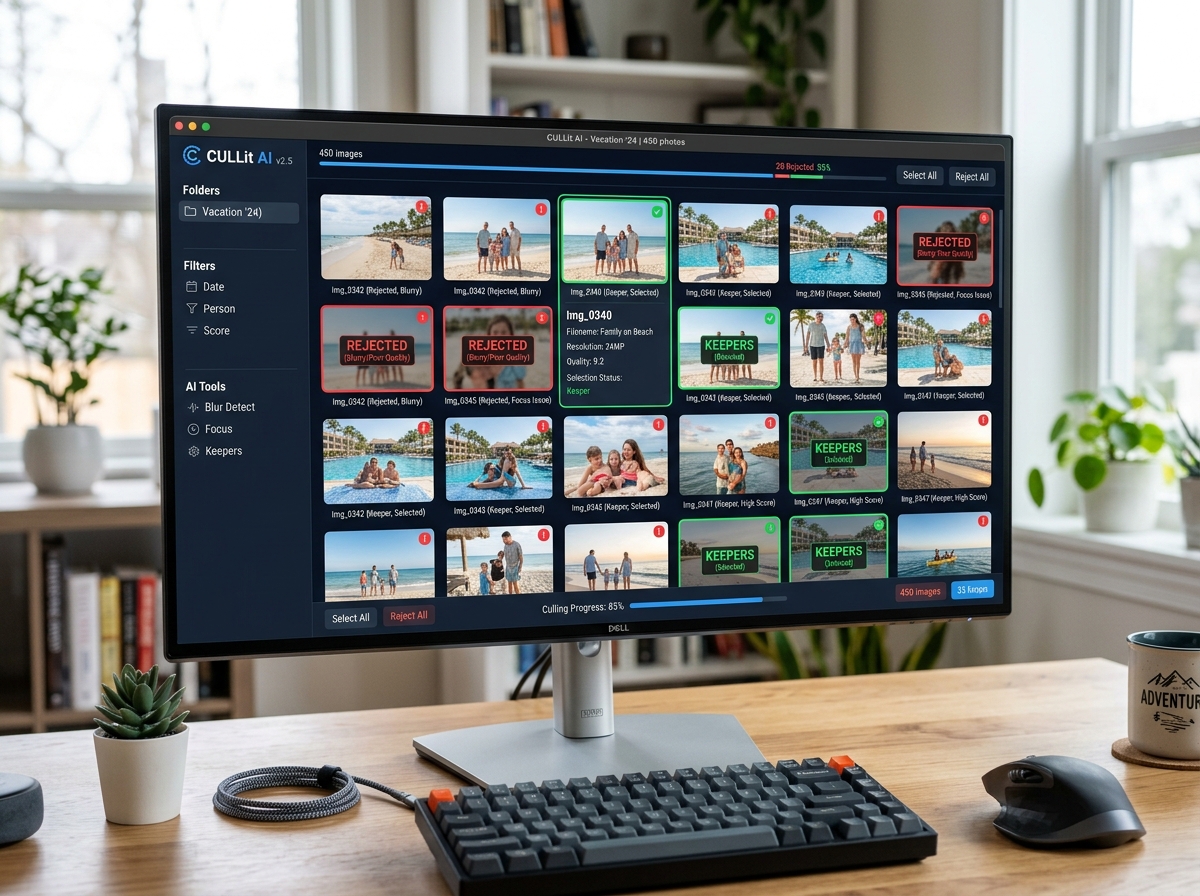
- Aesthetic Evaluation: Tools like Excire use AI to “rate” your photos based on sharpness and composition, helping you find the best shots instantly.
- Culling Projects: AI-assisted culling can sift through a batch of 5,000 photos from a weekend trip and suggest which ones to delete (blurry shots, closed eyes) in minutes.
AI and Facial Recognition in Organize Digital Photos Software
Facial recognition is the ultimate tool for family historians. By using “People Mode,” the software groups similar faces together. You simply tell the app “This is Sarah,” and it finds Sarah across twenty years of photos.
Advanced relationship detection can even distinguish between different people in a crowded group shot. For those of us who take most of our photos on the go, finding the Best Photo Organizing Apps for iPhone with these features is a life-changer for keeping the family album updated in real-time.
Privacy and Data Ownership: Local vs. Cloud Storage
In an age of data breaches, many of us are wary of sending our entire life’s history to a cloud server. This is where “local-first” software shines.
Tools like PhotoStructure – Privacy-First Self-Hosted Photo Management ensure your photos never leave your hardware. This “self-hosted” approach means you own the data, the metadata, and the privacy. There is no AI training on your personal moments, and no location data sold to advertisers.
For those who still want the convenience of the cloud without the privacy risks, peer-to-peer syncing is a great middle ground. This allows your phone to sync directly with your home computer over your Wi-Fi, bypassing the “big tech” clouds entirely. If you’re balancing multiple devices, our guide on Organizing Photos on Smartphone and Cloud explains how to maintain this balance safely.
Practical Strategies for Managing Massive Libraries
If you are staring at a mountain of a million photos, you need a plan. We recommend a “top-down” approach:
- Consolidate: Move all your images from old SD cards and external drives into one primary location (or at least index them in one software).
- De-duplicate: Use software to find exact matches. You don’t need 47 copies of the same sunset.
- Folder Hierarchy: Organize by Year > Month > Event. For example:
2024 / 05-May / Scotland-Trip. - Naming Conventions: Use batch renaming tools to change
IMG_4829.jpgto2024-05-Scotland-001.jpg.
For a deeper dive into these workflows, see our article on Efficient Strategies for Organizing Large Media Libraries.
Frequently Asked Questions about Photo Organization
Can these tools manage both photos and videos?
Yes! Most modern organize digital photos software treats videos as first-class citizens. They can read video metadata (like GPS and date taken) and allow you to tag them just like photos. Some even include built-in video players and basic trimming tools. If you’re a heavy mobile user, you might find Android Apps for Decluttering Digital Life helpful for managing the video bloat that often fills up phone storage.
How do I handle duplicates in a library of 100,000+ images?
Manual deletion is impossible at that scale. You need “visual similarity” detection. Software like Excire Foto Light – AI-Powered Duplicate Finder can find photos that aren’t just exact file matches, but are visually identical (like a burst shot of the same person). This helps you keep the best shot and toss the other ten “almost identical” versions, saving gigabytes of space.
What are the typical system requirements for this software?
To run modern organizers efficiently, we suggest:
- Processor: Intel i5 or AMD Ryzen 5 (minimum).
- RAM: 8GB for small libraries, 16GB+ for 100k+ images.
- Storage: An SSD is highly recommended for the software database. While your photos can live on a slow external HDD, the “catalog” or “index” should be on a fast SSD.
- GPU: Many AI features now use GPU acceleration to speed up face detection.
If you are also trying to manage your non-photo files, take a look at these Apps for Organizing Digital Documents to keep your entire digital life in order.
Conclusion
Organizing your digital life isn’t just about cleaning up a hard drive; it’s about preserving your digital legacy. By choosing the right organize digital photos software, you turn a chaotic pile of data into a searchable, enjoyable timeline of your life’s best moments.
At Tambas Tech, we believe that technology should work for you, not the other way around. Whether you choose an open-source tool like digiKam or a privacy-focused solution like Mylio, the best time to start is today. Stop the hoarding, start the organizing, and finally find that photo from 2015 in seconds.
For more tips on keeping your computer running smoothly, check out More info on efficient file management.
