
You Can Now Take a Pic and Find Out What It Is in Seconds
Want to take a pic and find out what it is right now? Here are the fastest ways to do it:
- Google Lens – Open the app (or the Google app), point your camera, and get instant results. Free, no sign-up.
- Lens App – Upload a photo or snap one to identify plants, animals, coins, food, and more. Free daily scans.
- IdentifyThis.app – Upload any image and get detailed AI results in under 2 seconds. 10 free identifications included.
- PictureThis – Best for plants specifically. Snap a photo and get care tips, toxicity info, and more.
- Google Images – Go to images.google.com, click the camera icon, and upload any photo.
You’re looking at something — a plant, a bug, an old tool, a piece of furniture — and you have no idea what it is. You can’t describe it in words. You just have a photo.
That used to be a dead end. Not anymore.
AI-powered visual search has changed everything. Tools like Google Lens (with over 1 billion downloads) can analyze a photo and match it against massive databases in just a few seconds. Specialized apps go even further, giving you breed profiles, care tips, value estimates, and more — all from a single image.
Whether you’re a curious iPhone user who stumbled on a strange mushroom, spotted a gorgeous plant in a friend’s apartment, or found a mystery gadget at a thrift store — there’s an app that can tell you exactly what you’re looking at.
This guide covers the best tools available, how to get the most accurate results, and what to watch out for along the way.
How to Take a Pic and Find Out What It Is Using AI
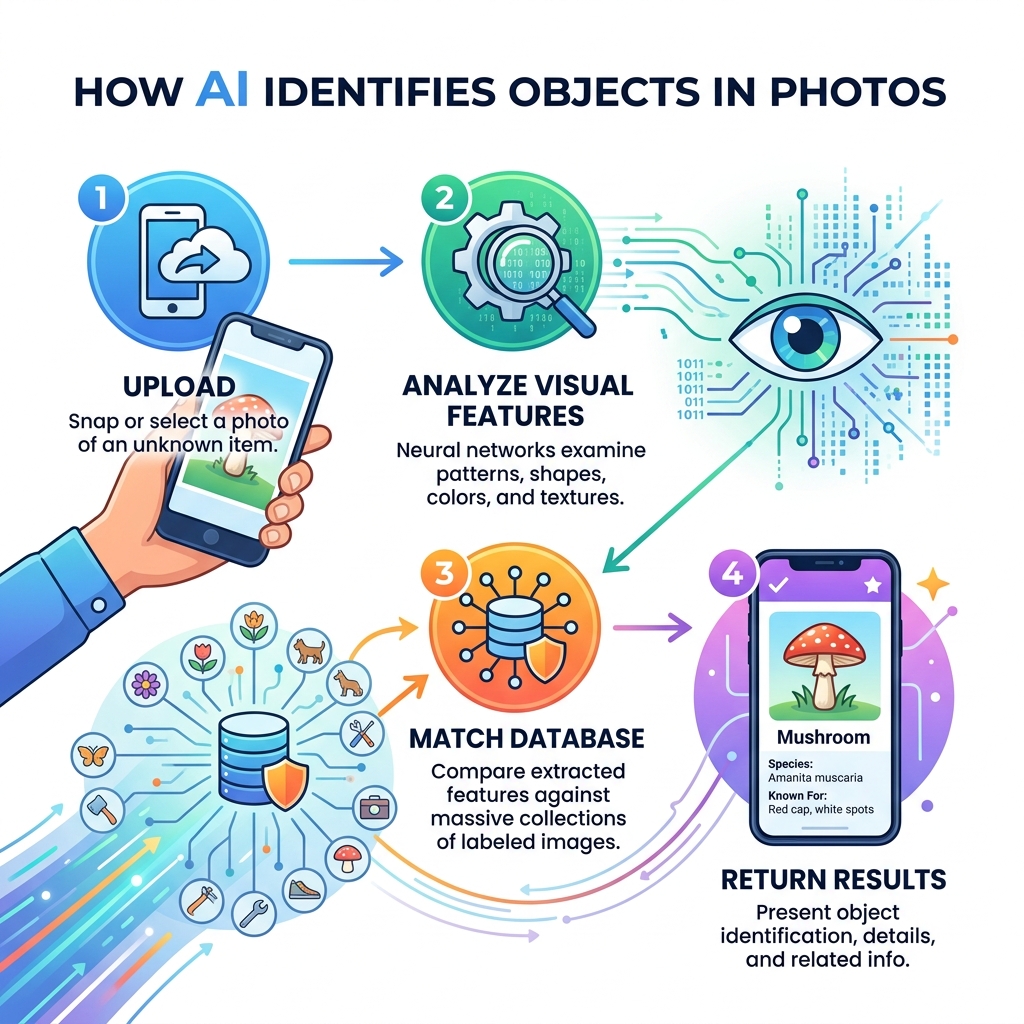
At its core, the ability to take a pic and find out what it is relies on a field of artificial intelligence called computer vision. Think of it as giving a brain to your smartphone’s eyes. When you snap a photo, the app doesn’t just “see” a bunch of pixels; it uses complex neural networks to break the image down into recognizable components.
These tools work through a process of sophisticated pattern matching. The AI analyzes visual features such as shapes, colors, textures, and specific markings. It then compares these features against a massive database containing millions of known patterns. For example, if you are using an Item Identifier – Instantly Recognize Any Object with AI, the system looks at the geometry of the object and the material it appears to be made of to provide a real-time identification.
Beyond just the pixels, many of these apps use metadata signals to improve accuracy. This might include your GPS location (to distinguish between a plant that grows in the Amazon versus one found in the Alps) or the language of any text appearing in the frame. The result is a probabilistic ranking—the AI might be 95% sure it’s a German Shepherd and 5% sure it’s a Corgi—and it typically presents you with the most likely match in under two seconds.
Common Items You Can Identify with Your Camera
The versatility of modern image recognition is staggering. We no longer need to spend 30 minutes sifting through Google Search results when an AI can do the heavy lifting instantly. From consumer products and barcodes to famous landmarks and storefronts, the world is now searchable.
If you see a piece of home decor you love or a pair of sneakers someone is wearing, you can use these tools to find out who makes them and where to buy them. Many apps even provide price estimates and similar items. For those interested in flora, PictureThis – Plant Identification | Instantly Identify Plants and Flowers can turn a simple leaf photo into a full encyclopedia entry.
Take a Pic and Find Out What It Is: Nature and Wildlife
Exploring the outdoors is much more rewarding when you can identify the species you encounter. Whether you are a hiker, a gardener, or just someone curious about a bug on your windowsill, specialized AI tools provide deep insights.
Using an Identify This Picture Free – AI Image Recognition Tool | IdentifyThis.app, you can get instant results for:
- Species Detection: Identifying rare wildflowers, tree species, or birds.
- Breed Profiles: Finding out if that dog in the park is a purebred or a specific mix.
- Animal Tracks: Identifying what kind of wildlife passed through your backyard.
- Care Tips: Learning how much water that new houseplant actually needs.
The accuracy for common species often exceeds 90%, making these apps a reliable companion for nature lovers.
Take a Pic and Find Out What It Is: Household Objects and Antiques
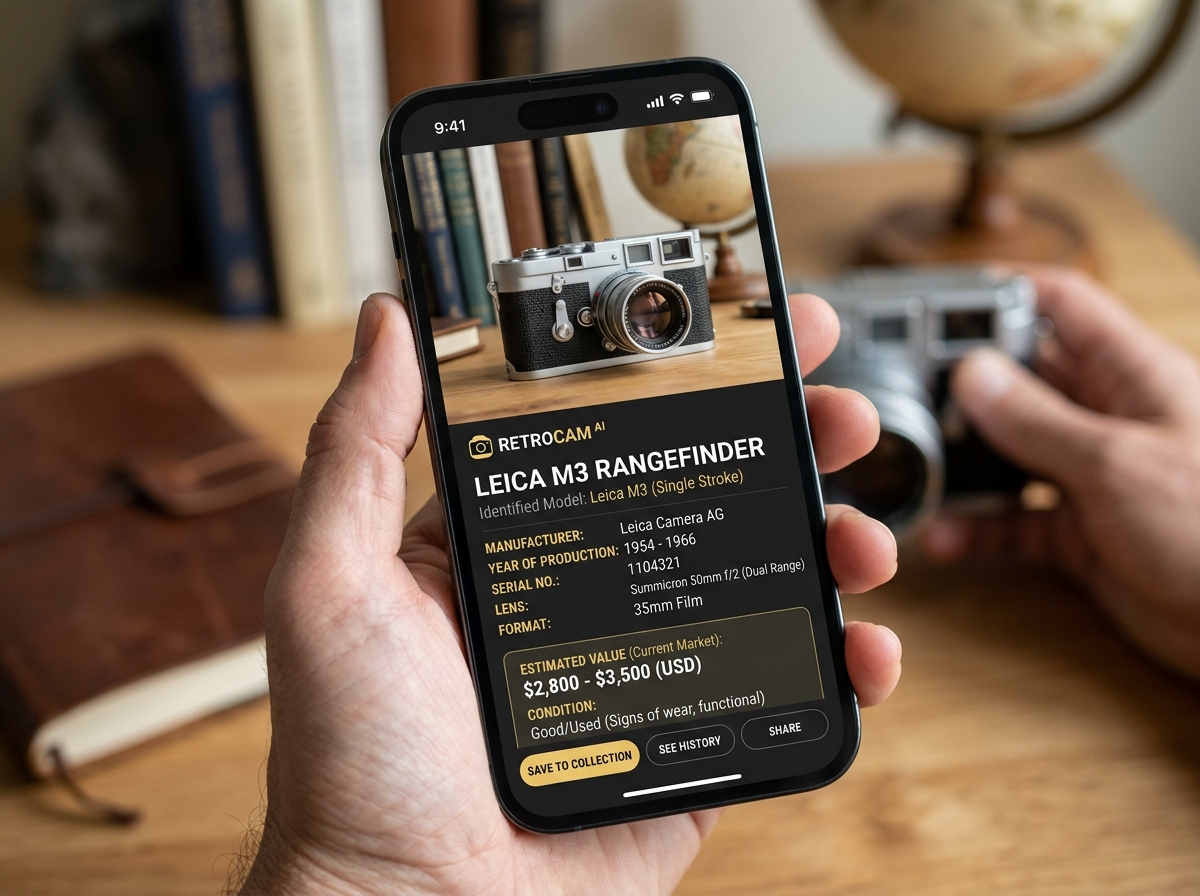
Have you ever found a strange tool in your grandfather’s garage or a mystery gadget at a flea market? This is where object-specific AI shines. General search engines often struggle with “mystery hardware,” but dedicated tools like the Identify This Object App – Free AI Object Recognition Tool | IdentifyThis.app are trained on specific categories like tools, electronics, and antiques.
These apps can identify:
- Vintage Gadgets: Old cameras, typewriters, or kitchen appliances.
- Mystery Tools: Specialized hardware like torque wrenches or antique buttonhooks.
- Value Estimates: Providing a ballpark figure of what an item might be worth based on similar listings.
- Brand Matching: Identifying logos even when they are partially faded or damaged.
Maximizing Accuracy and Safety in Image Recognition
While AI is incredibly powerful, the quality of your result depends heavily on the quality of your photo. To get the most out of a Lens App – Free AI Image Search | Identify Anything, we recommend following a few best practices:
- Natural Lighting: Soft, even daylight is best. Avoid harsh shadows or dim rooms which can obscure textures.
- Subject Focus: Ensure the object is in sharp focus. On most phones, you can tap the screen to lock focus on the item.
- Clear Background: Try to isolate the object. Multiple items in one frame can confuse the AI.
- Multiple Angles: If the first shot doesn’t work, try a side profile or a close-up of a unique marking or serial number.
Safety Warning: We must emphasize that while these apps are highly accurate (often boasting 93% average accuracy), they should never be used as the sole source of truth for identifying wild plants or mushrooms for consumption. Misidentification can be fatal. Always consult a human expert or a professional field guide before touching or eating unknown wildlife.
Comparison: General vs. Specialized Apps
| Feature | General-Purpose (e.g., Google Lens) | Specialized (e.g., IdentifyThis.app) |
|---|---|---|
| Primary Goal | Web links & visual search | Detailed ID & specific data |
| Accuracy | High for products/landmarks | Superior for niche categories |
| Speed | 3-5 Seconds | Under 3 Seconds |
| Data Provided | Shopping/Search results | Care tips/Value/Materials |
| Privacy | May store data for ads | Often deletes images instantly |
Privacy and Cost Considerations for Visual Search Tools
When you take a pic and find out what it is, you are sending data to a server for processing. It is important to understand how that data is handled. Many users prefer tools that offer real-time deletion. For instance, the Image Identifier – Instantly Identify Anything with AI platform processes images in real-time and deletes them immediately after analysis, ensuring your photos aren’t stored or shared.
Regarding cost, most of these apps follow a “freemium” model. You might get 10 free tokens or a few free daily scans before needing a subscription. This allows casual users to get answers for free while providing professional-grade features for collectors or researchers.
If you find yourself taking a lot of photos for identification, you might also want to check out our guide on the Best Photo Organizing Apps for iPhone to keep your library manageable.
Frequently Asked Questions about Visual Identification
Are these image identification apps free to use?
Yes, most of the top-rated apps offer a free tier. Some provide a set number of “tokens” (like IdentifyThis.app giving 10 free tries), while others like Google Lens are completely free but supported by the broader Google ecosystem. Specialized apps often have an optional subscription for unlimited scans and advanced features like offline mode.
How accurate are the results for rare items?
Accuracy is remarkably high, often averaging around 93% across major platforms. However, for very rare antiques or obscure machine parts, the AI might provide a “confidence score.” If the score is low, it means the AI sees similarities but isn’t certain. In these cases, the “Related Images” feature is your best friend to help you manually verify the match.
Can I identify objects from photos already in my gallery?
Absolutely. You don’t always need to take a live photo. Most apps allow you to “Upload” or “Import” from your camera roll. This is perfect for identifying something you photographed days ago while traveling. If your gallery is getting cluttered with these “search photos,” learning about Organizing Photos on Smartphone and Cloud can help you stay organized.
Conclusion
The ability to take a pic and find out what it is has turned our smartphones into the ultimate “Star Trek” style tricorder. Whether you’re identifying a rare bird on a hike, checking the value of a thrift store find, or translating a menu in a foreign country, these AI tools provide instant clarity.
At Tamba Tech, we believe that understanding the technology in your pocket makes life just a little bit easier (and a lot more interesting). From the expert reviews by Lucas Oliveira to our deep-dive guides, we are here to help you navigate the ever-evolving world of digital discovery.
Ready to see what else your phone can do? Explore more about the latest Apps on our site and start mastering your digital world today!
